INST
MIX
SPLIT
STEREO
MIC/LINE
ON
OFF
-20dB
LINE
MIC
LEFT
RIGHT
MIC/LINE
OPEN/
SPEAKER
ALC/ATT
INPUT
ON
OFF
DIGITAL
ANALOG
PHONE SELECTOR
MIC/LINE
LINE
CD
PHONE/SPEAKER
MIC/LINE
AUX
R
LINE OUT
MIC
INT MIC
LEVEL
L
PHONES
LINE OUT
CD PLAY/RECORD
PUSH
NEUTRIK
PUSHPUSH
NEUTRIK
REMOTE
IN
RC-5
OUT
EXT.
INT.
IN
OFF
ON/
POWER
OUT
DIGITAL
OUT
AUX
LINE
MIX
IN
L
PEDAL
FOOT
R
OUT
IN
L
R
INST
INST
MIX
SPLIT
STEREO
MIC/LINE
ON
OFF
-20dB
LINE
MIC
LEFT
RIGHT
MIC/LINE
MIC/LINE
OPEN/CLOSE
SPEAKER
ALC/ATT
INPUT
ON
OFF
DIGITAL
ANAL
PHONE SELECTOR
MIC/LINE
LINE
CD
PHONE/SPEAKER
MIC/LINE
AUX
R
LINE OUT
MIC
INT MIC
LEVEL
L
PHONES
LINE OUT
PUSH
NEUTRIK
PUSHPUSH
NEUTRIK
Internal Microphone
1. Set the Right LINE/MIC/INT MIC switch to “INT MIC.”
2. When “INT MIC” is selected, both the left level
control and the right level controls are active. Adjust
both left and right level controls to determine how
much signal is sent to either channel.
3. When using the INTERNAL MIC, it is recommended
that the SPEAKER switch be turned OFF. If you need
to monitor the incoming sound, use headphones.
Using headphones avoids feedback--the nasty squeal
that is heard when the mic picks up sound from the
speaker and amplifies it, creating a feedback loop.
Using the remote will also ensure that the INTERNAL
MIC will not pick up the sound of any buttons being
depressed.
4. See Setting Levels sidebar on this page.
Instruments
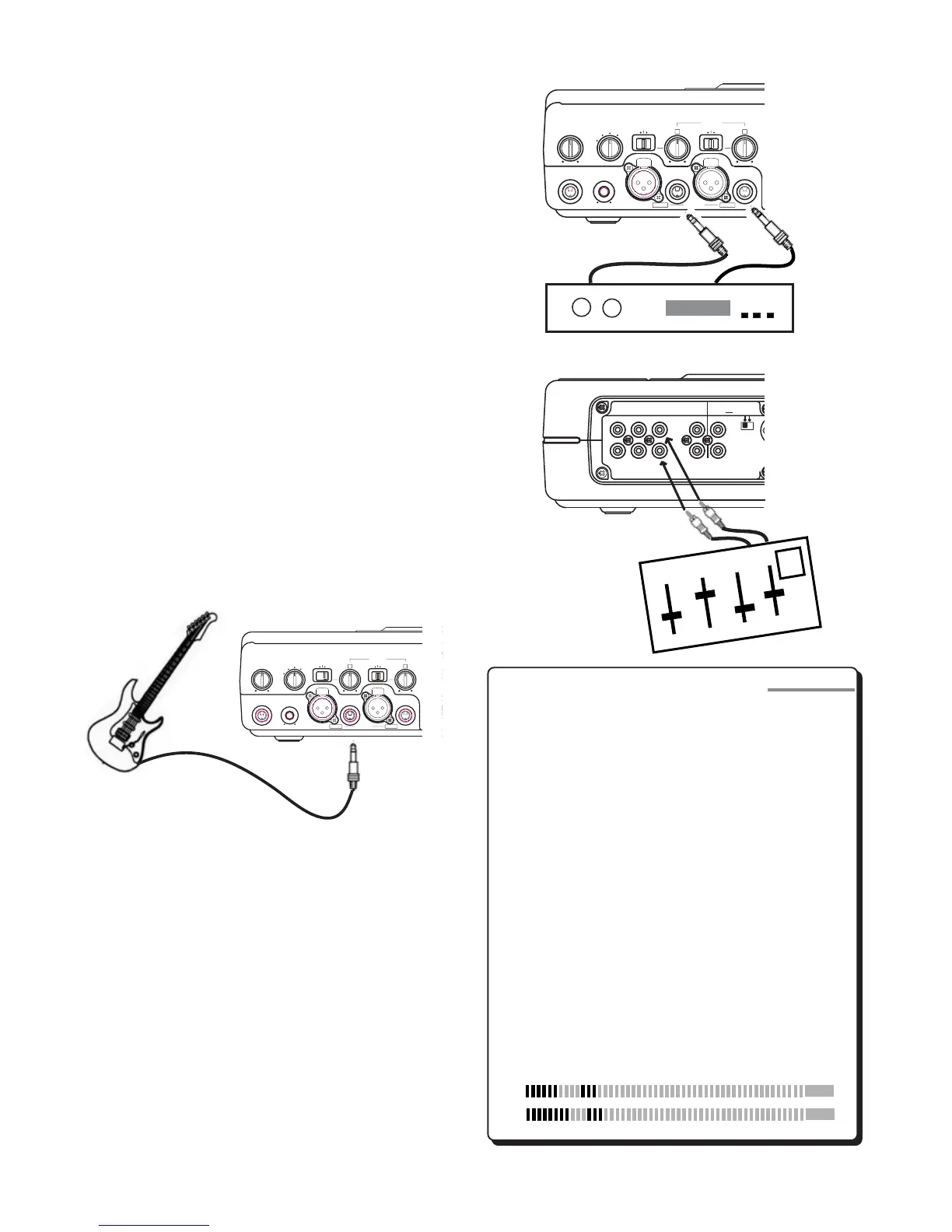
1. Set the Left LINE/MIC/INST switch to “INST.”
2. Plug an instrument into the Left 1/4” front panel
input.
3. Set the Right LINE/MIC/INT MIC switch to “LINE.”
4. See Setting Levels sidebar on this page.
Setting Levels
If you are setting levels while using the CD
recorder drive, make sure to press RECORD
first. This will place the unit in record pause
mode. You may set levels at any time during
CD player operation. As you sing or play your
instrument, turn the Left and Right input-level
control knobs clockwise while observing the
display VU meters. When your performance is
at its loudest, the VU meter should read close
to 0 dB without going into the red zone. If
the meter consistantly bounces into the red,
adjust the level control knob counter clock-
wise to reduce the level. If your mics have
higher than normal output, try switching the
ALC/ATT switch to -15dB. Peaking at 0 dB will
provide the greatest dynamic range while
avoiding distortion.
Line Level Sources
1. Set the Left LINE/MIC/INST switch to “LINE” and set
the Right LINE/MIC/INT MIC switch to “LINE.”
2. Line level equipment can be connected to the front
panel Right and Left inputs ... OR ... to the rear panel
RCA AUX inputs. Note: When connecting an auxil-
iary source into the rear panel AUX inputs, you can
adjust the signal input level using the AUX IN control
on the rear panel. Use the front panel inputs for
individual control of Right and Left input levels.
3. See Setting Levels sidebar on this page.
OR
R
L
dB-50 -30 -22 -16 -12 -8 -4 0OVER
- 12 -
SIDEBAR
Mixer
Stereo Preamp



 To Next Page