Surface (interval) time
Battery status (for device: charging, ok, low; for Tank POD: ok, low)
Battery level - number indicates remaining diving time before need to
recharge
Tank / gas pressure information
Bluetooth
3.4. Product compatibility
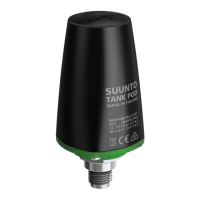
Suunto EON Steel Black can be used together with Suunto Tank POD for wireless
transmission of tank pressure to the dive computer. One or more Tank PODs can be paired
with the dive computer for multi-gas diving.
You can pair your dive computer with the Suunto app over Bluetooth. You can transfer your
dive logs to Suunto app from the dive computer and analyze them on your mobile phone. It is
also possible to customize dive modes and change dive computer settings via Suunto app.
You may also connect this dive computer to a PC or Mac with the supplied USB cable to
update the dive computer software with SuuntoLink.
With the optional bungee adapter kit for Suunto EON Steel Black, you can replace the default
strap with a bungee cord if desired.
Do not use this dive computer with any unauthorized accessories or attempt to connect
wirelessly with mobile apps or equipment not authorized or
ocially supported by Suunto.
Suunto EON Steel Black
12



 To Next Page