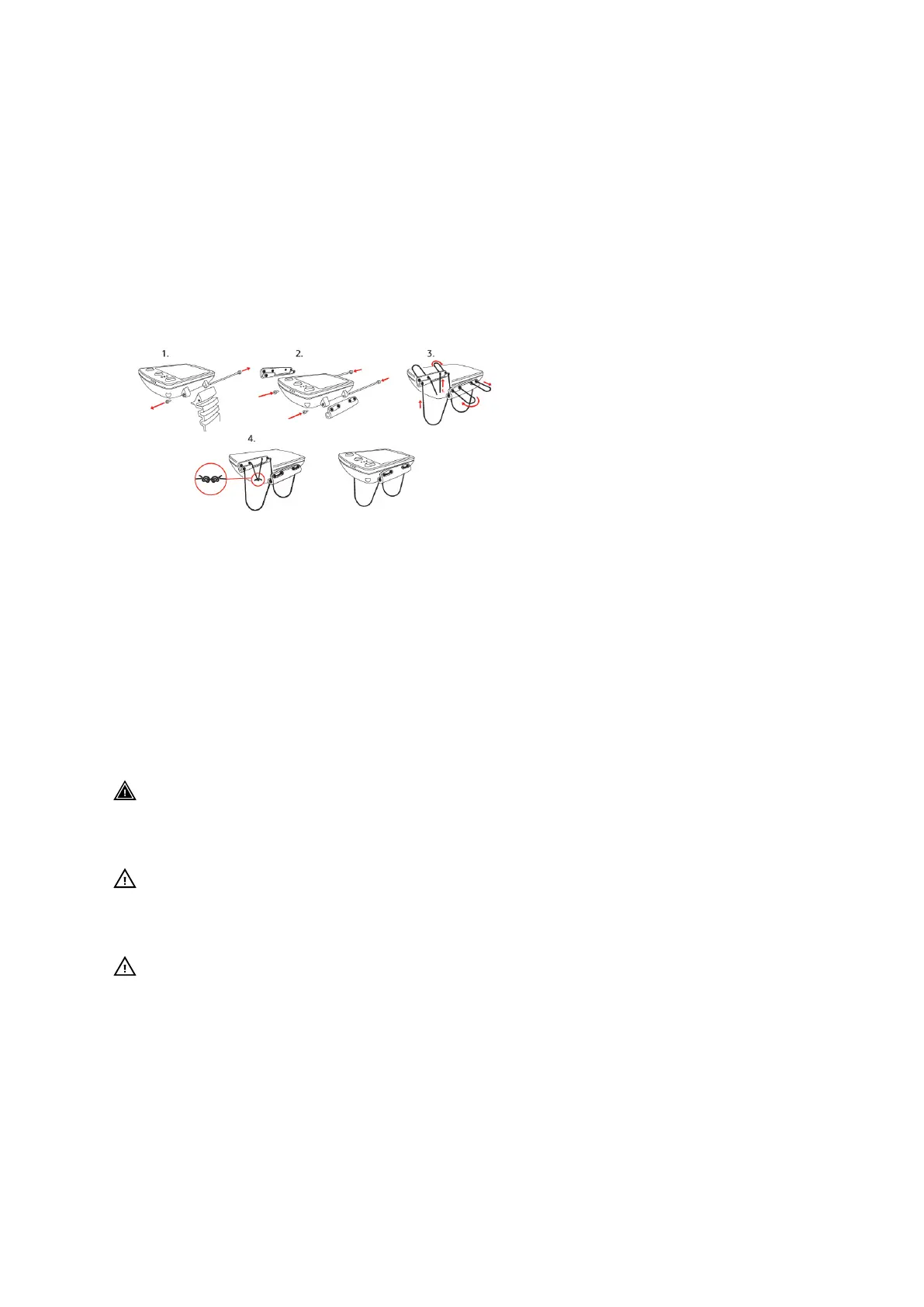
6.3. Changing strap to bungee
You can change between the wrist strap and bungee as needed. The bungee is included in
the box of your Suunto EON Steel Black.
To install the bungee:
1. Remove the strap.
2. Attach the bungee adapters.
3. Thread the cord through both adapters.
4. Securely tie the ends of the bungee cord and cut
o excess cord.
6.4. Charging battery
Charge Suunto EON Steel Black with the supplied USB cable. For charging, use a USB port of
5 Vdc, with minimum 0.8 A as a power source. If the battery is very low, the display is o while
charging until the battery reaches an adequate charge level. When battery is so low that
device cannot be turned on, a red led is blinking next to the display. Blinking stops when
battery has enough power to start the device. If the red led stops blinking while the display is
still
o, the charging stops. Remove the charging cable and reconnect it to continue charging.
When device is on and battery is charging, battery symbol in the upper left corner of the
display turns green.
WARNING: You must only charge your device using USB adapters that comply with the
IEC 62368-1 standard and have a maximum output of 5 V. Non-compliant adapters are a fire
hazard and a risk to personal injury and might damage your Suunto device.
CAUTION: DO NOT use the USB cable when Suunto EON Steel Black is wet. This may
cause an electrical failure. Ensure the cable connector and connector pin area on the device
are both dry.
CAUTION: DO NOT allow the connector pins of the USB cable to touch any conductive
surface. This may short circuit the cable, making it unusable.
Rechargeable batteries have a limited number of charge cycles and may eventually need to
be replaced. The battery should be replaced only by authorized Suunto Service Centers.
6.5. Getting support
To get additional support, visit product support page.
Suunto EON Steel Black
58



 To Next Page