4. Features
4.1. Alarms, warnings, and notifications
Suunto EON Steel Black has color-coded alarms, warnings and notifications. They are shown
prominently on the display with an audible alarm (if tones are on). Alarms are always red.
Warnings may be red or yellow.
Notifications are always yellow.
When an alarm, warning, or notification occurs, a message is displayed as a pop-up. Pop-up
messages can be acknowledged by pressing any button. The information needing attention
remains on screen or as a scrollable element in the bottom
field until the situation is back to
normal.
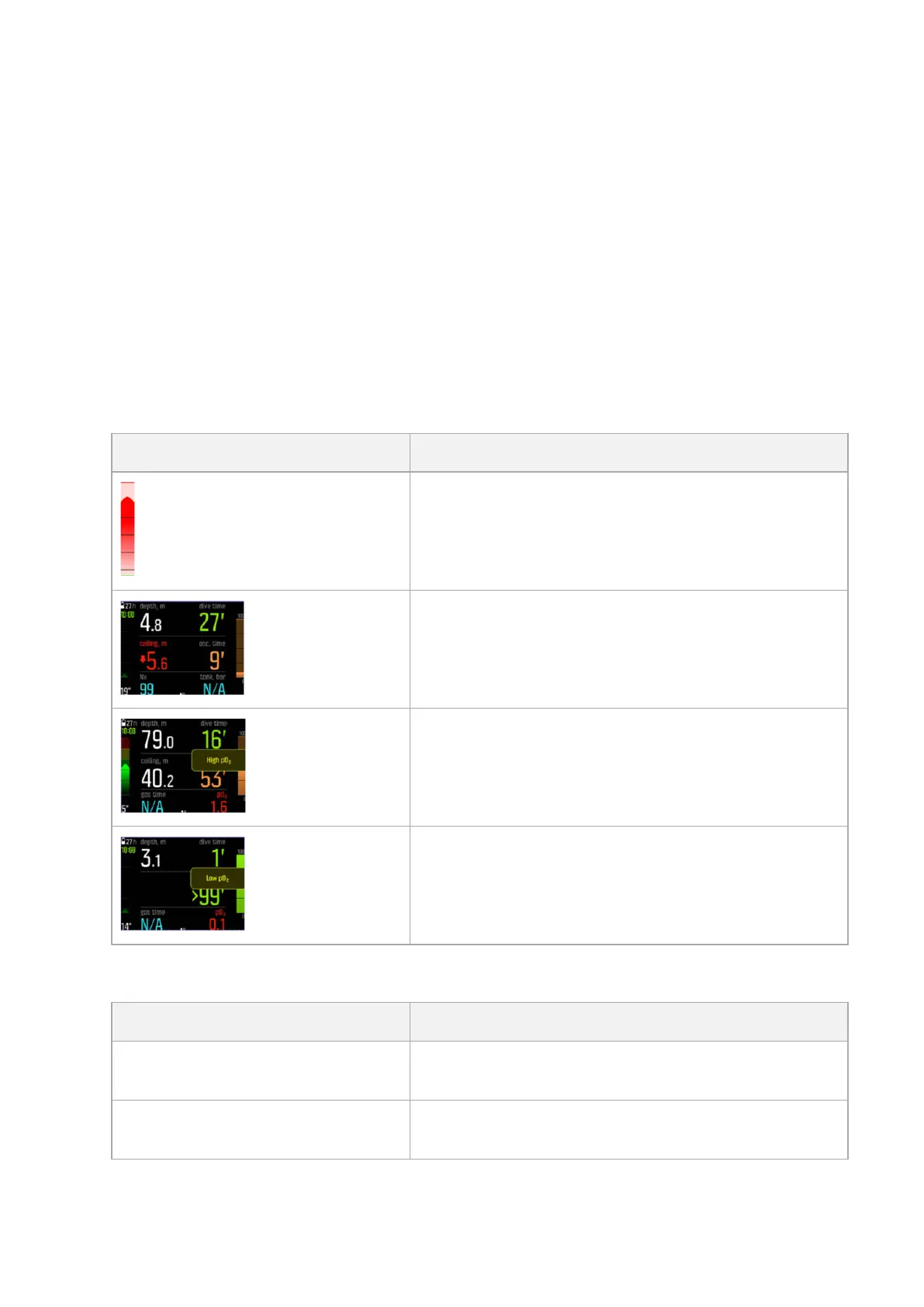
Alarms are critical events that always require immediate action. When an alarm situation
comes back to normal, the alarm will stop automatically.
Alarm
Explanation
Ascent speed exceeds safe speed of 10 m (33 ft) per
minute for five seconds or more.
Decompression ceiling or mandatory safety stop is
broken by more than 0.6 m (2 ft) on a decompression
dive. Immediately descend back below ceiling depth
and continue to ascend normally.
Partial pressure of oxygen exceeds safe level (>1.6).
Immediately ascend or change to a gas with lower
oxygen percentage.
Partial pressure of oxygen below safe level (<0.18).
Immediately descend or change to a gas with higher
oxygen percentage.
Warnings alert you to events that can impact your health and safety if you do not take action.
Acknowledge the warning by pressing any button.
Warning
Explanation
CNS 100% Central Nervous System (CNS) Oxygen Toxicity level at
100% limit
OTU 300 Recommended daily limit for Oxygen Tolerance Unit/
Oxygen Toxicity Unit (OTU) reached
Suunto EON Steel Black
13



 To Next Page