Electrical systems
57
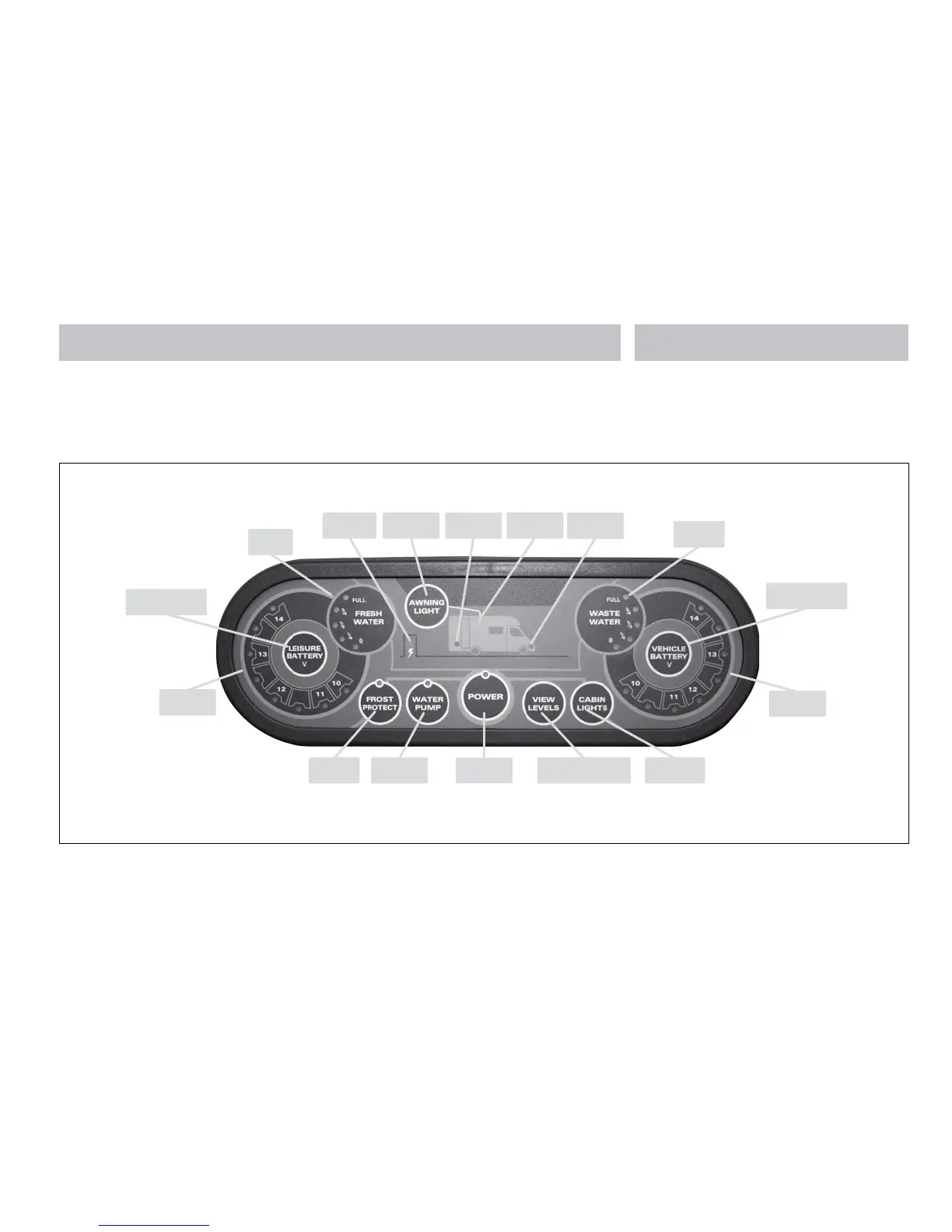
2.4 Control Panel - Component Layout
Depending on your type of vehicle the control
panel will vary in specification. Not all features
are present in all vehicles. Please refer to the
following diagrams to identify your control panel.
EC467 Motorhome Control Panel
EC462 Motorhome Control Panel
Frost Protect
On / O button
Water pump
On / O button
Power On / O
button
View levels button, press to
show battery & tank levels
Internal lighting
On / O button
Vehicle battery
voltage gauge
Vehicle battery selection
button
Waste water
level gauge
Vehicle battery
selected LED
Awning light
LED
Leisure battery
selected LED
Mains supply
& charger on
Fresh water
level gauge
Leisure battery selection
button
Leisure battery
voltage gauge
Awning light
On / O button
Water pump
On / O button
Power
On / O button
View levels button, press to
show battery & tank levels
Internal lighting
On / O button
Vehicle battery
voltage gauge
Vehicle battery selection
button
Waste water
level gauge
Vehicle battery
selected LED
Awning light
LED
Leisure battery
selected LED
Awning light
On / O button
Mains supply
& charger on
Fresh water
level gauge
Leisure battery selection
button
Leisure battery
voltage gauge






 To Next Page