40
ENGLISH
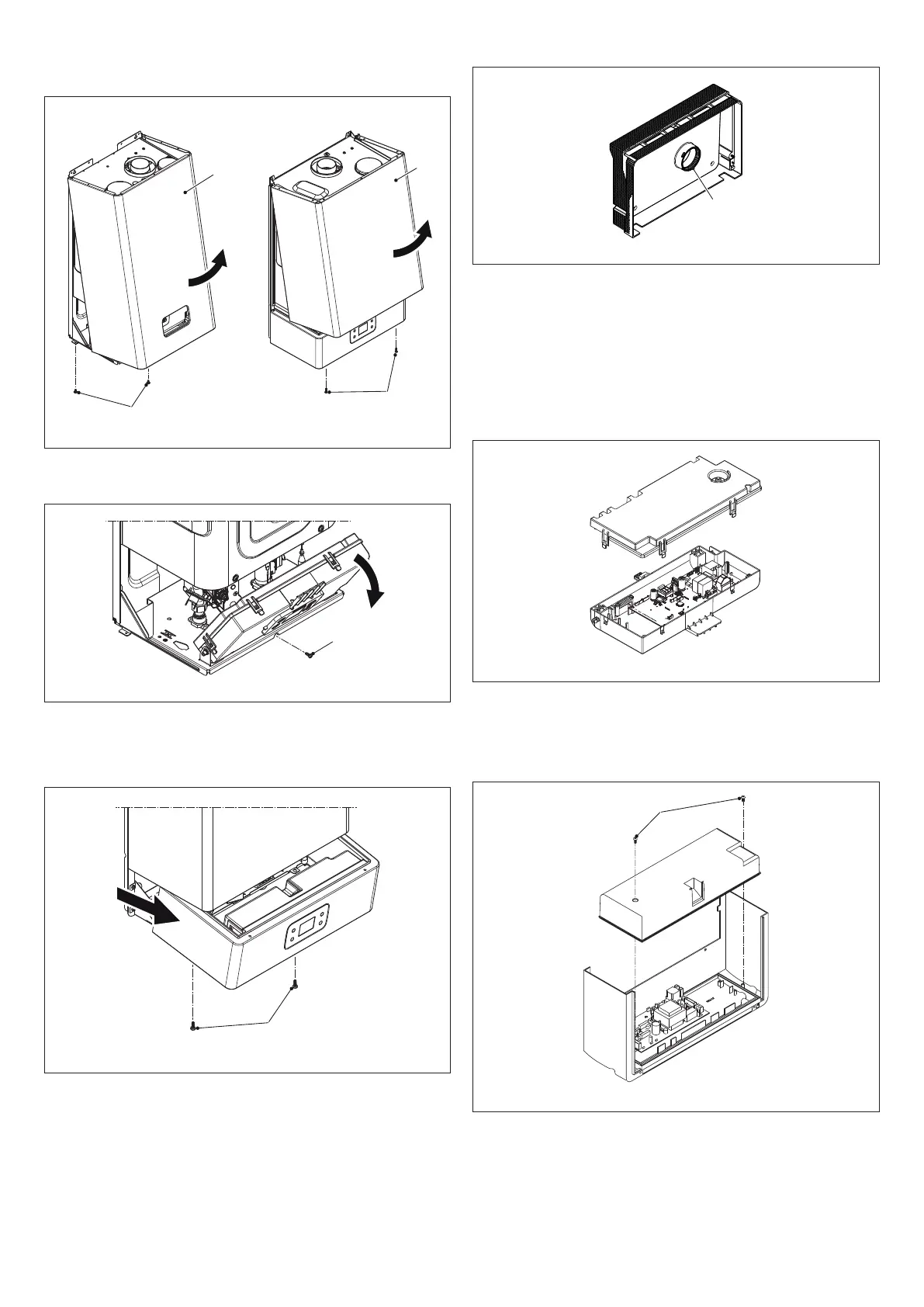
- remove the two screws
B
- push the casing
C
forwards
- move the casing
C
upwards, freeing it from the top hooks
Models 11-13 Models 17
C
C
B
Fig. 44
Models 11-13
Toaccesstheinstrumentpanelremovethexingscrew
D
and turn it
D
Fig. 45
Models 17
To open the instrument panel:
- remove the screws
C
- slide the instrument panel out and rotate it to the stop position
Fig. 46
At the end of the operations described above, put everything back in the
reverse order.
b
The gasket
F
should always be in its original seat.
F
Fig. 47
6.3 Accessing the modulation circuit board
b
First disconnect the appliance from the electrical power supply us-
ing the mains omnipolar switch.
Models 1
1-13
- To access the electronics of the control box, remove the casing and
turn the instrument panel
- Remove the cover to access the board.
Fig. 48
Models 17
- To access the electronics of the control box, remove the casing and
take out the instrument panel
- remove the two screws
G
- remove the cover and access the board.
Fig. 49


 To Next Page
 Loading...