EasyManua.ls Logo

Symbol TC70 - User Manual

Symbol TC70
144 pages
Print Icon
To Next Page IconTo Next Page
Loading...
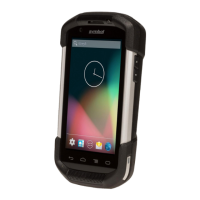
TC70
USER GUIDE

Table of Contents

Other manuals for Symbol TC70

Question and Answer IconNeed help?

Do you have a question about the Symbol TC70 and is the answer not in the manual?

Summary

About This Guide

Introduction to the TC70 User Guide

Provides an overview of the TC70 mobile computer and accessories.

Service Information for TC70

Details on how to contact support and obtain service for the TC70 device.

Getting Started with TC70

Unpacking the TC70

Procedure for unpacking the TC70 mobile computer and its accessories.

Charging the Battery

Instructions on how to charge the main TC70 battery using various accessories.

Battery Management on TC70

Guidance on monitoring battery usage, notifications, and optimization tips.

Display Settings on TC70

How to adjust screen brightness, rotation, timeout, font size, and touch key light.

Using the TC70

TC70 Home Screen Overview

Overview of the TC70's home screen, status bar, and icons.

Un-Locking the TC70 Screen

Procedures for securing and unlocking the device using patterns, PINs, or passwords.

Resetting the TC70 Device

Instructions for performing soft and hard resets to resolve device issues.

TC70 Applications

Using the TC70 Camera

Detailed guide on using the TC70's camera for photos, videos, and panoramic shots.

Managing Photos and Videos with Gallery

How to view, manage, edit, and share photos and videos stored on the device.

PTT Express Voice Client Setup

Configuration and usage of the Push-to-Talk (PTT) communication feature on the TC70.

TC70 Data Capture

TC70 Imager Features

Information on the TC70's integrated imager capabilities and operational modes.

DataWedge Configuration on TC70

How to enable and disable DataWedge for advanced bar code scanning functionality.

TC70 Wireless Connectivity

Connecting to Wi-Fi Networks

Connecting and configuring Wi-Fi networks on the TC70 device.

TC70 Bluetooth Operations

Guide to Bluetooth pairing, profiles, and managing connections on the TC70.

Near Field Communications (NFC) on TC70

Using NFC for reading cards and sharing information between devices.

TC70 Accessories

2-Slot Charge Only Cradle

Description and usage of the 2-Slot Charge Only Cradle for charging devices.

TC70 Battery Charging

Details on charging the main and spare batteries, including LED indicators and temperatures.

Magnetic Stripe Reader Accessory

Instructions for attaching, removing, and using the Magnetic Stripe Reader accessory.

Maintenance and Troubleshooting

Maintaining the TC70

Tips for keeping the TC70 in good condition for optimal performance and longevity.

TC70 Troubleshooting Guide

Detailed troubleshooting for common TC70 issues: power, battery, connectivity, scanning.

TC70 Technical Specifications

TC70 Physical and Performance Specs

Key physical, performance, and environmental specifications for the TC70 device.

Wireless LAN and Bluetooth Specs

Technical details on the TC70's wireless LAN, Bluetooth, NFC, and data capture capabilities.

TC70 Camera Specifications

Technical details regarding the TC70's rear and front camera resolutions.

Summary

About This Guide

Introduction to the TC70 User Guide

Provides an overview of the TC70 mobile computer and accessories.

Service Information for TC70

Details on how to contact support and obtain service for the TC70 device.

Getting Started with TC70

Unpacking the TC70

Procedure for unpacking the TC70 mobile computer and its accessories.

Charging the Battery

Instructions on how to charge the main TC70 battery using various accessories.

Battery Management on TC70

Guidance on monitoring battery usage, notifications, and optimization tips.

Display Settings on TC70

How to adjust screen brightness, rotation, timeout, font size, and touch key light.

Using the TC70

TC70 Home Screen Overview

Overview of the TC70's home screen, status bar, and icons.

Un-Locking the TC70 Screen

Procedures for securing and unlocking the device using patterns, PINs, or passwords.

Resetting the TC70 Device

Instructions for performing soft and hard resets to resolve device issues.

TC70 Applications

Using the TC70 Camera

Detailed guide on using the TC70's camera for photos, videos, and panoramic shots.

Managing Photos and Videos with Gallery

How to view, manage, edit, and share photos and videos stored on the device.

PTT Express Voice Client Setup

Configuration and usage of the Push-to-Talk (PTT) communication feature on the TC70.

TC70 Data Capture

TC70 Imager Features

Information on the TC70's integrated imager capabilities and operational modes.

DataWedge Configuration on TC70

How to enable and disable DataWedge for advanced bar code scanning functionality.

TC70 Wireless Connectivity

Connecting to Wi-Fi Networks

Connecting and configuring Wi-Fi networks on the TC70 device.

TC70 Bluetooth Operations

Guide to Bluetooth pairing, profiles, and managing connections on the TC70.

Near Field Communications (NFC) on TC70

Using NFC for reading cards and sharing information between devices.

TC70 Accessories

2-Slot Charge Only Cradle

Description and usage of the 2-Slot Charge Only Cradle for charging devices.

TC70 Battery Charging

Details on charging the main and spare batteries, including LED indicators and temperatures.

Magnetic Stripe Reader Accessory

Instructions for attaching, removing, and using the Magnetic Stripe Reader accessory.

Maintenance and Troubleshooting

Maintaining the TC70

Tips for keeping the TC70 in good condition for optimal performance and longevity.

TC70 Troubleshooting Guide

Detailed troubleshooting for common TC70 issues: power, battery, connectivity, scanning.

TC70 Technical Specifications

TC70 Physical and Performance Specs

Key physical, performance, and environmental specifications for the TC70 device.

Wireless LAN and Bluetooth Specs

Technical details on the TC70's wireless LAN, Bluetooth, NFC, and data capture capabilities.

TC70 Camera Specifications

Technical details regarding the TC70's rear and front camera resolutions.

Symbol TC70 Specifications

General IconGeneral
Operating SystemAndroid
RAM2 GB
Internal Storage16 GB
SealingIP67
Cellular Connectivity4G LTE
GPSYes
Display4.7 inches, 1280 x 720 pixels
Touch PanelCapacitive
Expansion SlotmicroSD up to 32 GB
ConnectivityWi-Fi, Bluetooth
Battery4000 mAh
Camera8 MP rear, 1.3 MP front
Operating Temp-20 to 50 °C
Drop SpecMultiple 1.8 m drops to concrete
Barcode ScannerIntegrated 1D/2D scanner
Wireless ConnectivityWi-Fi 802.11 a/b/g/n