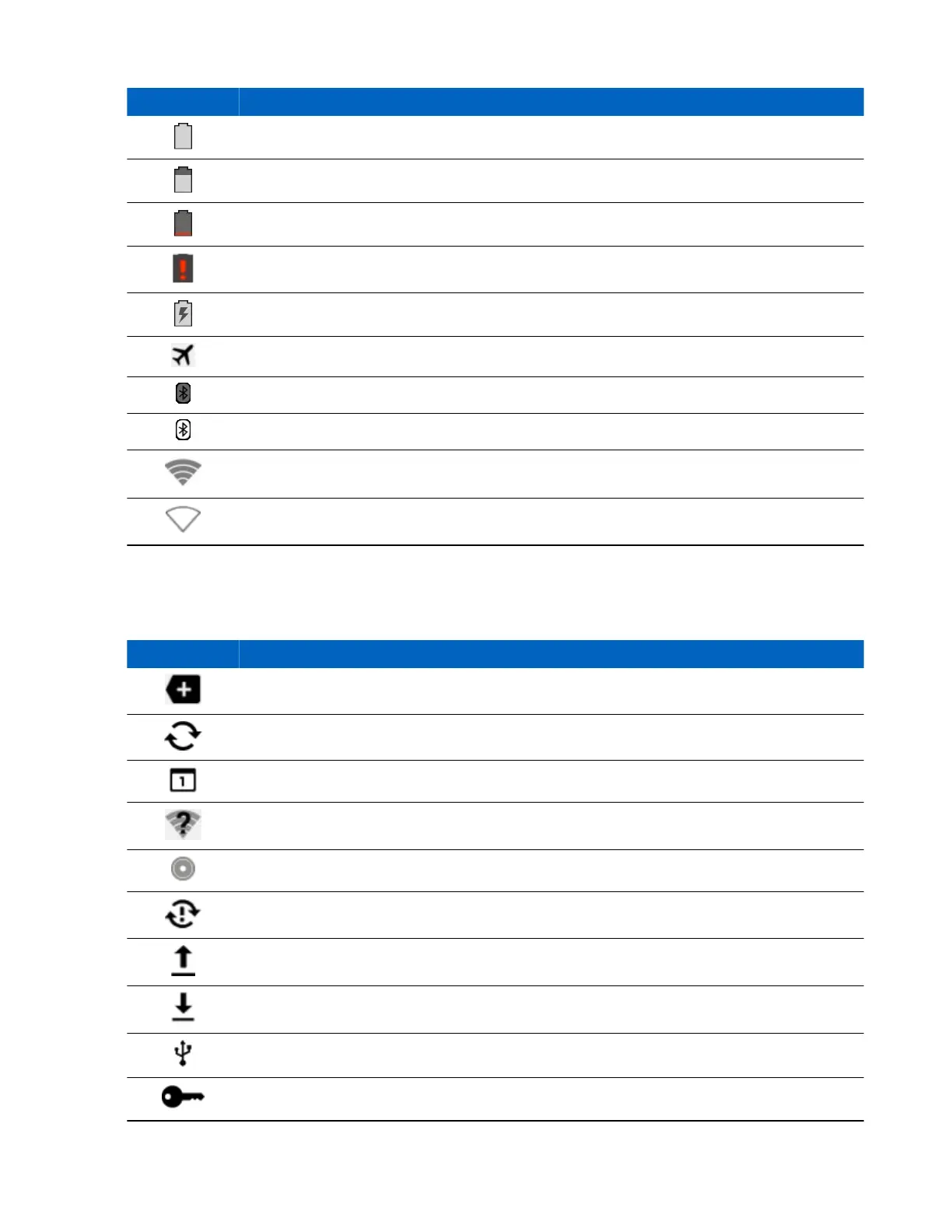
Icon Description
Indicates that the battery is fully charged.
Indicates that the battery is partially drained.
Indicates that the battery charge is low.
Indicates that the battery charge is very low.
Indicates that the battery is charging.
Indicates that the Airplane Mode is active. All radios are turned off.
Indicates that Bluetooth is on.
Indicates that the TC70 is connected to a Bluetooth device.
Connected to a Wi-Fi network.
No Wi-Fi signal.
Notification Icons
Table 7: Notification Icons
Icon Description
Indicates that more notifications are available for viewing.
Indicates that data is syncing.
Indicates an upcoming event.
Indicates that an open Wi-Fi network is available.
Indicates that a song is playing.
Indicates that a problem with sign-in or sync has occurred.
Indicates that the TC70 is uploading data.
Indicates that the TC70 is downloading data when animated and download is complete when stat-
ic.
Indicates that the TC70 is connected via USB cable.
Indicates that the TC70 is connected to or disconnected from virtual private network (VPN).
Table continued…
Using the TC70 | 35
MN001120A01-A | October 2014


 To Next Page