2
Touch .
3 Slide the Bluetooth switch to the OFF position.
4
Touch .
Discovering Bluetooth Device(s)
The TC70 can receive information from discovered devices without pairing. However, once paired, the TC70 and a
paired device exchange information automatically when the Bluetooth radio is on. To find Bluetooth devices in the
area:
Procedure:
1 Ensure that Bluetooth is enabled on both devices.
2 Ensure that the Bluetooth device to discover is in discoverable mode.
3 Ensure that the two devices are within 10 meters (32.8 feet) of one another.
4
Touch
.
5
Touch
.
6
Touch Bluetooth.
7 Touch SCAN FOR DEVICES. The TC70 begins searching for discoverable Bluetooth devices in the area and
displays them under AVAILABLE DEVICES.
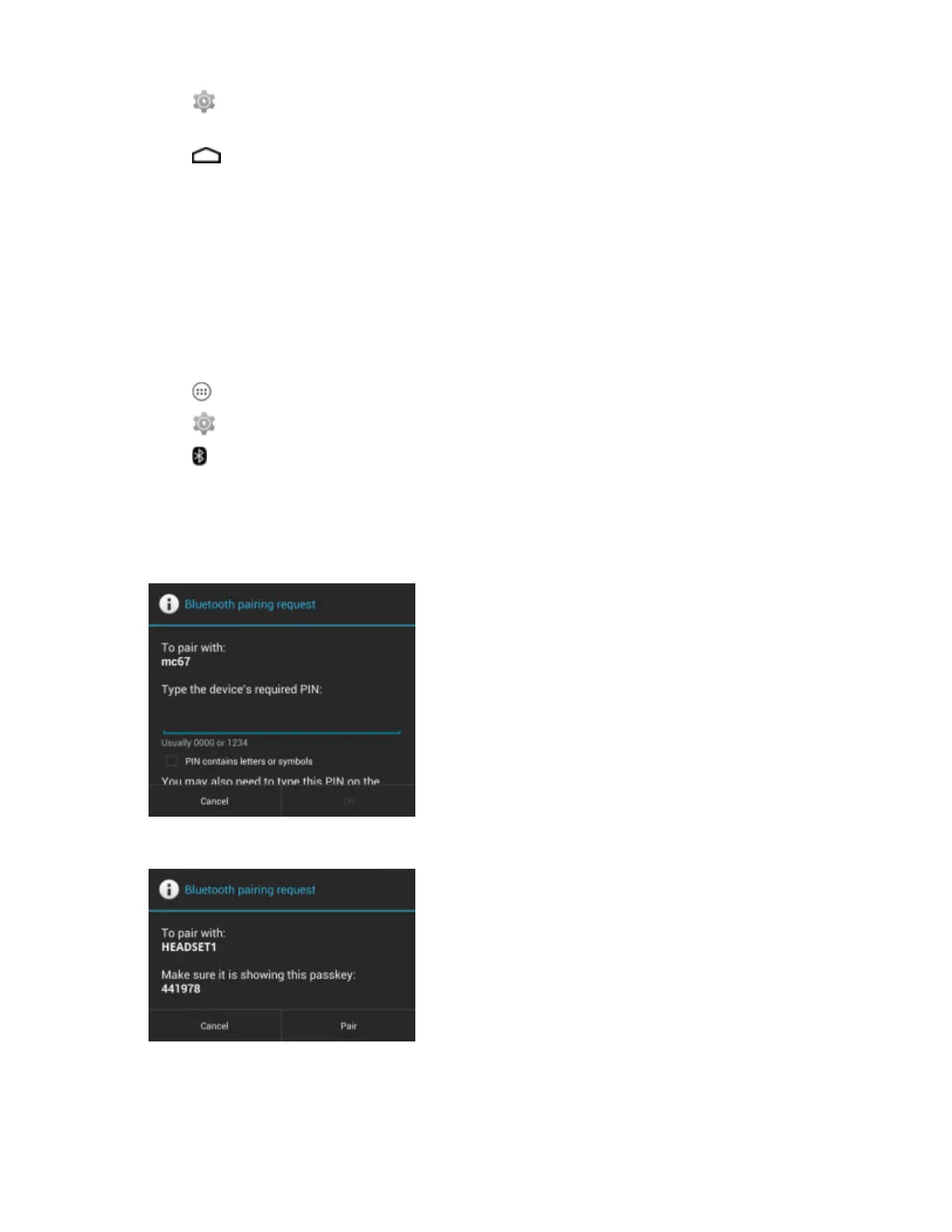
8 Scroll through the list and select a device. The Bluetooth pairing request dialog box appears.
Figure 82: Bluetooth Pairing - Enter PIN
Figure 83: Bluetooth Pairing - Smart Pairing
9 Enter a PIN in the text box and touch OK. Enter the same PIN on the other device.
10 For Simple Pairing, touch Pair on both devices.
11 The Bluetooth device is added to the Bluetooth devices list and a trusted (“paired”) connection is established.
Wireless | 97
MN001120A01-A | October 2014


 To Next Page