PTT Audible Indicators
The following tones provide helpful cues when using the voice client.
• Talk Tone: Double chirp. Plays when the Talk button is depressed. This is a prompt for the user to start talking.
• Access Tone: Single beep. Plays when another user just finished a broadcast or response. The user is now able to
initiate a Group Broadcast or Private Response.
• Busy Tone: Continuous tone. Plays when the Talk button is depressed and another user is already communicating
on the same talkgroup. Plays after the maximum allowed talk time is reached (60 seconds).
• Network Tone:
- Three increasing pitch beeps. Plays when PTT Express has acquired the WLAN connection and the service is
enabled.
- Three decreasing pitch beeps. Plays when PTT Express has lost the WLAN connection or the service is
disabled.
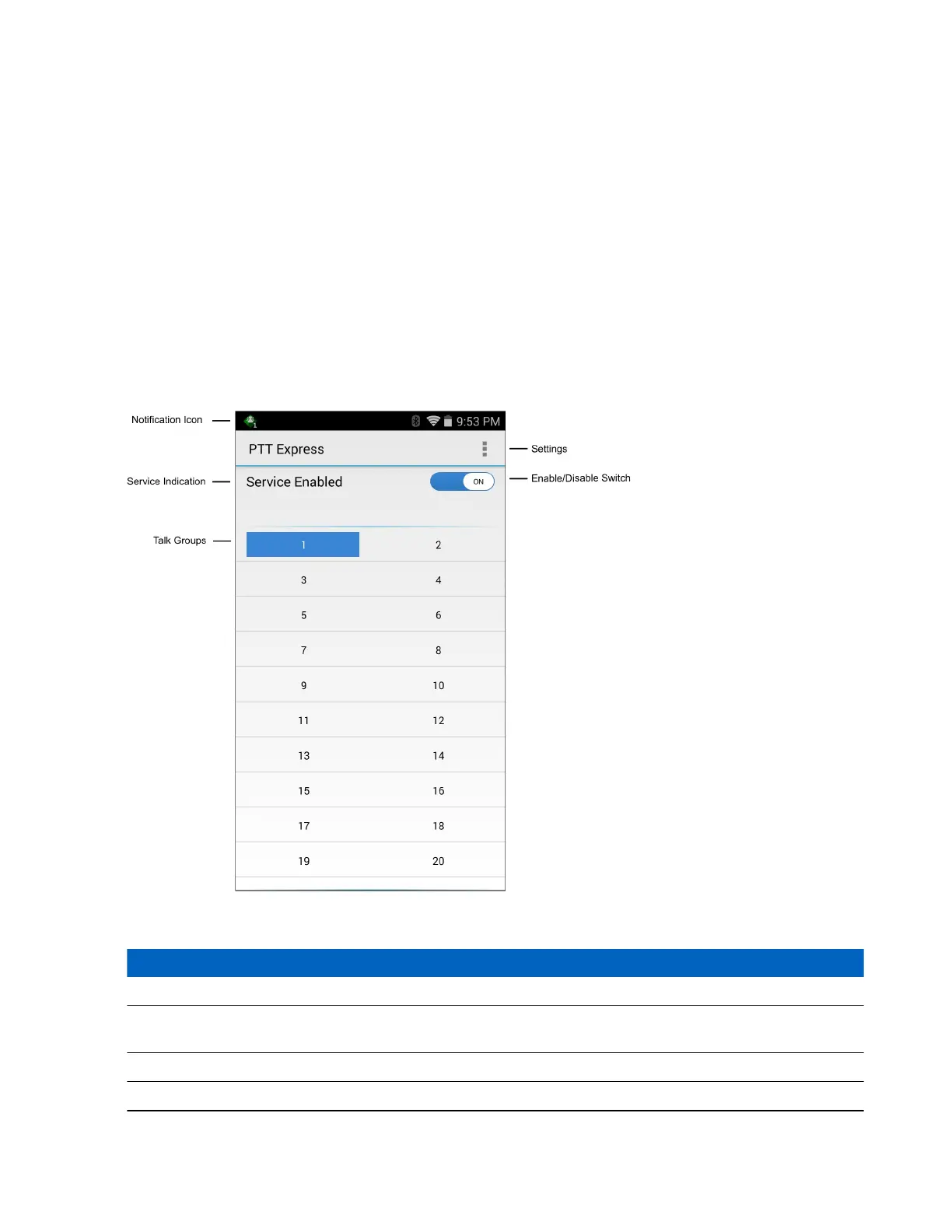
Figure 61: PTT Express Default User Interface
Table 10: PTT Express Default user Interface Descriptions
Item Description
Notification Icon Indicates the current state of the PTT Express client.
Service Indication Indicates the status of the PTT Express client. Options: Service Enabled, Service Disabled
or Service Unavailable.
Talk Groups Lists all 32 Talk Groups available for PTT communication.
Settings Opens the PTT Express Settings screen.
Table continued…
Applications | 73
MN001120A01-A | October 2014


 To Next Page