12
Remote control unit
DAC DISP
VOLUME
MUTE
D/A CONVERTER
1
USB
23
4
INPUT
1 6
2
3
5
4
30°
30°
7 m (23 ft.)
Remote sensor
Remote
control unit
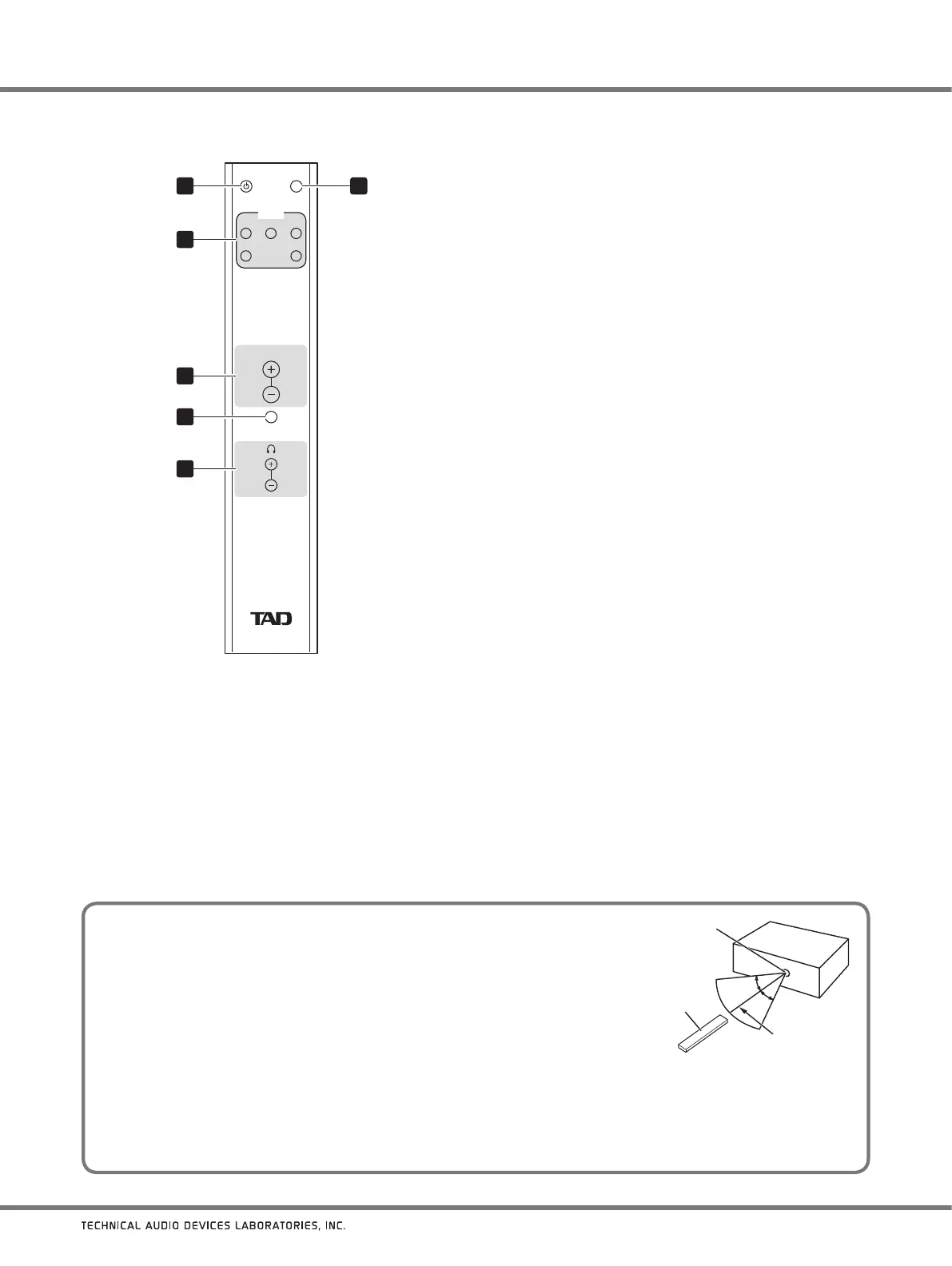
Remote control operating range
When using the remote control unit to operate the TAD-DA1000, point the remote
control at the main unit’s remote sensor within the ranges shown in the accompanying
illustration.
The remote control may not operate properly if obstructions exist between the
remote control unit and the remote sensor, or if the angle between the remote
control and the remote sensor is poor.
Malfunctions may occur if the TAD-DA1000 is used nearby other appliances that
emit infrared light, or
if remote control units for other devices utilizing infrared light are used nearby. Alternately, using
this remote control unit near other appliances that also utilize infrared light may cause those appliances to malfunction.
Replace the batteries when you notice a reduction in the operating range of the remote control unit.
The remote control may not operate correctly if strong sunlight or light from fluorescent lamps is allowed to strike the
remote sensor directly. In such cases, change the installation location, or remove the fluorescent lamps to a more
distant location.
1
DAC button
Use to set power to ON/standby mode.
2 INPUT buttons
Use to select the input source.
3 VOLUME (+/
−
) buttons
Use to adjust sound volume at the unit’s line
output connectors (ANALOG OUTPUT: BALANCED/
UNBALANCED).
These buttons are deactivated in their default factory-
shipped status, and output is fixed at its maximum value.
To activate these buttons, hold the main unit’s
VOL (−)
button depressed for several seconds.
4 MUTE button
Press to temporarily turn off playback sound.
When the MUTE mode is active, the volume display will
show
[ - - ]
.
5 Headphones volume (
−
/+) buttons
Use to adjust the headphone sound volume.
6 DISP button
Use to change or hide information items shown in the
display.



 To Next Page