Changing procedure of the frame
1-15
1
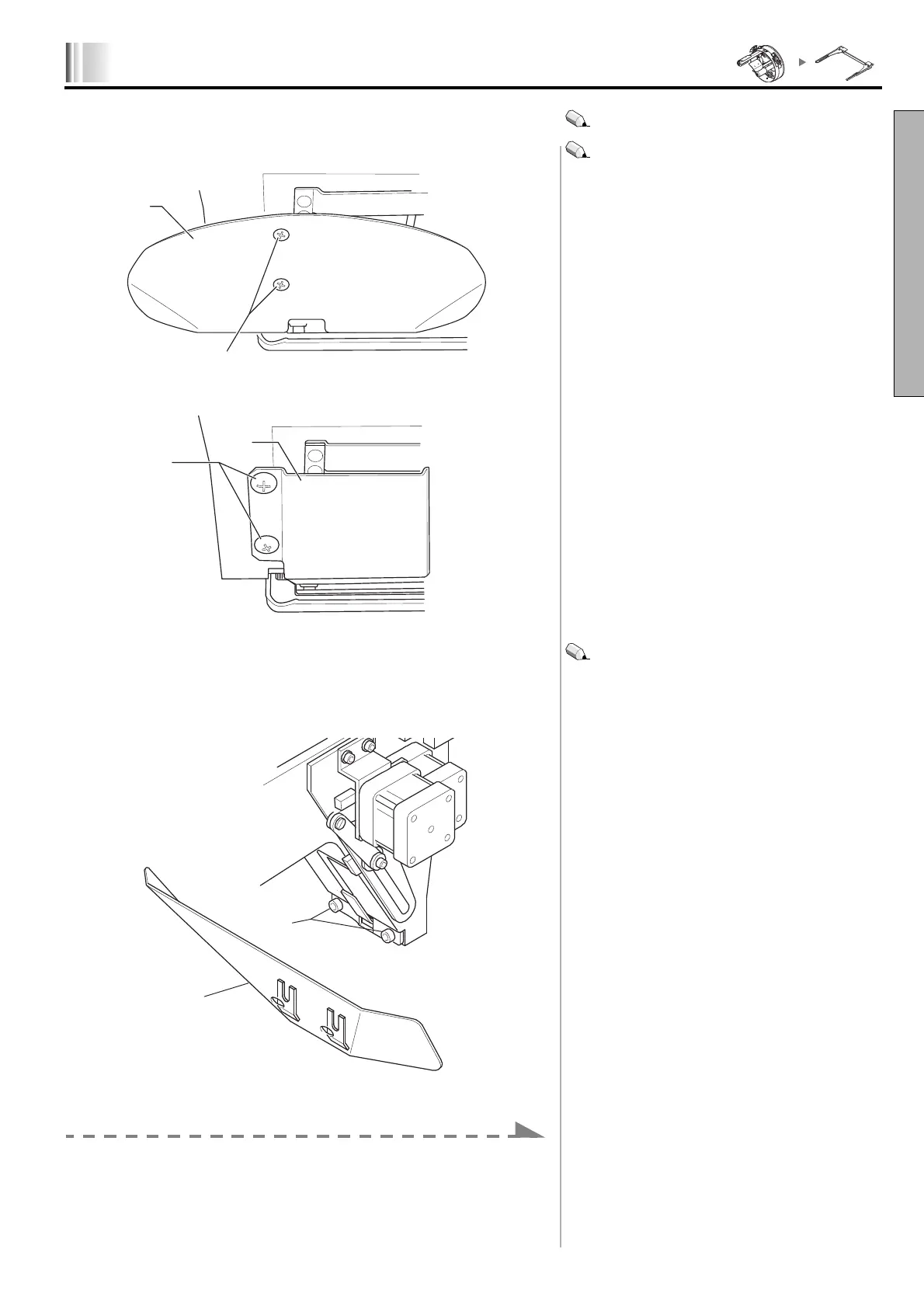
3. Attaching of hook cover (In case of TFMX-C)
1.
Remove the screw (1) to detach the cap frame guide (2).
2.
Attach the hook cover (4) using the screw (3).
3.Detaching of cap frame guide (TEJTII-C/TEMX-C)
1.
Loosen the screw (5).
2.
After detaching the cap frame guide (6), tighten the screw (5).
Proceed to the next work.
In case of TEJTII-C/TEMX-C: Proceed to “Detaching of
cap frame guide” (p.1-15).
You may let the cap frame guide (2) remain as it is.
However, if has a trouble for embroidery works, replace it
with the hook cover (4).
You may let the cap frame guide (6) remain as it is.
However, if has a trouble for embroidery works, detach it.
Turn ON the power switch, or release sleep mode (p.1-19) and after
LX03



 To Next Page