Setup Mode
USING SETUP MODE
User's Manual 5-37
Quick
Reference
Introduc-
tion
Setting Up
Paper
Handling
Printing
Setup Mode
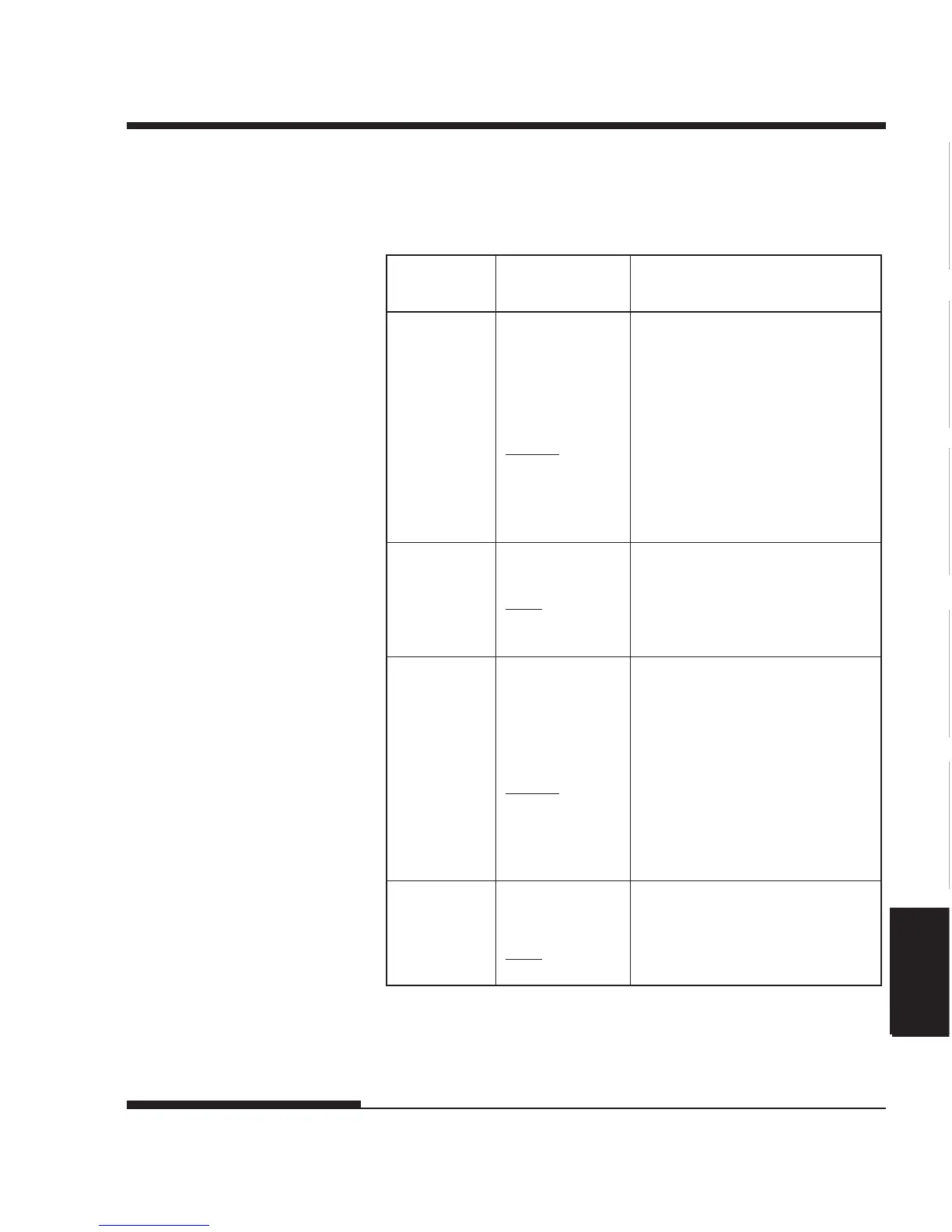
Table 5.5 ADJUST Items and Options
NOTE: Underlined options are the factory defaults.
<CNT-ORG> Sets the top-of-form for continuous
forms in increments of 1/6 inch
(4.2 mm) from the physical top of
the page.
1/6 IN The default is recommended if
1.8/6 IN your top margin is not software-
: specified. A setting of 1/6 inch
6/6 IN is preferable when your top
: margin is software-specified.
66/6 IN
<CNTFINE> Fine-tunes the top-of-form position
for continuous forms.
0/180, ..., 29/180 Increases top-of-form in increments
of 1/180 inch
(0.14 mm).
<CNT-ORG> Sets the top-of-form for single
sheets in increments of 1/6 inch (4.2
mm) from the physical top of the
page.
1/6 IN The default is recommended if
1.8/6 IN your top margin is not software-
: specified. A setting of 1/6 inch
6/6 IN is preferable when your top
: margin is software-specified.
66/6 IN
<CUTFINE> Fine-tunes the top-of-form
position for single sheets.
0/180, ..., 29/180 Increases top-of-form in increments
of 1/180 inch (0.14 mm).
ADJUST
Items
Options Description


 To Next Page
 Loading...












