Setup Mode
USING SETUP MODE
User's Manual 5-39
Quick
Reference
Introduc-
tion
Setting Up
Paper
Handling
Printing
Setup Mode
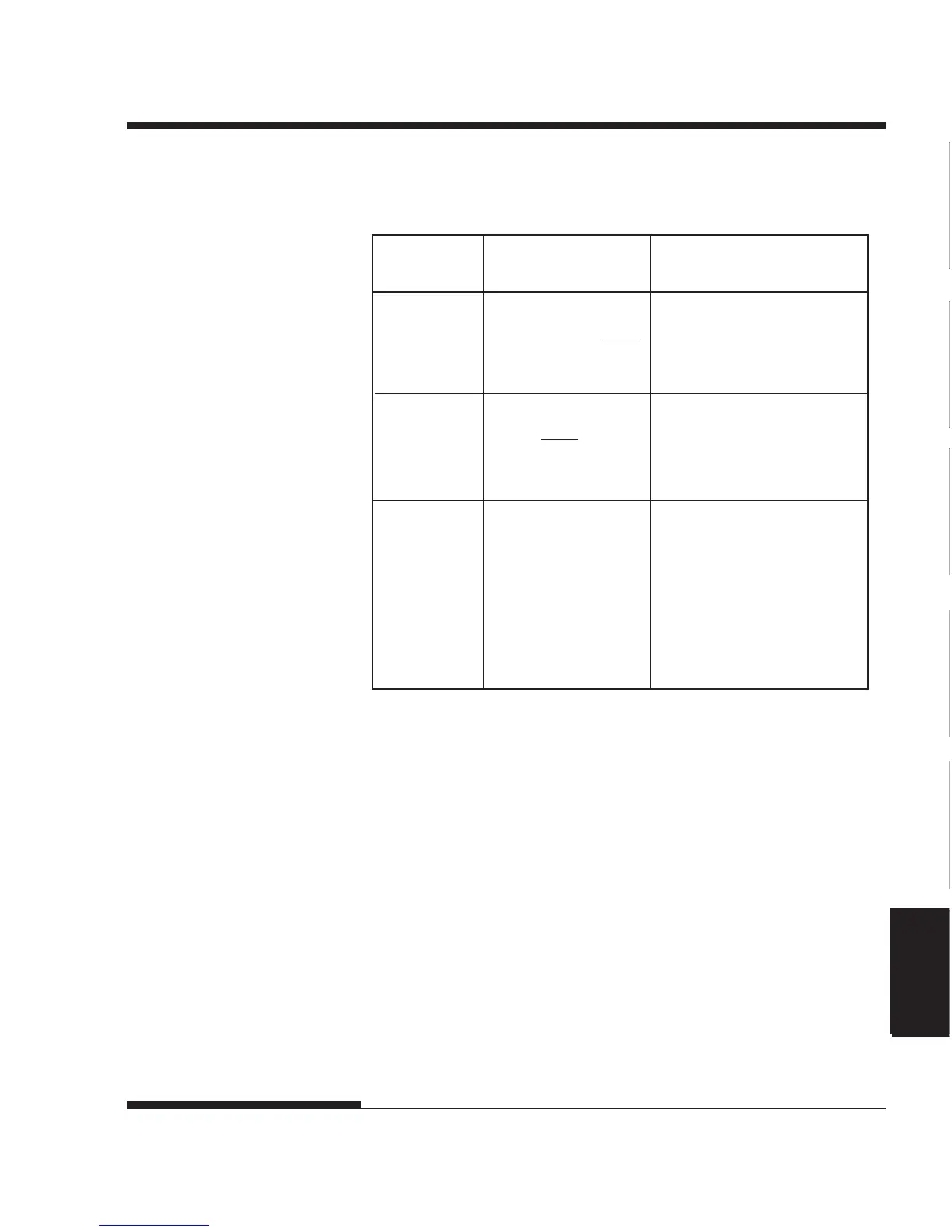
Table 5.5 ADJUST Items and Options (Cont.)
ADJUST
Items
<CNT-ADJ> Compensates for the forms
feed error accumulated through
feeding of continuous forms.
<CNTADJL> Compensates for the forms
feed error accumulated through
feeding of continuous forms.
(Last page)
<==END==> Indicates the end of the
ADJUST item list. Press
MENU to print the first item,
which is <CNT-ORG>. Press
TEAR OFF to print the last
item, which is <CUTADJL>.
Press ONLINE to reprint the
<<FUNCTION>> menu.
*1:When printing graphics, selecting "GRAPHIC" may result in the
printing of clearer graphics.
Options Description
–28/360, –21/360,
–14/360, –7/360, 0/360,
7/360, 14/360, 21/360,
28/360, GRAPHIC (*1)
–21/360, –14/360,
–7/360,
0/360,
7/360, 14/360, 21/360,
GRAPHIC (*1)




 To Next Page