Setup Mode
USING SETUP MODE
User's Manual 5-15
Quick
Reference
Introduc-
tion
Setting Up
Paper
Handling
Printing
Setup Mode
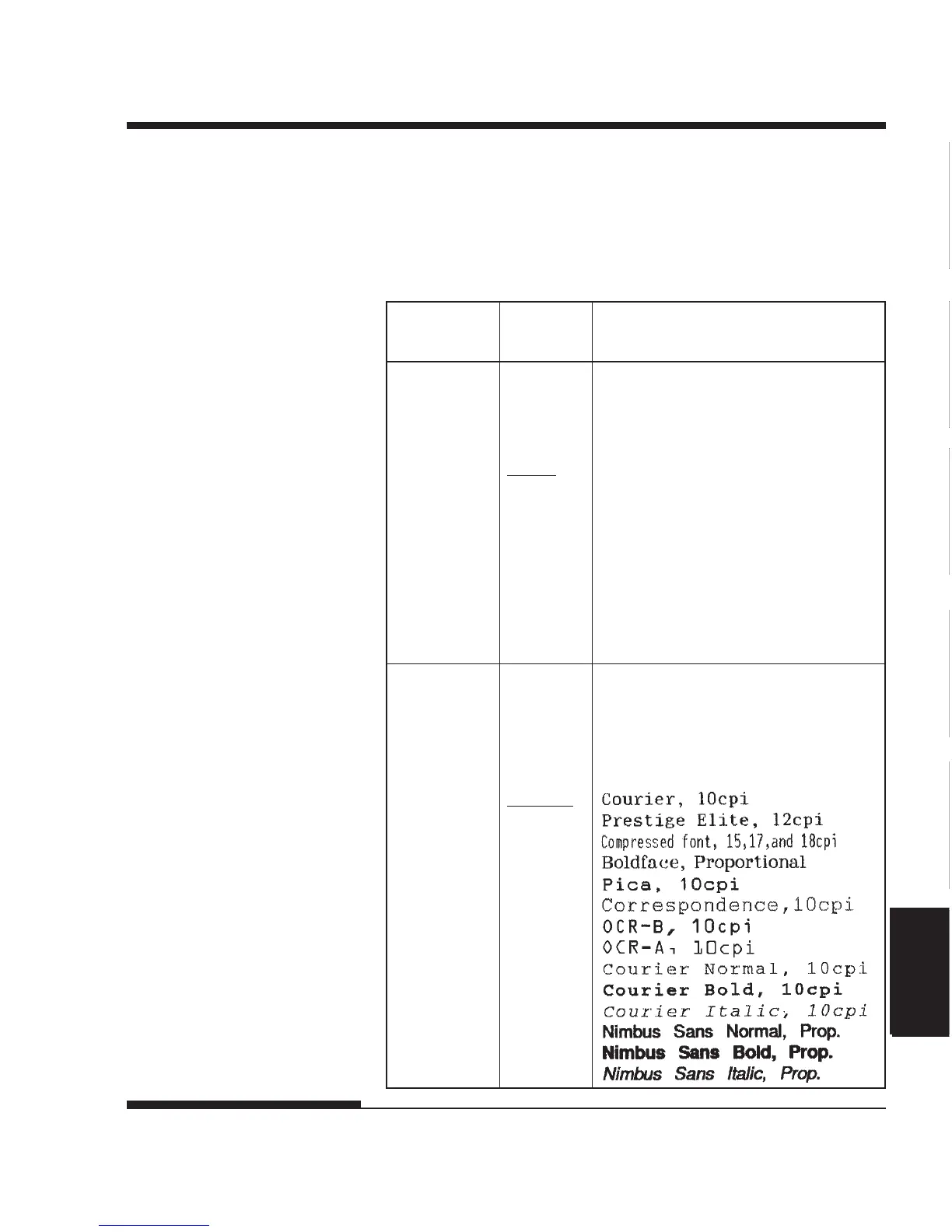
Table 5.3 MENU1 and MENU2 Items and Options
NOTES:
• Underlined options are the factory defaults.
• Asterisks identify items and options that differ for the IBM XL24E and
Epson ESC/P2 emulations. The notes are defined at the end of the table.
MENU1 and
MENU2 Items
<EMULATE>
Select the same emulation as is selected in
your software. See the section Selecting
an Emulation in Chapter 2 for informa-
tion on selecting an emulation.
ESC/P2 EPSON-series printers
(ESC/P2 command set)
XL24E IBM Proprinter XL24E printers
NOTE: When you change the
emulation, all MENU1 or MENU2
options are reset to the factory
defaults for that emulation.
<FONT> For each of the following fonts, the
recommended pitch settings are given after
the font name. When you change the font,
be sure to also change the pitch, if
required.
COUR 10
PRSTG12
COMPRSD
BOLDFCE
PICA 10
CORRESP
OCR-B
OCR-A
COUR-N
COUR-B
COUR-I
N.SAN-N
N.SAN-B
N.SAN-I
Options Description














 To Next Page