- 3 -
Standalone Terminal
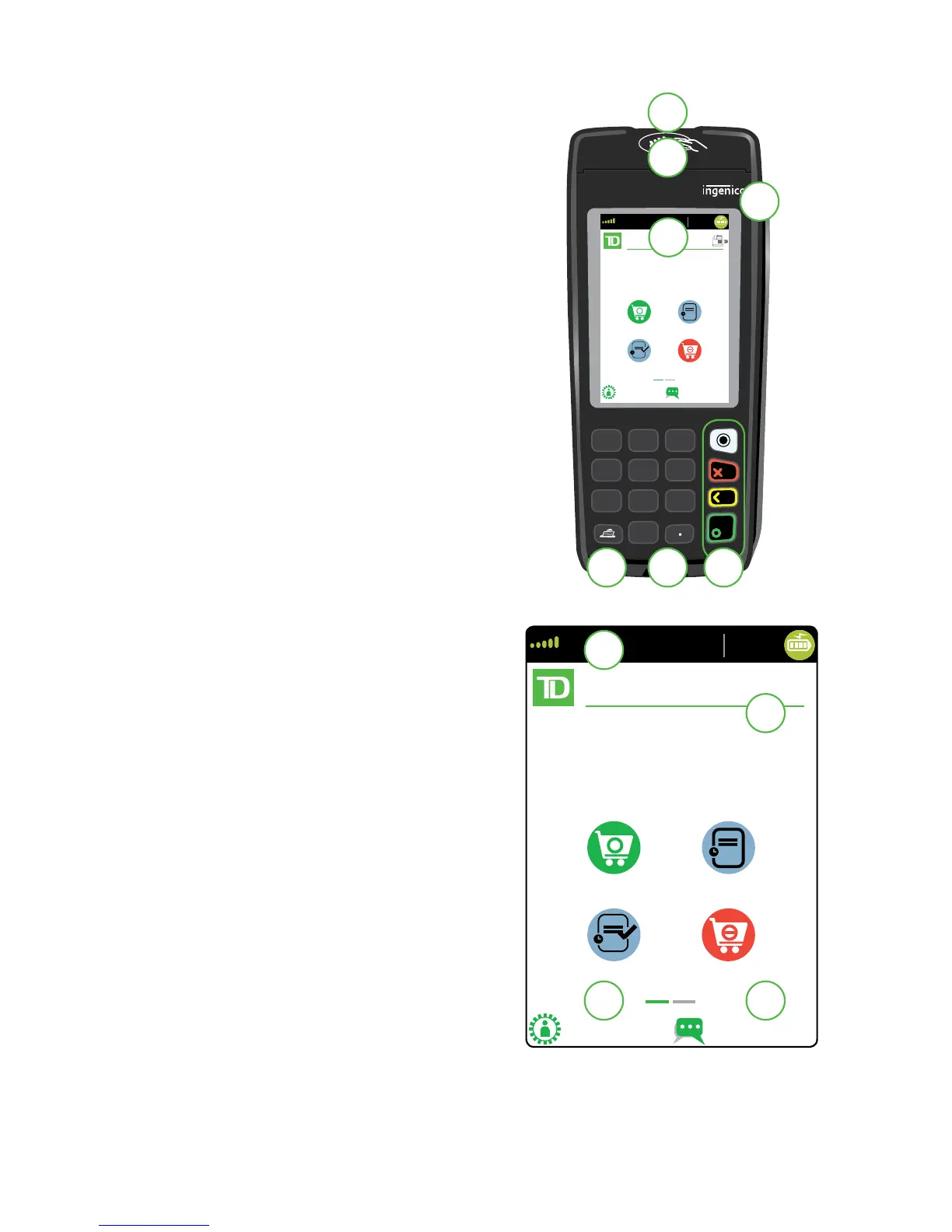
1. Command keys
• Application key
• Cancel
• Correction
• OK (or Enter)
2. Touchscreen
All terminal navigation is performed
through the touchscreen.
3. Paper advance key
4. Paper chamber panel
5. Card readers
a) Insert chipped cards
b) Swipe cards
c) Contactless cards (Tap the
card on the contactless
icon, not the touchscreen.)
Home screen and icons
The default screen is called the Home screen.
It displays important information, icons and
dierent ways to access terminal functionality.
They are:
1. Communication icons
The icons on this bar will be
dierent depending on which
setup or comms method
is chosen. See below for
explanations on each icon type.
2. Power
The battery icon in the top-right
corner indicates the terminal
battery level. When the lightning
bolt appears on top of the battery
icon, it means it is charging.
3. Admin
This icon will open the Admin Menu.
4. Language
This icon will open the Language
Menu.



 To Next Page