EasyManua.ls Logo

Teac AG-V3020 - Remote Control Unit; Battery Installation

Teac AG-V3020
55 pages
Print Icon
To Next Page IconTo Next Page
To Previous Page IconTo Previous Page
Loading...
@
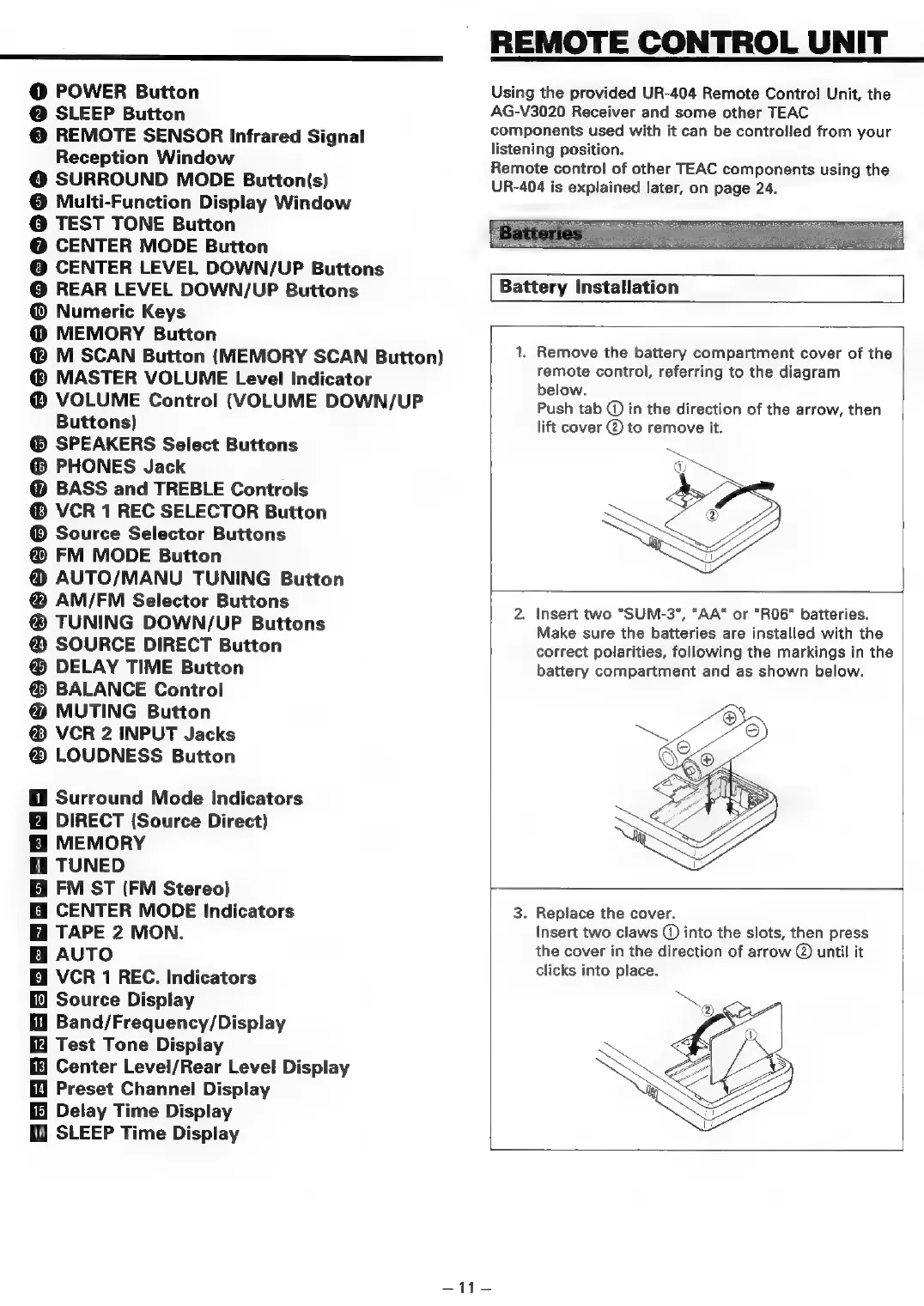
POWER
Button
@
SLEEP
Button
©
REMOTE
SENSOR
Infrared
Signal
Reception
Window
@
SURROUND
MODE
Button(s)
©
Multi-Function
Display
Window
©
TEST
TONE
Button
@
CENTER
MODE
Button
©
CENTER
LEVEL
DOWN/UP
Buttons
©
REAR
LEVEL
DOWN/UP
Buttons
@
Numeric
Keys
@
MEMORY
Button
@
M
SCAN
Button
(MEMORY
SCAN
Button)
MASTER
VOLUME
Level
Indicator
@
VOLUME
Control
(VOLUME
DOWN/UP
Buttons)
®
SPEAKERS
Select
Buttons
@
PHONES
Jack
@
BASS
and
TREBLE
Controls
VCR
1
REC
SELECTOR
Button
Source
Selector
Buttons
@
FM
MODE
Button
@
AUTO/MANU
TUNING
Button
@
AM/FM
Selector
Buttons
TUNING
DOWN/UP
Buttons
@
SOURCE
DIRECT
Button
DELAY
TIME
Button
®
BALANCE
Control
@
MUTING
Button
VCR
2
INPUT
Jacks
LOUDNESS
Button
Surround
Mode
Indicators
DIRECT
(Source
Direct)
MEMORY
Gi
TUNED
FM
ST
(FM
Stereo)
Gi
CENTER
MODE
Indicators
TAPE
2
MON.
Bi
AUTO
Ei
VCR
1
REC.
Indicators
Source
Display
Hl
Band/Frequency/Display
Test
Tone
Display
Center
Level/Rear
Level
Display
Preset
Channel
Display
Delay
Time
Display
fH
SLEEP
Time
Display
REMOTE
CONTROL
UNIT
Using
the
provided
UR-404
Remote
Control
Unit,
the
AG-V3020
Receiver
and
some
other
TEAC
components
used
with
it
can
be
controlled
from
your
listening
position.
Remote
control
of
other
TEAC
components
using
the
UR-404
is
explained
later,
on
page
24.
Battery
Installation
1.
Remove
the
battery
compartment
cover
of
the
remote
control,
referring
to
the
diagram
below.
Push
tab
()
in
the
direction
of
the
arrow,
then
lift
cover
@
to
remove
it.
ON
2.
Insert
two
"SUM-3",
"AA"
or
“RO6"
batteries.
Make
sure
the
batteries
are
installed
with
the
correct
polarities,
following
the
markings
in
the
battery
compartment
and
as
shown
below.
3.
Replace
the
cover.
Insert
two
claws
@
into
the
slots,
then
press
the
cover
in
the
direction
of
arrow
@
until
it
clicks
into
place.
~~
sr

Table of Contents

Related product manuals