EasyManua.ls Logo

Teac AG-V3020 - Speaker Installation; Dolby Pro Logic and Dolby 3 CH Logic Modes; Hints on Speaker Installation; THEATER and STADIUM Modes

Teac AG-V3020
55 pages
Print Icon
To Next Page IconTo Next Page
To Previous Page IconTo Previous Page
Loading...
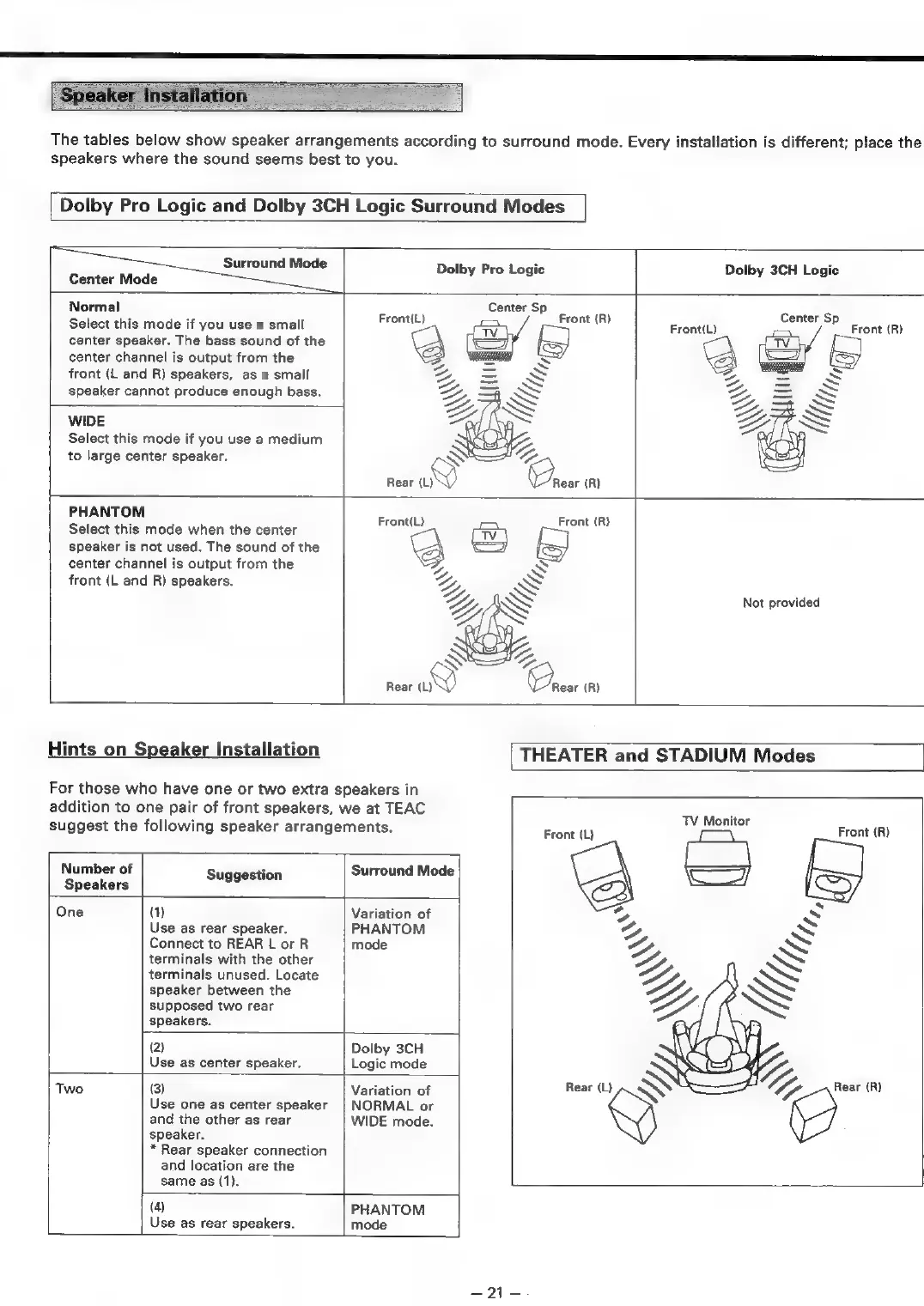
The
tables
below
show
speaker
arrangements
according
to
surround
mode.
Every
installation
is
different;
place
the
speakers
where
the
sound
seems
best
to
you.
Dolby
Pro
Logic
and
Dolby
3CH
Logic
Surround
Modes
Surround
Mode
Dolby
Pro
Logic
Dolby
3CH
Logic
Center
Mode
Normal
Center
Sp
Select
this
mode
if
you
use
a
small
center
speaker.
The
bass
sound
of
the
center
channel
is
output
from
the
front
(L
and
R)
speakers,
as
a
small
speaker
cannot
produce
enough
bass.
Front
(R)
Center
Sp
Front
(R)
WIDE
Select
this
mode
if
you
use
a
medium
to
large
center
speaker.
PHANTOM
Select
this
mode
when
the
center
speaker
is
not
used.
The
sound
of
the
center
channel
is
output
from
the
front
(L
and
R)
speakers.
Not
provided
3
Rear
(L)
Y)
Crest
(R)
Hints
on
Speaker
Installation
THEATER
and
STADIUM
Modes
For
those
who
have
one
or
two
extra
speakers
in
addition
to
one
pair
of
front
speakers,
we
at
TEAC
suggest
the
following
speaker
arrangements.
TV
Monitor
Front
(L)
Front
(R)
Number
of
Suggestion
Surround
Mode
\
Speakers
AB)
One
(1)
Variation
of
Z
Use
as
rear
speaker.
PHANTOM
Connect
to
REAR
L
or
R
mode
terminals
with
the
other
terminals
unused.
Locate
speaker
between
the
supposed
two
rear
speakers.
(2)
Dolby
3CH
Use
as
center
speaker.
Logic
mode
(Ky
Two
(3)
Variation
of
Rear
(L)
S
C7.
Rear.R)
Use
one
as
center
speaker
|
NORMAL
or
and
the
other
as
rear
WIDE
mode.
speaker.
*
Rear
speaker
connection
and
location
are
the
same
as
(1).
(4)
PHANTOM
Use
as
rear
speakers.
mode
Dit

Table of Contents

Related product manuals