EasyManua.ls Logo

Teac AG-V3020 - Speaker Connections; Front Speaker IMPEDANCE SELECTOR

Teac AG-V3020
55 pages
Print Icon
To Next Page IconTo Next Page
To Previous Page IconTo Previous Page
Loading...
Front
Speaker
IMPEDANCE
SELECTOR
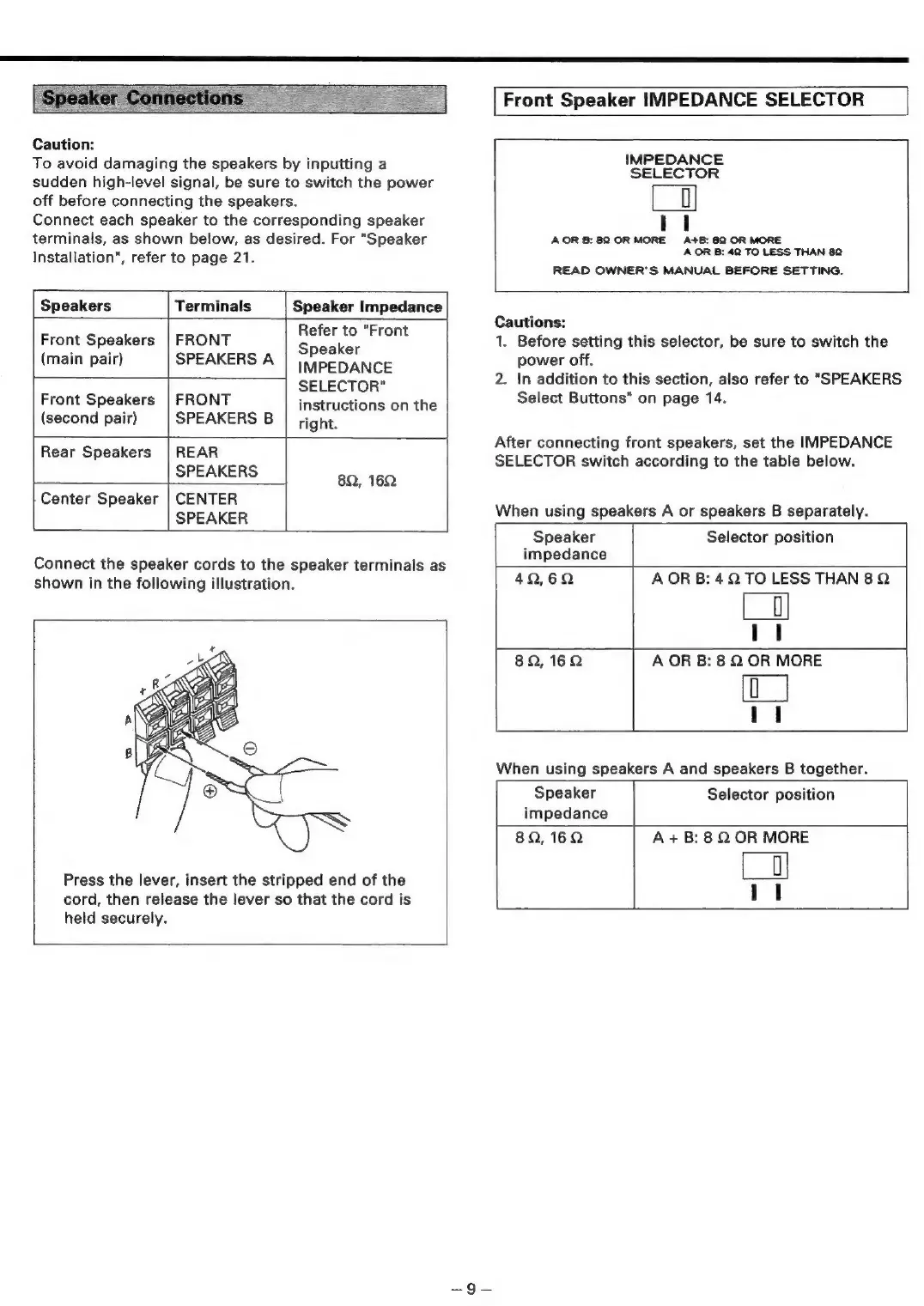
Caution:
To
avoid
damaging
the
speakers
by
inputting
a
sudden
high-level
signal,
be
sure
to
switch
the
power
off
before
connecting
the
speakers.
Connect
each
speaker
to
the
corresponding
speaker
terminals,
as
shown
below,
as
desired.
For
"Speaker
Installation",
refer
to
page
21.
IMPEDANCE
SELECTOR
Lo)
AOR
B:
82
OR
MORE
A+B:
82
OR
MORE
AOR
B:
42
TO
LESS
THAN
82
READ
OWNER'S
MANUAL
BEFORE
SETTING.
Speakers
Terminals
Speaker
Impedance
Front
Speakers
|
FRONT
osetia
nae
(main
pair)
SPEAKERS
A
IMPEDANCE
SELECTOR"
Front
Speakers
|
FRONT
instructions
on
the
(second
pair)
SPEAKERS
B
right.
Rear
Speakers
|
REAR
SPEAKERS
82,
162
Center
Speaker
|
CENTER
SPEAKER
Connect
the
speaker
cords
to
the
speaker
terminals
as
shown
in
the
following
illustration.
Press
the
lever,
insert
the
stripped
end
of
the
cord,
then
release
the
lever
so
that
the
cord
is
held
securely.
Cautions:
1.
Before
setting
this
selector,
be
sure
to
switch
the
power
off.
In
addition
to
this
section,
also
refer
to
"SPEAKERS
Select
Buttons"
on
page
14.
2.
After
connecting
front
speakers,
set
the
IMPEDANCE
SELECTOR
switch
according
to
the
table
below.
When
using
speakers
A
or
speakers
B
separately.
Speaker
Selector
position
impedance
42,62
AOR
B:
4Q
TO
LESS
THAN
8Q
|
82,162
A
OR
B:
8
2
OR
MORE
[o_|
When
using
speakers
A
and
speakers
B
together.
Speaker
Selector
position
impedance
8Q,16Q
A
+B:
8
Q
OR
MORE
=|

Table of Contents

Related product manuals