EasyManua.ls Logo

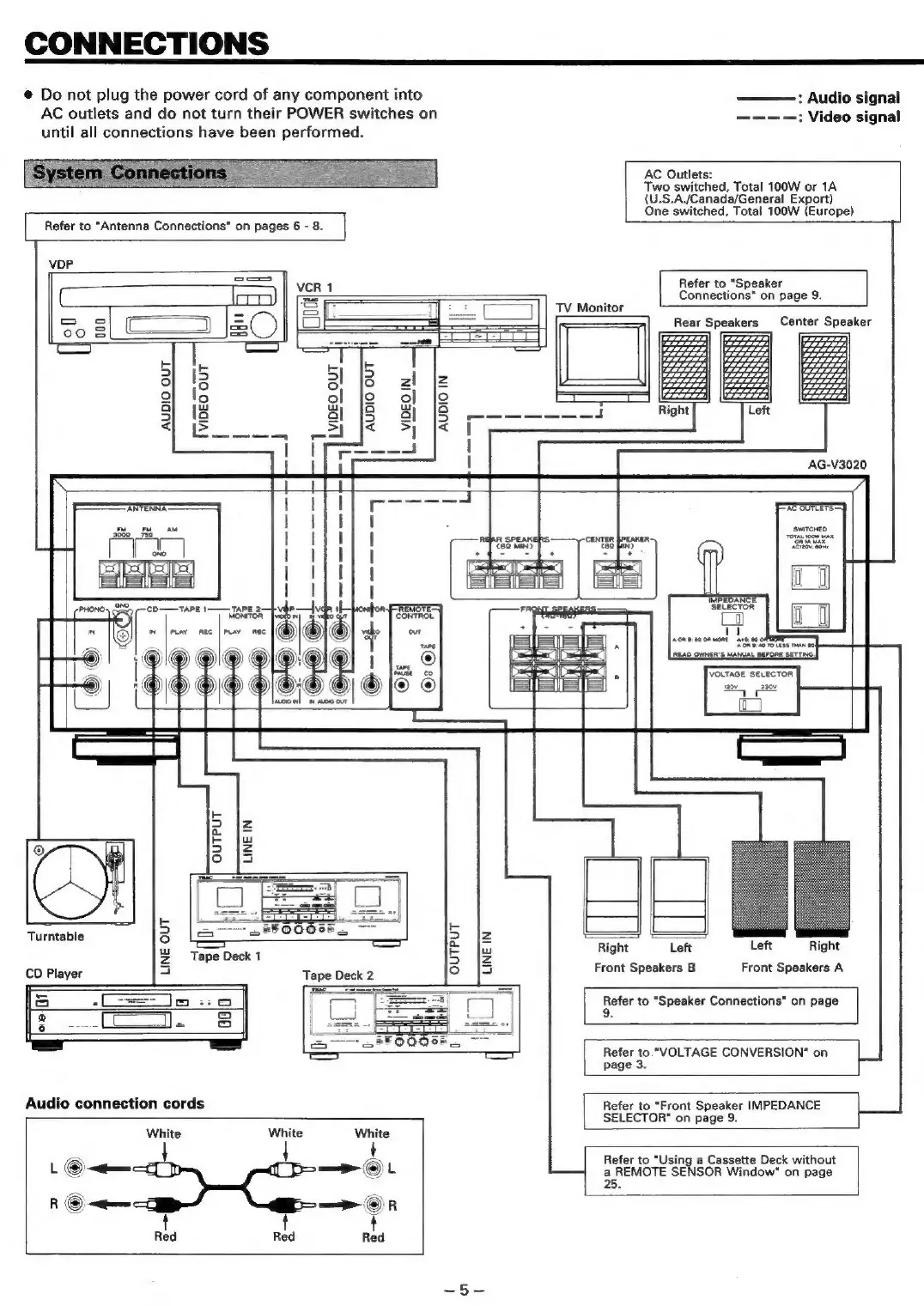
Teac AG-V3020 - Connections; System Connections Overview; Audio Component Wiring; Speaker Setup and Impedance

Teac AG-V3020
55 pages
Print Icon
To Next Page IconTo Next Page
To Previous Page IconTo Previous Page
Loading...
CONNECTIONS
@
Do
not
plug
the
power
cord
of
any
component
into
AC
outlets
and
do
not
turn
their
POWER
switches
on
until
all
connections
have
been
performed.
Refer
to
“Antenna
Connections”
on
pages
6
-
8.
|
—_]
TV
Monitor
:
Audio
signal
———-—:
Video
signal
AC
Outlets:
Two
switched,
Total
100W
or
1A
(U.S.A./Canada/General
Export)
One
switched,
Total
100W
(Europe)
Refer
to
“Speaker
Connections"
on
page
9.
Rear
Speakers
Center
Speaker
VDP
C
Io)|
Se
=
SS
aes]
50
§_C—
120
|
= b
2
i=}
fo)
12
2
g
lo
Q
:
S}
la
yy
—————
ae
|
=}os
=<
|
a
1
AG-V3020
‘ANTENNA:
eo
A
wnTorED
center
preanen
eta
es
fad
ae
PHONO’
CO——TAPE
1
TAPE
2.
MONITOR
~
1B)”
pray
nec
|
ts
OUTPUT
LINE
IN
IMPEOANCE™
SELECTOR
ACR
B90
0R
ome
As0.
00
READ
OWNER'S
MANUAL
BEFORE
SETTING.
=
ay
]
Right
Left
Left
Right
Front
Speakers
B
Front
Speakers
A
9
i
5
kb
Turntable
ro}
2
|Z
%
Tape
Deck
1
5
Fd
CD
Player
a
Tape
Deck
2
f=]
io
So
4
oa
Audio
connection
cords
White
White
L
©
~<qemm
R
©
jem
t t
Red
Red
Refer
to
“Speaker
Connections"
on
page
9.
Refer
to.
"VOLTAGE
CONVERSION"
on
page
3.
Refer
to
“Front
Speaker
IMPEDANCE
SELECTOR"
on
page
9.
Refer
to
“Using
a
Cassette
Deck
without
a
REMOTE
SENSOR
Window"
on
page
25.

Table of Contents

Related product manuals