Configuring the CD-RW Drive
TEAC CD-RW Drive User’s Manual 7
Chapter 2. Configuring and Installing the CD-RW Drive
This chapter explains how to configure and install the TEAC CD-RW drive in
your computer.
Configuring the CD-RW Drive
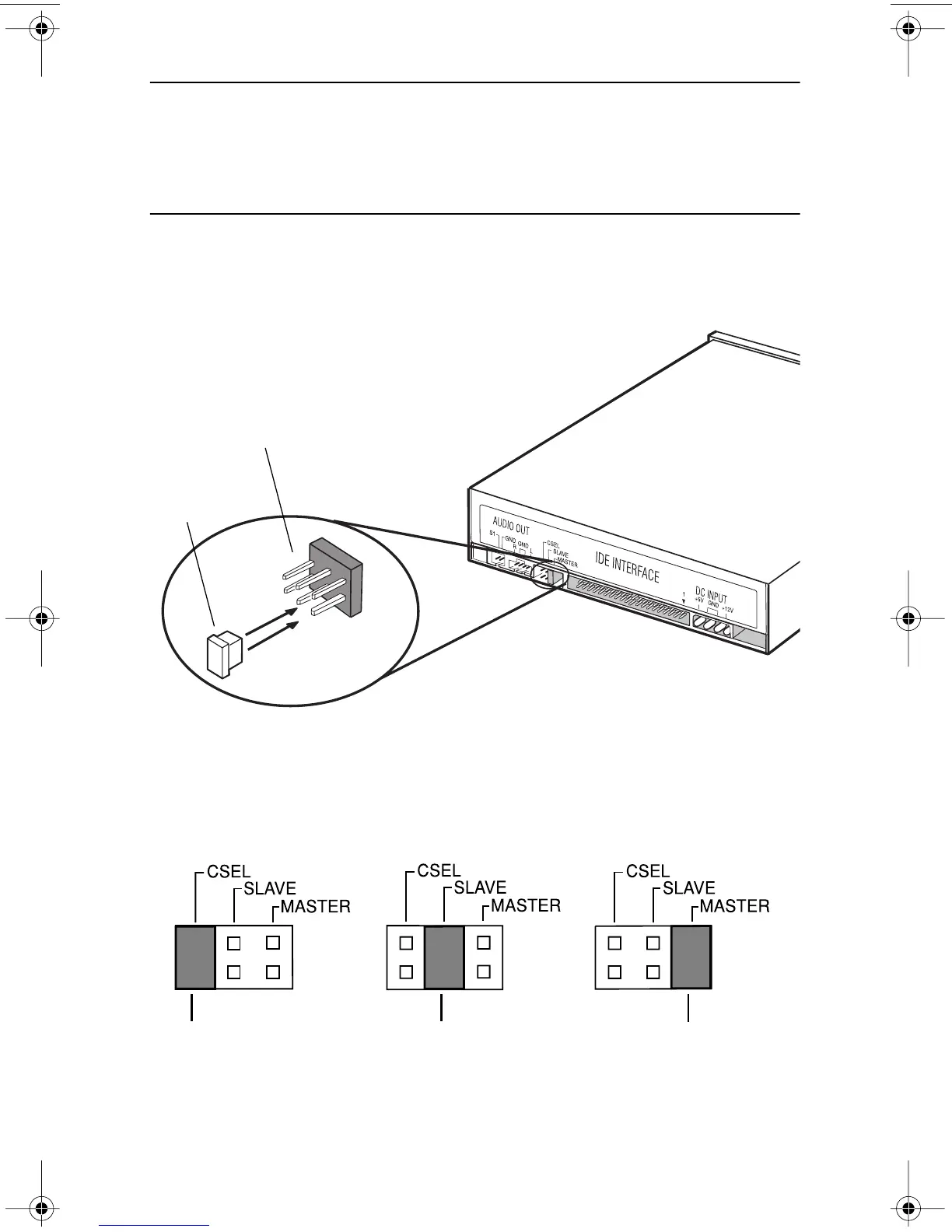
The CD-RW drive features three pairs of jumper pins on the rear panel. By placing
the jumper on the appropriate pair of pins, you can set the drive to Master, Slave,
or CSEL mode (see Figures 4 and 5).
Figure 4. Jumper Pins on Rear Panel
The Master/Slave/CSEL jumper configuration of your TEAC CD-RW drive will
depend on whether or not you have an IDE CD-ROM/DVD drive installed in your
system. The following section will guide you through most typical system
configurations.
Figure 5. CSEL, Slave, and Master Jumper Pin Settings
jumper
jumper pins
jumper jumper jumper
set to CSEL set to Slave set to Master
(default)
TEAC52x24x52.book Page 7 Thursday, December 19, 2002 3:29 PM



 To Next Page