About the Help Files (help button)
22 TEAC CD-RW Drive User’s Manual
About the Help Files (help button)
This document explains the basic operations of Easy CD Creator 5.3x. To learn
more, refer to the extensive on-line Help system.
Before you install the program, you can access the Quick Start Guide in the
Help_pdf\Enu\Quickref.pdf on the CD-ROM.
After you install the program, you can more easily access the Help system by
clicking the Help menu in the selected program.
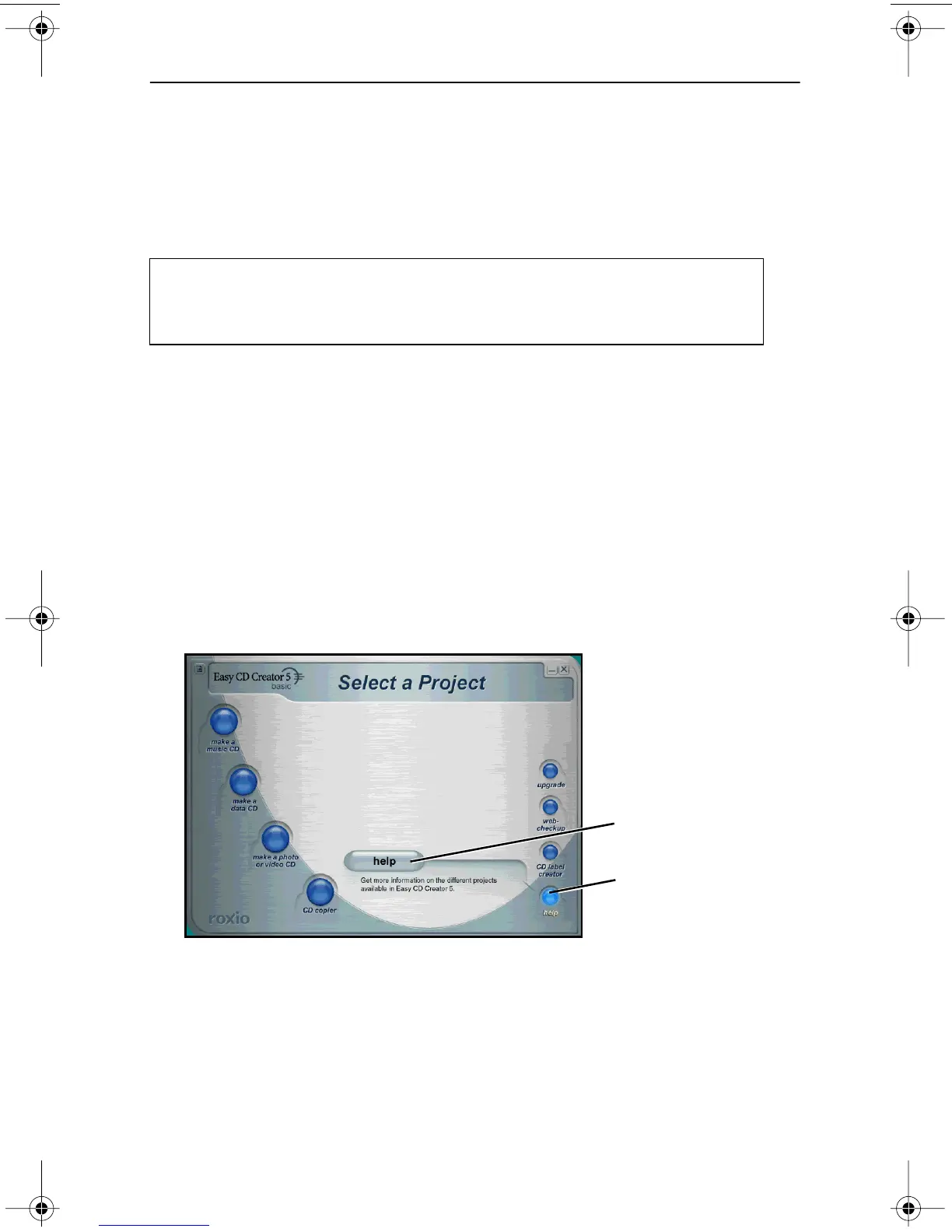
The Select a Project panel (Figure 22 on page 22) features a Help button that links
to additional information about Easy CD Creator.
To access on-line help:
1. On the Select a Project panel (Figure 22 on page 22), position the cursor
over the help rollover button in the lower right corner.
The system displays the help button and a brief description of the on-line
help.
Figure 22. Select a Project Panel: Help Button
2. Click the help button.
The system displays the Help Topics panel.
3. Click a topic in the left column of the Help Topics panel to expand the
topic list. Click an item to display detailed information in the right col-
umn.
You need Adobe Acrobat Reader to view the document. The Reader is
available as a free download from the following URL:
http://www.adobe.com/prodindex/acrobat/readstep.html
help button
help rollover button
TEAC52x24x52.book Page 22 Thursday, December 19, 2002 3:29 PM



 To Next Page