36
ENGLISH
Listening to the Radio
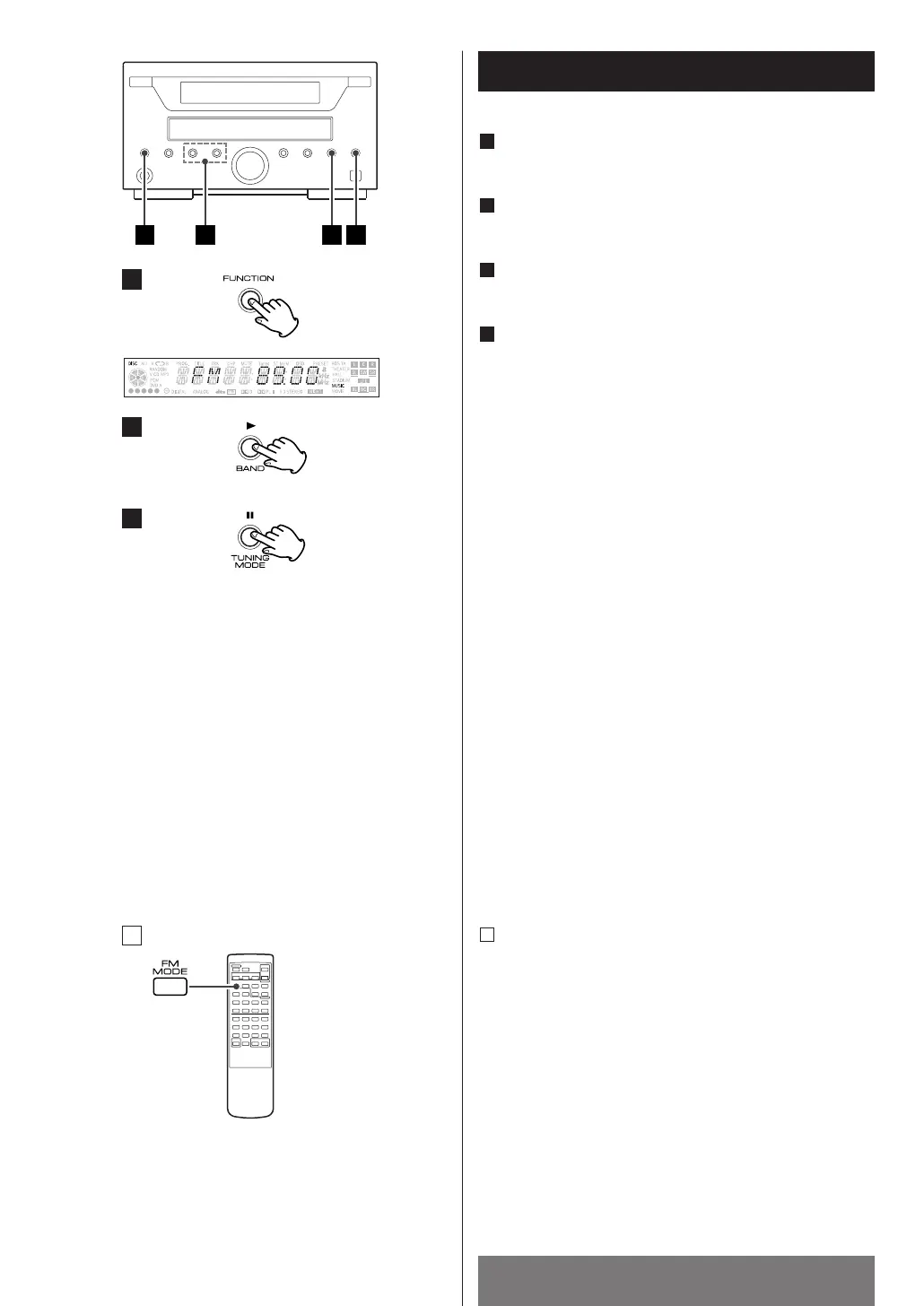
Press the FUNCTION button to select "TUNER".
Press the BAND button to select FM or AM.
Press the TUNING MODE button.
(MANUAL MODE)
Select the station you want to listen to (auto
selection).
Hold down the TUNING button within 0.5 to 2 seconds.
When a station is tuned in, the tuning process will stop
automatically.
Press the TUNING button to stop the auto selection.
4
3
2
1
< Selecting stations which cannot be tuned
automatically (manual selection)
Press the TUNING button repeatedly or hold down it,
and release it when the station you want to listen to is
found.
When the TUNING button is pressed momentarily (0.5
second or less), the frequency changes by a fixed step
(see STEPS below).
FM : 50 kHz steps
AM : 9 kHz steps
<
“STEREO” is displayed when a stereo broadcast is
tuned in.
<
“TUNED” is displayed when a broadcast is correctly
tuned in.
FM MODE Button
Pressing this button alternates between Stereo mode
and Mono mode.
Stereo
FM stereo broadcasts are received in stereo and the
STEREO indicator lights in the display.
Mono
To compensate for weak FM stereo reception, select
this mode. Reception will now be forced monaural,
reducing unwanted noise.
A


 To Next Page