- 6 -
Rear Panel
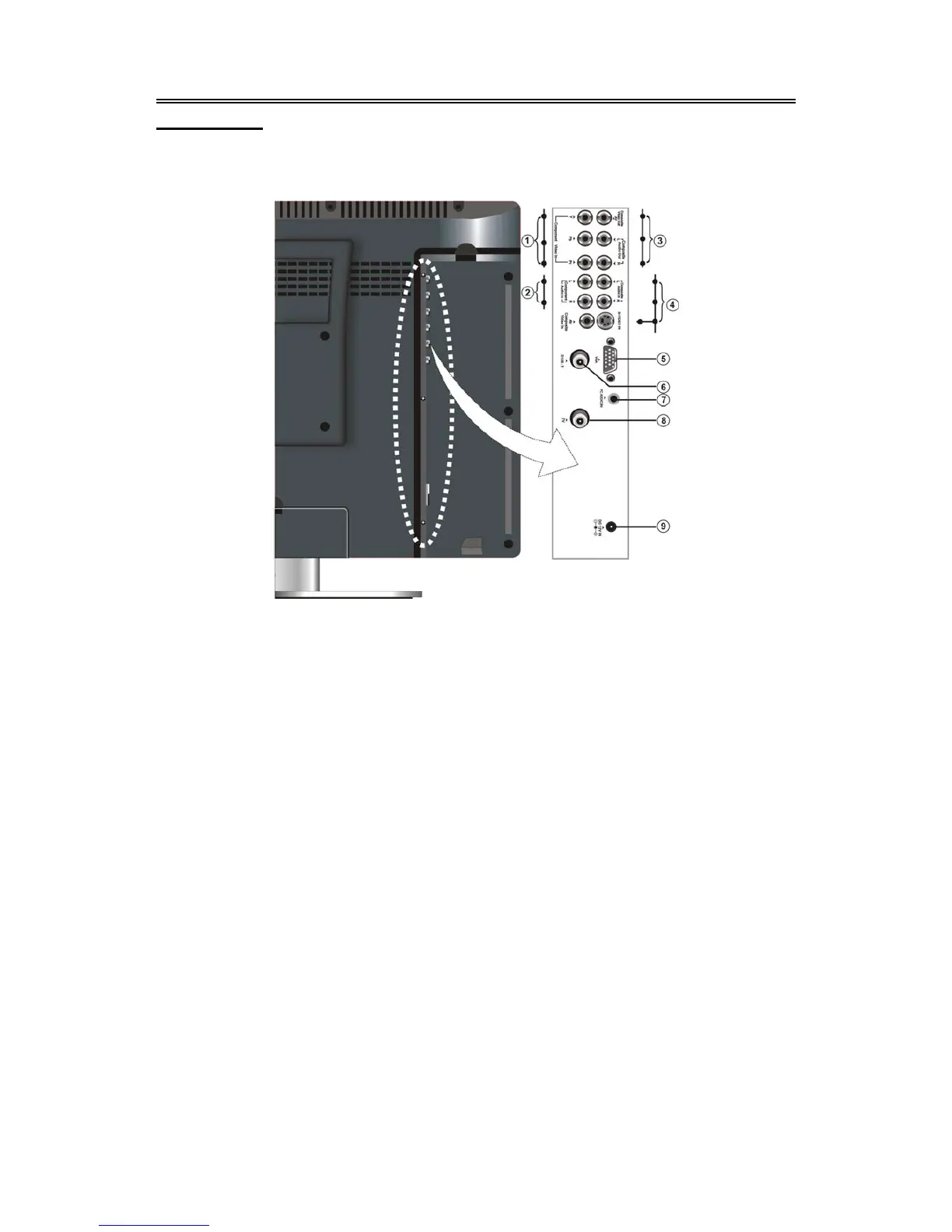
Jack Panel
Open the back cover on the right side of the unit’s rear panel, and you will see all jacks, as shown
below:
1. Y/Pb/Pr Input Jack
Connect the Y/Pb/Pr input in
COMPONENT mode.
2. Y/Pb/Pr L/R Audio Input Jack
Connect the L/R signal source in
COMPONENT mode.
3. Composite Audio/Video Output Jack
Output the Audio/Video signals in the
Composite mode.
4. L/R Audio Input Jacks (for COMPOSITE
and S-VIDEO)
Connect L/R audio signal source in
Composite or S-VIDEO mode.
5. VGA Input Jack
Connect VGA signal source.
6. DVB-T Input Jack
Input the DVB signal in the DVB mode.
7. PC AUDIO Input Jack
Connect VGA audio signal source.
8. TV Signal Input Jack
Connect TV aerial.
9. DC 12V Input Jack
Connect supplied adaptor.



 To Next Page