- 17 -
TV Function
NOTE: In other mode, you can refer to the following instructions in TV mode to go on with
some settings.
Preparations
1. After connection, press the POWER button to turn on the power. (If it is turned on, the power
indicator is blue.)
2. Press the SOURCE button to shift to TV mode. You can go on with the following operations:
Image Setting
Note: This item is only available when there is
signal input.
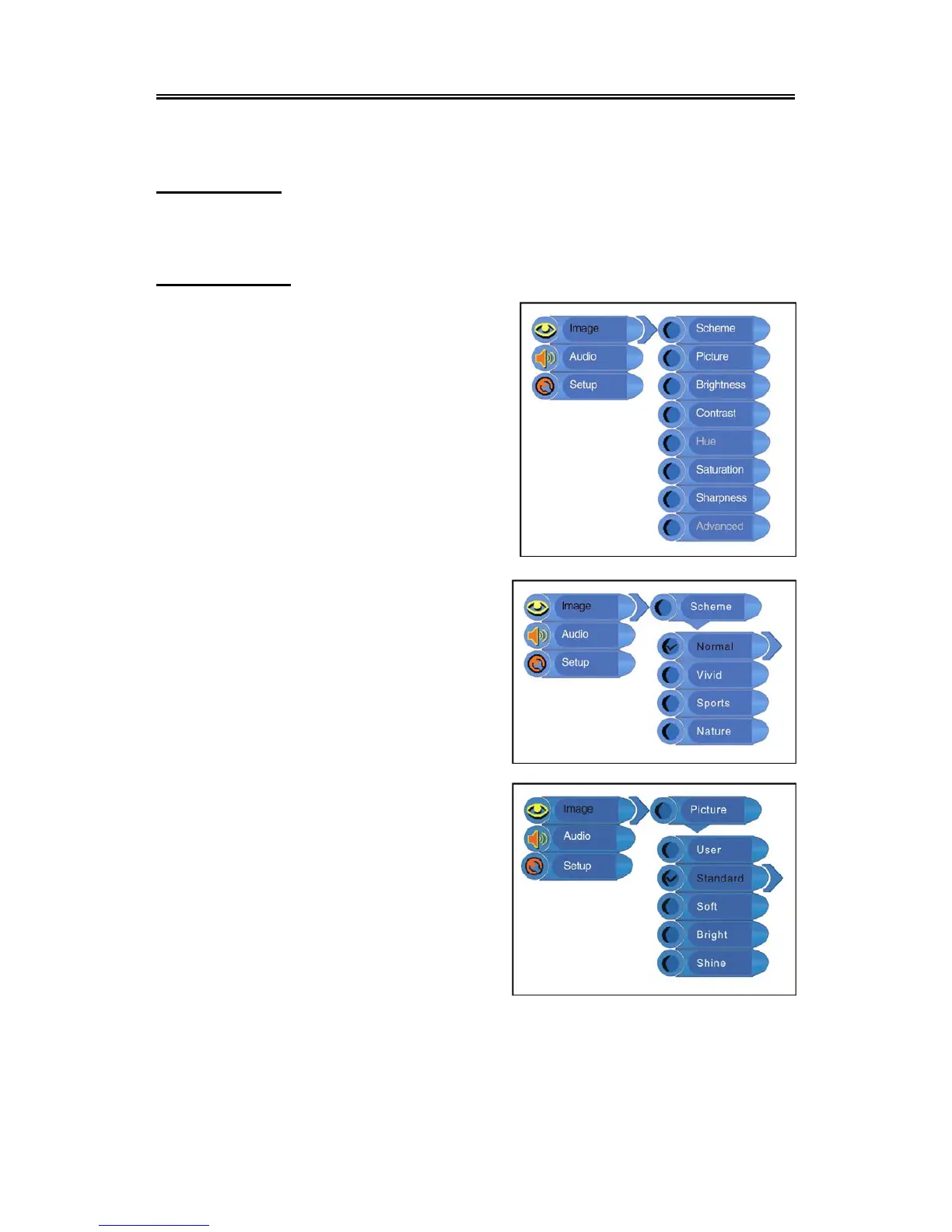
Press the MENU button once to enter the setup menu.
Press the ▲▼ button to select Image and press the
ENTER button to enter the menu shown on the right.
In the Image setup menu, press the ▲▼ button to
select the desired item. Press the EXIT button to exit
the menu.
Scheme Setup
Press the ▲▼ button to select Scheme and press
the ENTER button to enter. Press the ▲▼ button to
select the desired item and press the ENTER button
to confirm your selection. Press the MENU button to
return to the previous menu.
Picture Setup
Press the ▲▼ button to select Picture and press the
ENTER button to enter. Press the ▲▼ button to
select the desired item and press the ENTER button
to confirm your selection. Press the MENU button to
return to the previous menu.



 To Next Page