- 10 -
Remote Control
For DVB Operation
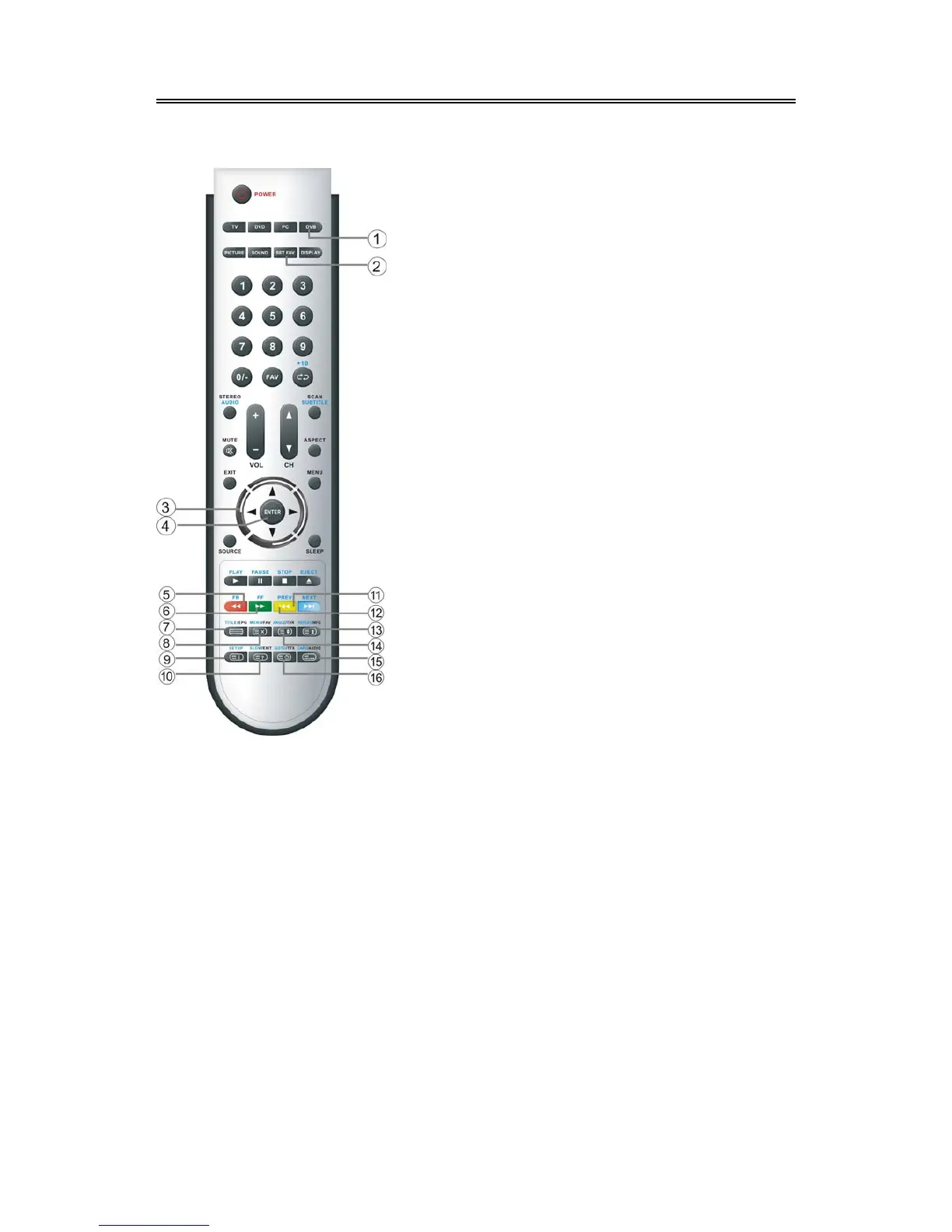
1. DVB button
Press to shift to DVB mode.
2. SET FAV button
Press to set the current channel as the
favorite channel.
3. Direction buttons (▲▼◄►)
In the setup menu, press the ▲▼ button to
select a desired item and press the ◄►
button to adjust or set.
4. ENTER button
Press to confirm your selection.
5. FB(RED) button
In DVB mode, press the button to select
the red page.
6. FF(GREEN) button
In DVB mode, press the button to select
the green page.
7. EPG button
Press to display or close EPG(Electronic
Program Guide) in DVB mode.
8. FAV button
Press to shift to the favorite channel.
9. SETUP button
Press to enter or exit setup menu in DVB
mode.
10. EXIT button
Press to exit from the setup menu.
11. NEXT(BLUE)button
In DVB mode, press the button to select
the blue page.
12. PREV(YELLOW) button
In DVB mode, press the button to select
the yellow page.
13. INFO button
Press to display the current mode
information.
14. TVR button
Press to shift channels between TV and
Radio in DVB mode.
15. AUDIO button
Press to select audio language or audio
track in DVB mode.
16. TTX button
Press to display the teletext information in
DVB mode.



 To Next Page