Network Meter Block Installation, Operation, & Maintenance Manual
Monitoring and Configuring the NMB 23
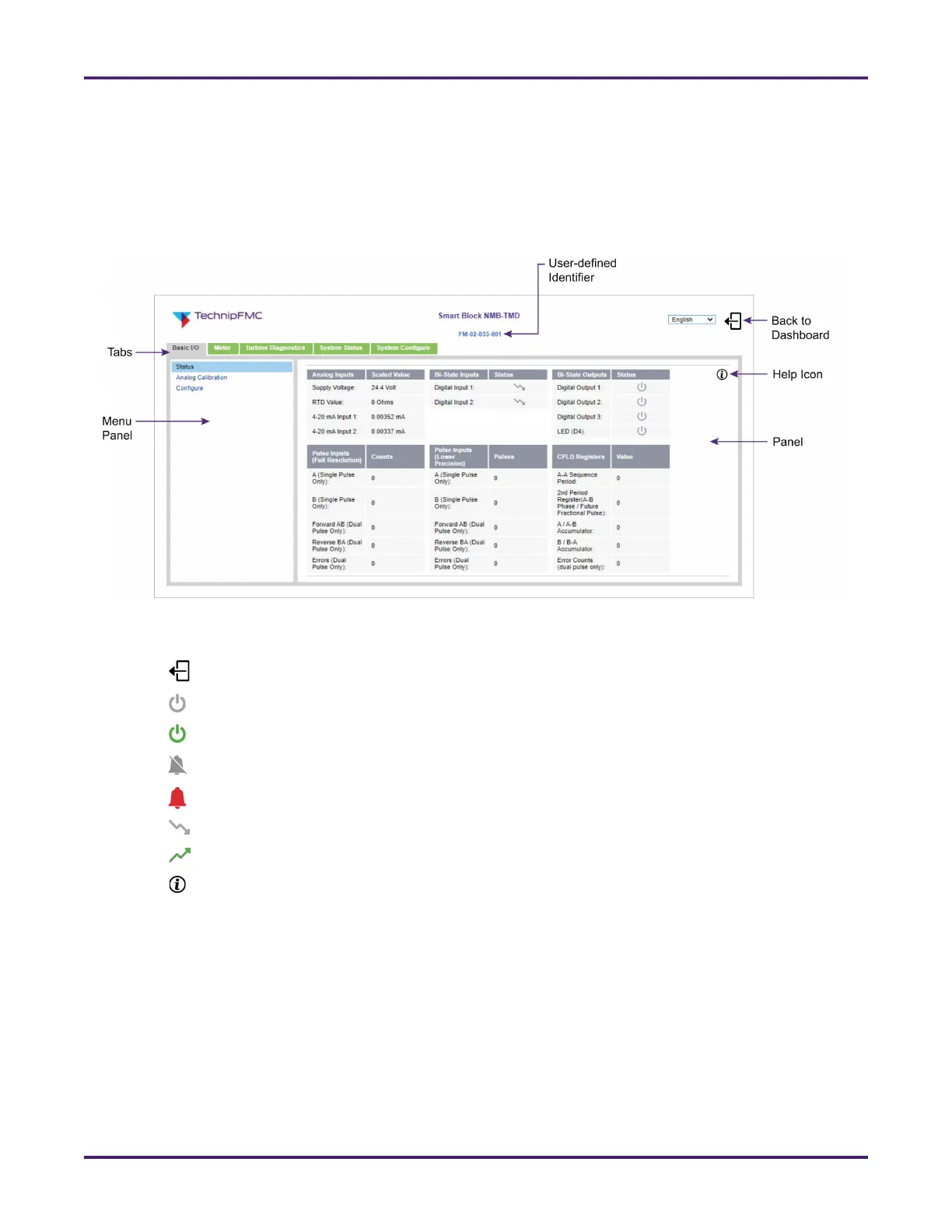
4.3.2 Navigating the Configuration Area
The NMB’s configuration parameters and details are organized into tabs across the top and a menu pane
on the left. When you click a tab and then select a menu option, the fields shown in the pane on the right
change accordingly. Depending on whether you own model NMB or NMB-TMD, the menus available may
change.
Listed below are common icons in the configuration area:
• Takes you back to the dashboard and logs you off of the configuration area
• Indicates the output channel is de-asserted (off)
• Indicates the input or output channel is asserted (on)
• Indicates the alarm is not active
• Indicates the alarm is active
• Indicates the input channel is de-asserted (off)
• Indicates the input channel is asserted (on)
• Opens a pop-up window with field-level information
4.3.3 Configuring Inputs and Outputs
The Basic I/O tab enables you to view and configure I/O details for the NMB, including basic I/Os, analog
calibration settings, MQTT message settings, and event log options.
4.3.3.1 Viewing I/O Statuses
To view the statuses of the NMB’s I/Os, values of pulse inputs, and additional details select the Basic I/O
tab > Status menu.
Figure 17: Configuration Area










 To Next Page