CAL appears on the display.
WARNING: DO NOT ROTATE THE BELT WHILE CALIBRATING THE BRAKE TABLE.
It is forbidden to make the calibration while the treadmill belt is moving because the Skillmill brake
opens during movement, and this will lead to an incorrect calibration.
• Position the lever on the lowest braking (lever towards the rear of the equipment).
• Presstheheartbuon,theeortlevelindicating“0”willashforafewmomentsandthenchange
to “1”.
• Move the lever forward (one click).
• Presstheheartbuon,theeortlevelindicating“1”willashforafewmomentsandthenchange
to “2”.
• Proceed to level 10.
• Attheendoftheprocedure,ENDwillappearandashforafewmoments.
versions: for details about the procedure to be followed if calibration errors are detected,
refer to paragraph “6.7.3.1 what to do if a calibration error appears”.
• Disconnectthecableconnectingtheconsole-PC/powerbankfromtheconsoleMINIUSBsocket;
• Reconnect the external power supply (Connect version).
6.7.3 AUTOMATIC CORRECT CALIBRATION CHECK
FromtheSWversionSKILLMILLCONNECT:HighKit:BA01.49-wi-:CA01.16;SKILLMILL
CONSOLE:HighKit:BA01.49,afunctionhas been addedat SWleveltoensureacheckof the
correctcalibration.Thislteravoidsanymacrocalibrationerrors.
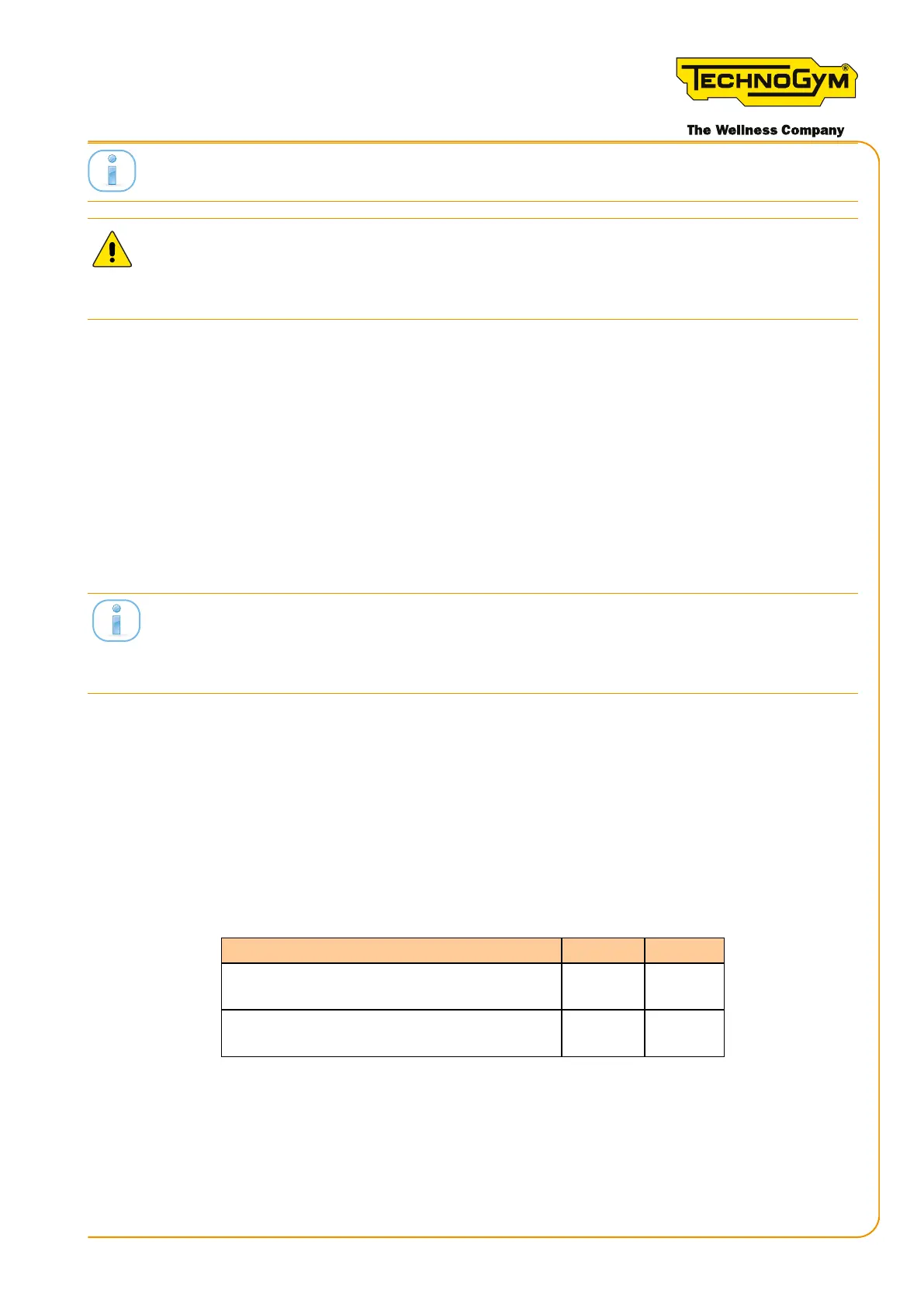
Specically,ifthefollowingcriteriaarenotrespected:
CALIBRATION RESULTS MIN MAX
DIFFERENCE BETWEEN TWO
ADJACENT LEVELS
100 220
DIFFERENCE BETWEEN EFFORT
LEVEL10ANDEFFORTLEVEL0
1500 2100
Table 60
the error message (Err) appears on the display for 5 seconds, showing the detected error.
Skillmill:
Technical Service Guide - Rev. 3.5
Page91email: support@technogym.com












 To Next Page