User Manual
9
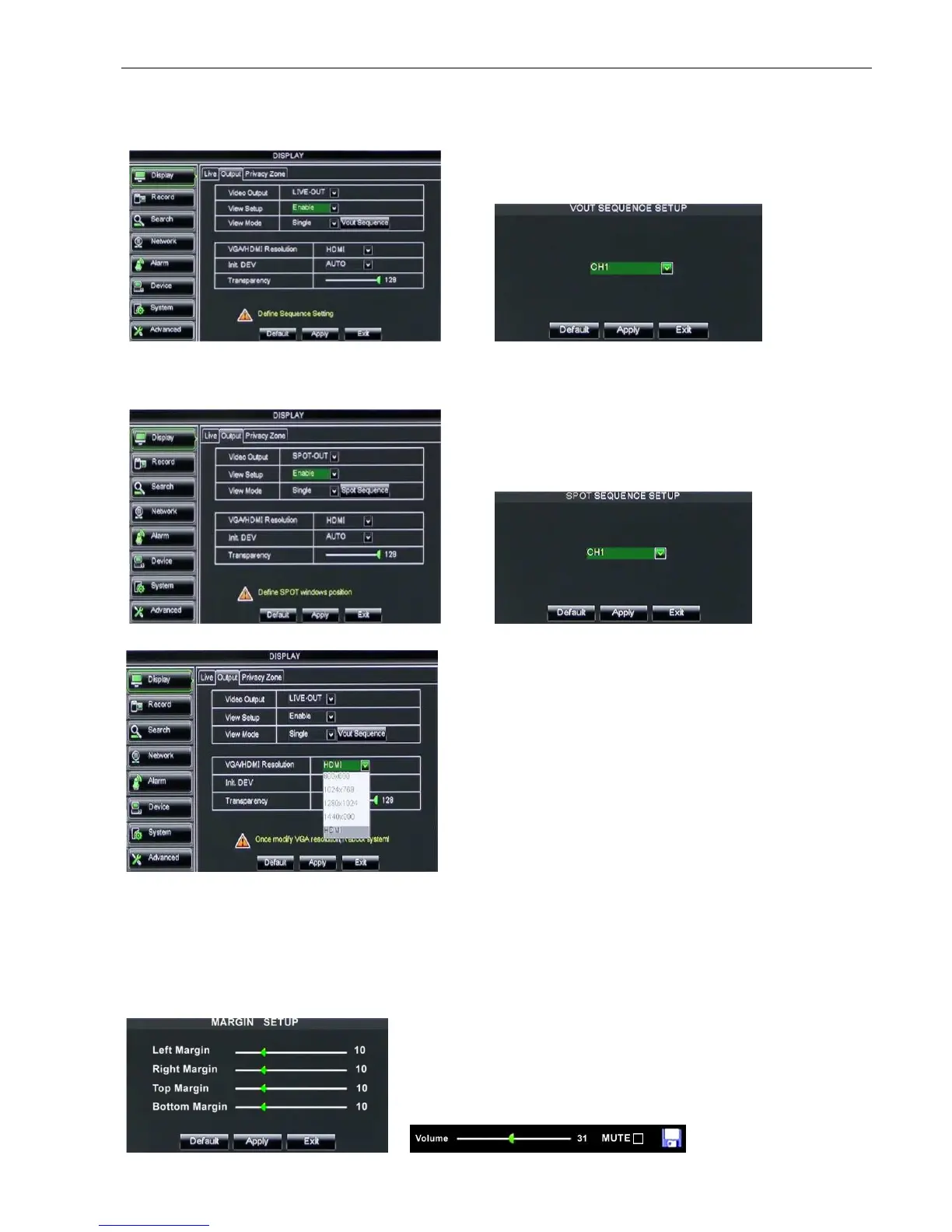
Display Mode: Live output: display window will include Single, Quad, 9-split and 16-split mode;
Spot output: display window will include Single, Quad and 9-split mode.
Transparency: allow you adjust menu’s transparency, and its range is 1~128.
Margin: allow you adjust the whole screen’s margin. Details operations please refer to the Picture 5-10.
Volume: allow you adjust the DVR volume shown as Picture 5-11.
Picture 5-5
Go to [Main menuDisplayOutput]
to enter into the output set interface
shown as Picture 5-5.
Click [Live] to pop up the interface
shown as Picture 5-6. Now you could
perform channel sequence setting.
Click [Spot output] option and set
relative parameters shown as Picture
Click [Spot sequence] to enter into the
interface shown as Picture 5-8.
Picture 5-7
Picture 5-8
Video output: Support CVBS output Live and Spot
mode simultaneously, and Live is main output, and
Spot is auxiliary output.
CH Sequence: the option is defaulted to “Off” and
sequence time is 5 second. User can activate the
option as per request.
Rotate time: allow you set sequence time, and
minimum time can be set to 3 seconds.
VGA/HDMI Resolution: allow you select VGA or
HDMI output, including 800x600, 1024x768,
1280x1024, 1440x900 and HDMI.
Picture 5-9
Picture 5-10 Picture 5-11



 To Next Page