User Manual
3
2.2
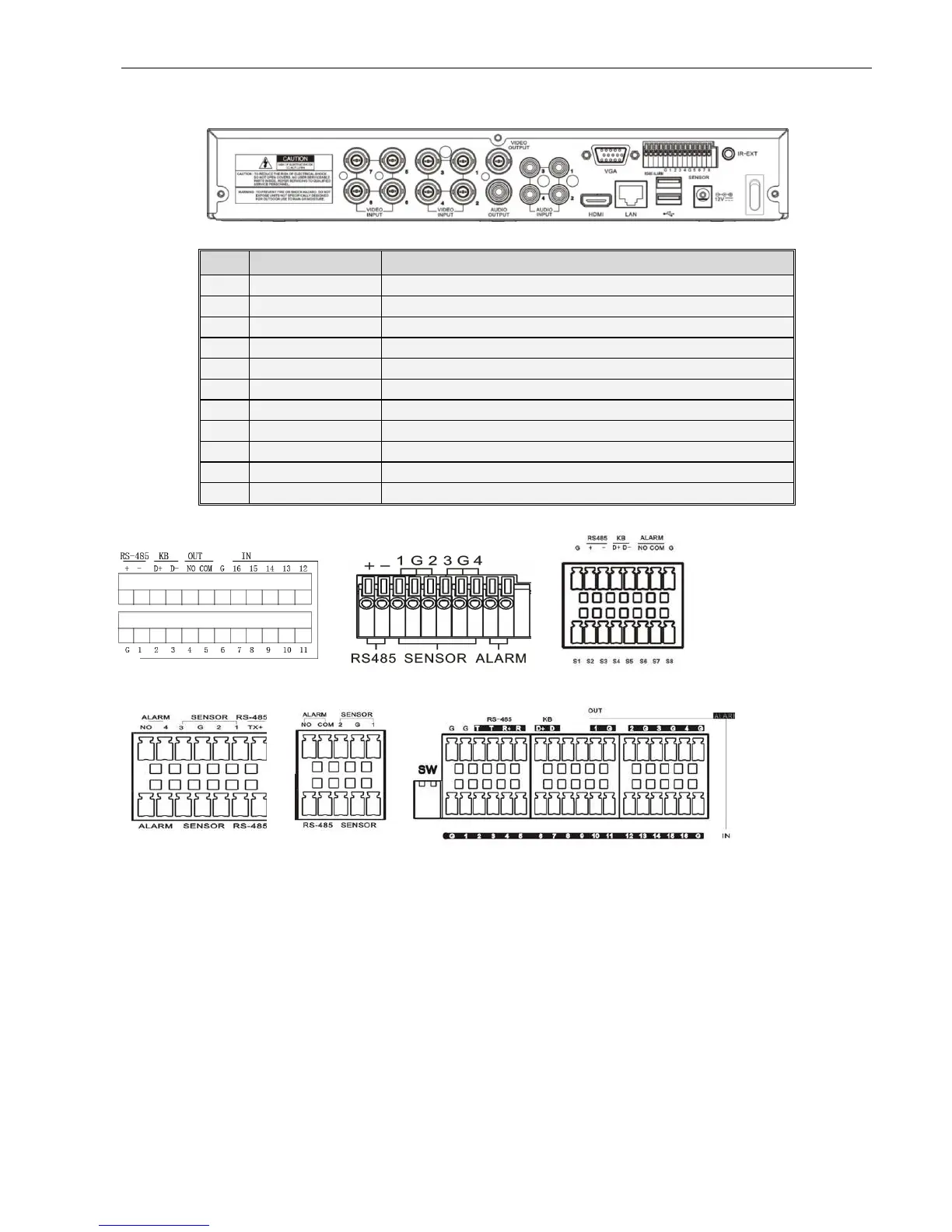
8CH (1U) DVR Rear Panel
Rear Panel
RS485/Sensor/Alarm port functions:
Alarm input: Connect [-] port of your sensor to G (GND) pin, and [+] port to channel input according to the
alarm device you purchased.
Alarm output: Connect to the two ports marked with “out”
PTZ Port:
::
:Connect your camera to RS-485A and RS485B accordingly.
Item
Physical port Connection method
Video input
Connect CH1-4 (Virtual) video input device(BNC interface)
Video output Connect monitor output(BNC interface)
Audio Input 4CH audio input (RCA interface);
Audio Output Audio output (RCA interface);
USB Port Connect USB device (Flash Drive, Hard Drive and Recorder etc)
USB Port Connect USB mouse
VGA Port Connect to VGA monitor, such as PC monitor (Optional)
RS-485/Sensor/Ala RS485/Sensor/Alarm interface (see pin outs below)
Power Port Connect power supply - DC12V 3A
Ethernet: Port Connect LAN, Ethernet (RJ45 interface)
Power Switch Turn Power on and off



 To Next Page