User Manual
19
5.2.4.5 Mobile Set
The DVR is currently compatible with mobile phones running Andriod, Windows Mobile, Symbian operating
systems, Iphone and Black berry on 3G networks.
Please note that the server port could not duplicate the port you have set to network set.
5.2.4.6 DDNS Set
Click [Apply] button and restart the DVR; and then enter the domain name (such as:
http://superdvr.3322.org:8080) to visit your remote DVR.
5.2.5 Alarm
5.2.5.1 Motion
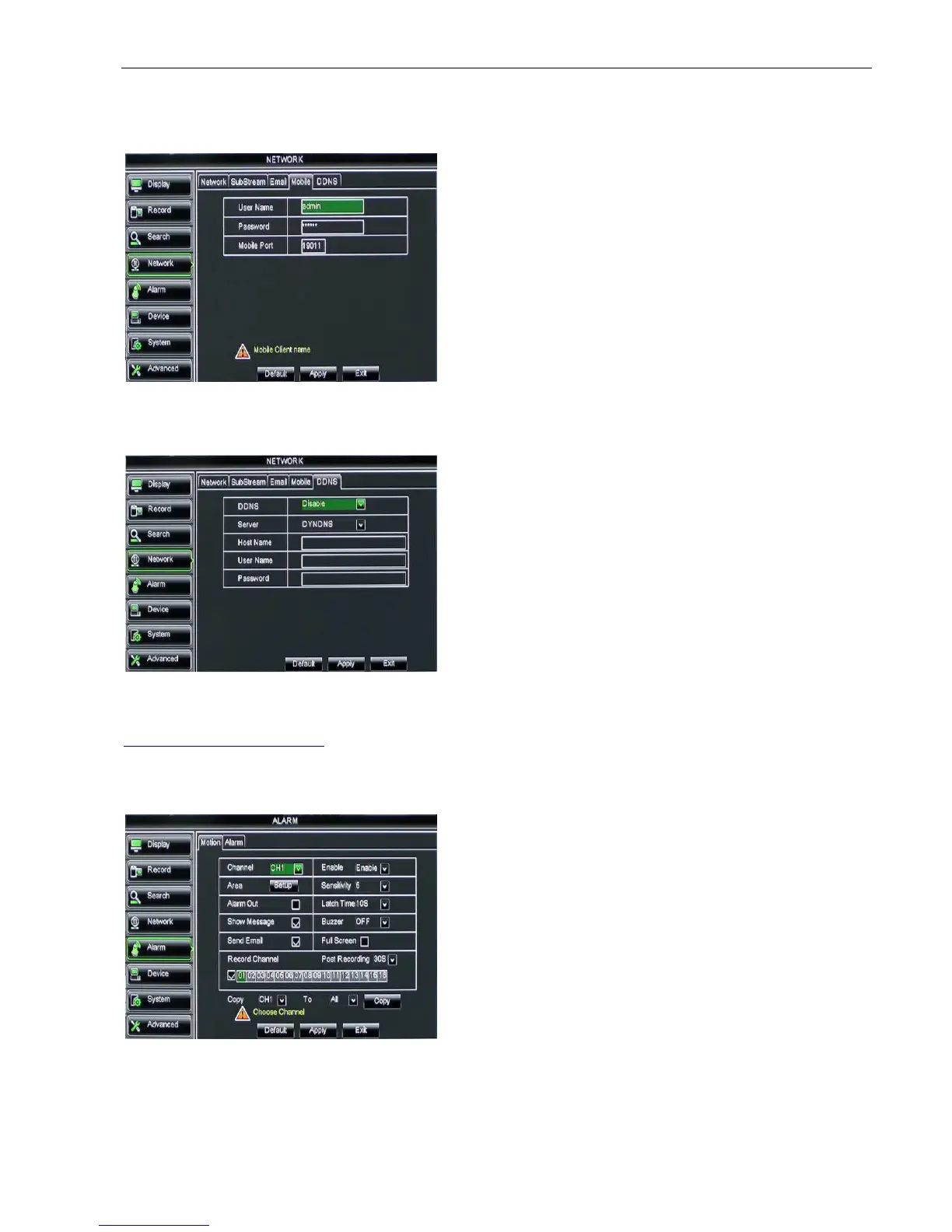
Click [Main menuAlarmMotion] to enter into the interface shown as Picture 5-42.
Click [Main menuNetworkMobile] to enter into the
[Mobile] interface shown as Picture 5-40.
User Name: indicate user name of DVR, and support
numbers and characters and 1~15 bits length
User password: indicate user password of DVR, and also
support numbers and characters and 1~15 bits length
Server port: Mobile monitoring port. Setting range is
between 1024 and 65535.
Server: select DDNS provider
Host name: input the host domain name you
have registered at dynamic domain name
system, such as: DVR2009.3322.org;
User Name: Input a user name registered
before applying for a domain name;
Password: Input a password you set when
registering a user name.
Channel: allow you enable/disable the
motion function for any channel.
Area: Click the [Setup] button to enter
into area setup interface shown as
Picture 5-41.
Sensitivity: allow you to set sensitivity
level of motion detection from higher to
low with 8 being the most sensitive.
Alarm out: allow you connect external
alarm sensor.
Picture 5-42
Picture 5-40



 To Next Page