User Manual
10
5.2.1.3 Privacy Zone
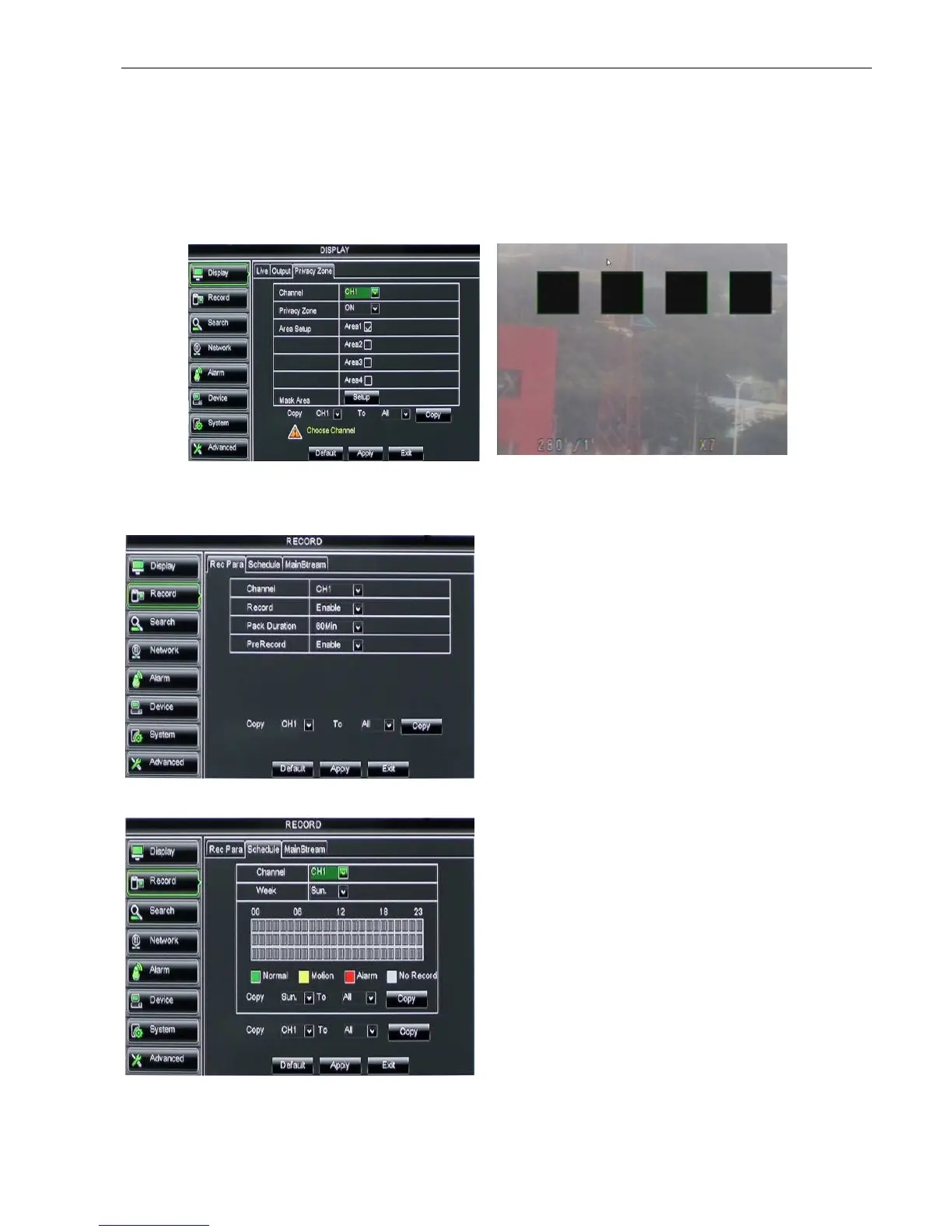
The function Allow you setup privacy zone parameters according to Picture 5-12. Each channel could set
up to four privacy zones, and please follow below steps to set:
1. Select the area no (Area 1 ~ Area 4);
2. Click [Setup] to adjust position of mask area;
3. After finishing position adjust, click right key of mouse to return back [Privacy zone] interface;
4. Click [Apply] to save the above setting.
5.2.2 Record set
5.2.2.1 Record parameters
5.2.2.2 Schedule
Click [Main MenuRecordSchedule] to enter into
the interface shown as Picture 5-15.
[Channel] option allows you select one channel you
desired.
To setup weekly schedules, tick-select the box of the
record status you want (Alarm, General, or No Record)
and then click on each box in the schedule time line that
you want this method to apply to. You can use the [Copy
– To] pull-down menus and Copy button to copy settings
from one day to another day or all days.
Click [Main menuRecordRecord Para] to enter
into the interface shown as Picture 5-14.
Channel: allow you setup the channel you
desired.
Record: allows you set up record status
(Enable/Disable) of each channel
Pack Duration: indicates maximum continuous
record time (15, 30, 45 and 60 min).
Pre-record: Motion detection and I/O triggered
record support Pre-record function.



 To Next Page