4、 System auto restart;
5、
User name and password of mobile is consistent
required when you want to access the DVR connected to the router from outside of the
router’s network. If PPPoE is selected, port forwarding is not required.
Input router’s IP address from IE
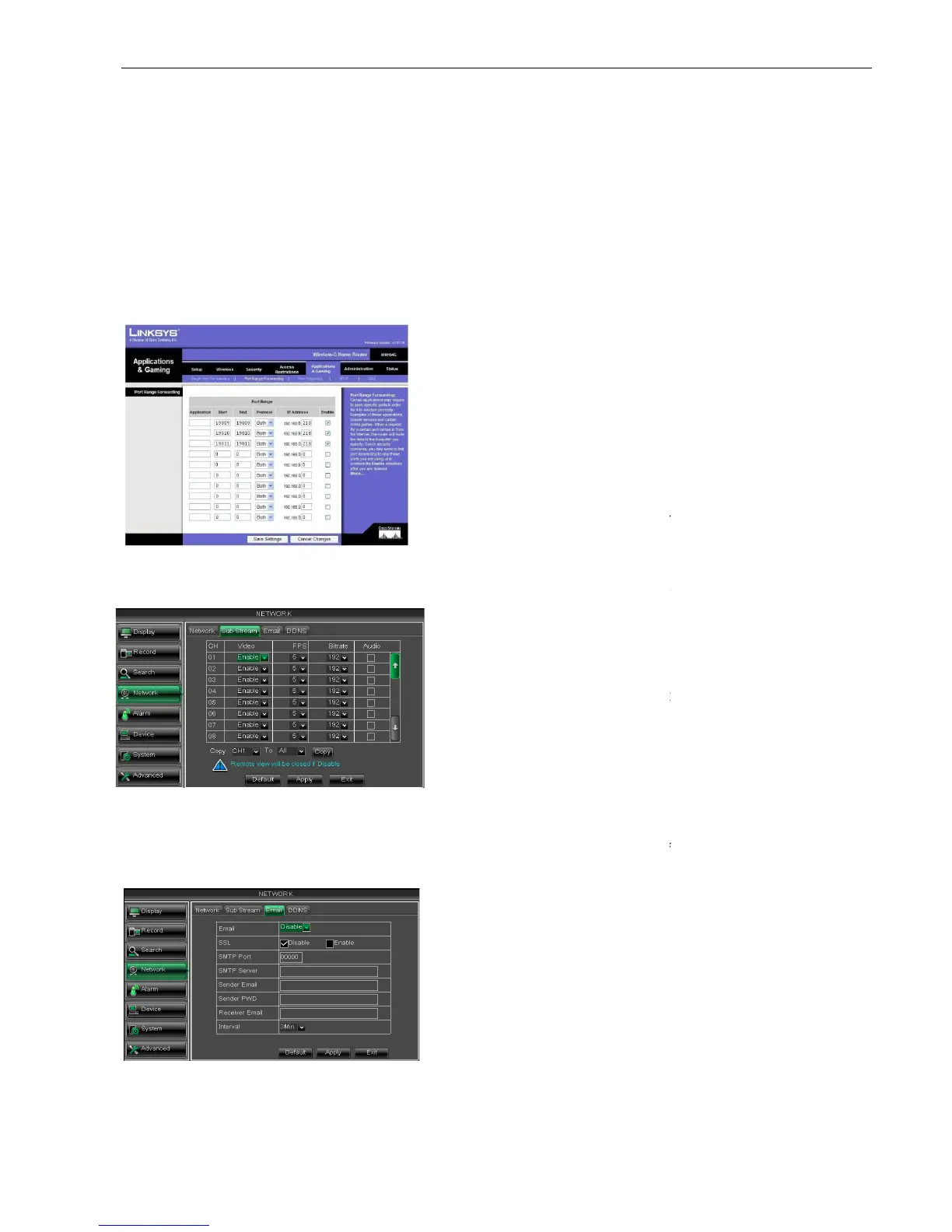
Click [Transmittal rule] option to take you to the port forwarding instructions for your router;
The DVR IP address for the intranet should be <192.168.1.101>, you should forward
Now user can visit the DVR remotely.
5.2.4.4 Sub stream
Go to [Main menu
5.2.4.5 Email set
Click [Main MenuNetwork
SMTP Port: indicate one kind of mail transmittal port opened by Simple Message
(SMTP). The port number for most mails is 25 except such as Gmail server (Port No.: 465).
SMTP server: indicates server address you used.
User name and password of mobile is consistent
required when you want to access the DVR connected to the router from outside of the
router’s network. If PPPoE is selected, port forwarding is not required.
Input router’s IP address from IE
based browser to open the Router configuration
Click [Transmittal rule] option to take you to the port forwarding instructions for your router;
The DVR IP address for the intranet should be <192.168.1.101>, you should forward
) to this IP address respectively.
Now user can visit the DVR remotely.
Sub Stream] to enter into the interface shown
Email] option to enter into the email set
interface shown as Picture 5
SMTP Port: indicate one kind of mail transmittal port opened by Simple Message
(SMTP). The port number for most mails is 25 except such as Gmail server (Port No.: 465).
SMTP server: indicates server address you used.
SSL: is a security link transport protocol. You can
encrypt your communication info (including your email)
using SSL to prevent hackers from
email or communication info and even your password.
Please set SSL to “On” via Gmail.com server, and set
to “Off” via other mail server.
allow you open or close the sub stream output. If
you select “Enable” system will select sub
and guarantee image quality once network is unstable.
allow you set net transmittal frame rate. User
could select the relative value b
allow you set net transmittal bit rate. User could
select the relative value by pull
selecting the option, system will record
video and audio simultaneously.
The router’s port forwarding
interface may be different, however, when entering into
virtual server, user will always
of router to IP address of DVR allocated
or automatically captured, and select [All] or [Both] in
corresponding protocol column and save the above
Above steps may differ from the router device
depending on the manufacturer.
required when you want to access the DVR connected to the router from outside of the
based browser to open the Router configuration
Click [Transmittal rule] option to take you to the port forwarding instructions for your router;
The DVR IP address for the intranet should be <192.168.1.101>, you should forward
Sub Stream] to enter into the interface shown
interface shown as Picture 5
SMTP Port: indicate one kind of mail transmittal port opened by Simple Message
(SMTP). The port number for most mails is 25 except such as Gmail server (Port No.: 465).
SSL: is a security link transport protocol. You can
encrypt your communication info (including your email)
using SSL to prevent hackers from
email or communication info and even your password.
Please set SSL to “On” via Gmail.com server, and set
allow you open or close the sub stream output. If
you select “Enable” system will select sub
and guarantee image quality once network is unstable.
allow you set net transmittal frame rate. User
could select the relative value b
allow you set net transmittal bit rate. User could
select the relative value by pull
selecting the option, system will record
video and audio simultaneously.
The router’s port forwarding
interface may be different, however, when entering into
of router to IP address of DVR allocated
or automatically captured, and select [All] or [Both] in
corresponding protocol column and save the above
Above steps may differ from the router device
depending on the manufacturer.



 To Next Page