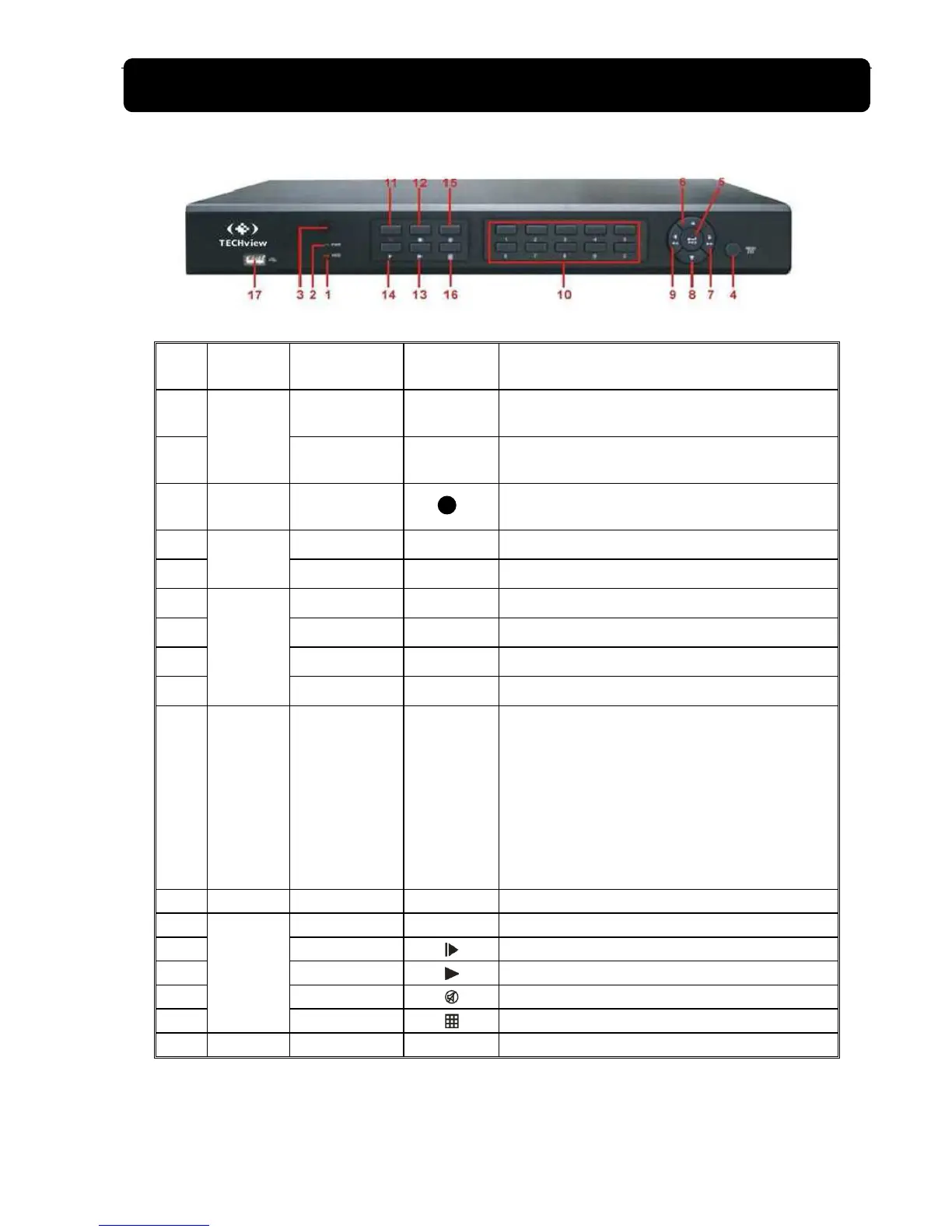
Enter into main menu / Exit
5 PTZ PTZ
Enter into PTZ control, select [Enter] / [Edit] operation
6
Direction
Key
UP
Move up
7 RIGHT /
Move right / FWD
8 DOWN
Move down
9 LEFT /
Move left / RWD
10
Channel
Select &
numeric
input
Single Channel
and numeric key
1. Number 1~9 stand for numeric 1~9 and CH
1~9.
2. CH11-CH16 select method: press firstly
numeric key 1 and then other numeric key.
For example CH16 select firstly press 1,
and then press 6.
3. Holding press key 0 for three seconds may
convert current output device
11 Rec. Manual record ● Press the button to start manual record.
12
Play
Control
Stop
Stop playing and stop manual record
13 By frame
Play frame by frame
14 Play
Convert to play status
15 Mute
Open or close audio input
16 Multi Display
Live display Quad mode, 9-split and 16-split mode
17
USB Port Connect to USB2.0 port



 To Next Page