User Manual
24
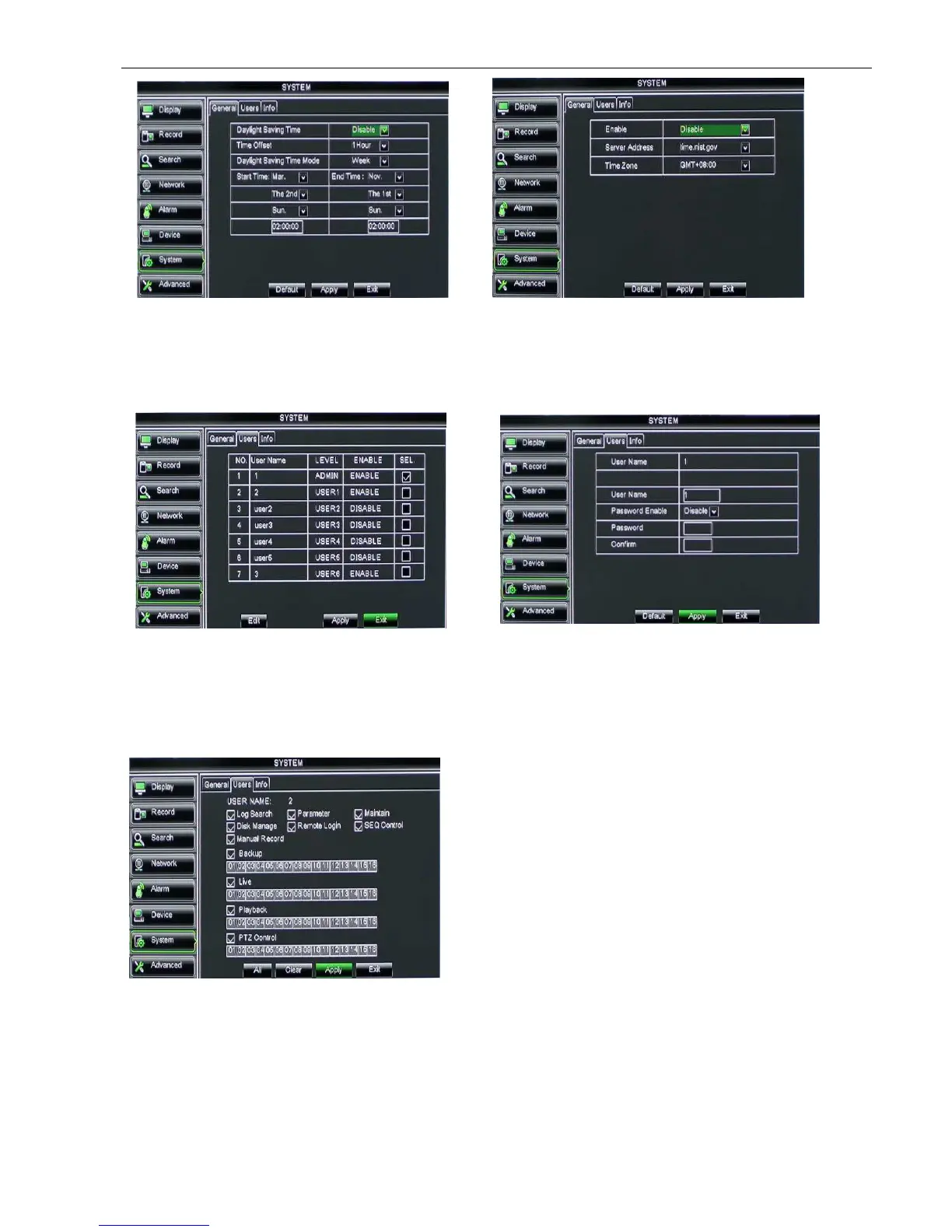
Note: The above [NTP function] change will be available only when system connected to internet. And
When NTP function is set to “Enable”, system will calibrate the time at every 00:07:50 and every start-up.
5.2.7.2 Users
Click [Main MenuSystemusers] option and then enter into the interface shown as Picture 5-51
The model supports up to seven users with one Admin and six users. Click [Edit] button to enter into the [User
Edit] interface shown as Picture 5-53. And input user name and password.
Select one <common user> and click <Apply>, and then enter into <Authority set> interface shown as
Picture 5-54. [Admin] is authorized to set common user’s authority.
Live: Tick-select the option and the user is allowed to view all the live images for all the channels.
Playback: Tick-select the option and the user is allowed to playback the record you selected.
PTZ control: Tick-select the option and the user is allowed to perform the PTZ operation for the selected
channel.
Picture 5-52
Picture 5-53
Log Search: allow you check all the system logs.
Parameter: allow you set all the parameters.
Maintain: allow you update version, recover
ex-factory value, device reboot and shut down.
Disk Manage: allow you manage and control the
HDDs.
Remote Login: allow you remote login DVR.
Rotate Control: allow you sequence live screens for
all the channels.
Manual record: allow you manually start/stop
record.
Backup: Tick-select the option, the user is allowed to
backup the record of all the channels.
Picture 5-54



 To Next Page