EasyManua.ls Logo

Tectrix Climbmax 150 - Test Mode; System Diagnostic Procedures

Tectrix Climbmax 150
60 pages
Print Icon
To Next Page IconTo Next Page
To Previous Page IconTo Previous Page
Loading...
3.
TEST
MODE
Test
Mode
is
used
to
test
the
climber's
electronic
hardware.
You
enter
Test
Mode
by
holding
the
ENTER
key
down
while
turning
the
ClimbMaJlon.
All
the
displays
light
up
as
long
as
you
hold
the
key
down.
When
you
release
the
key,
the
readouts
show
the
version
number
of
the
microprocessor
software
and
the
state
of
the
slack
switch
(SLACK
or
TIGHT).
The
Interval
and
speedometer
displays
show
moving
patterns.
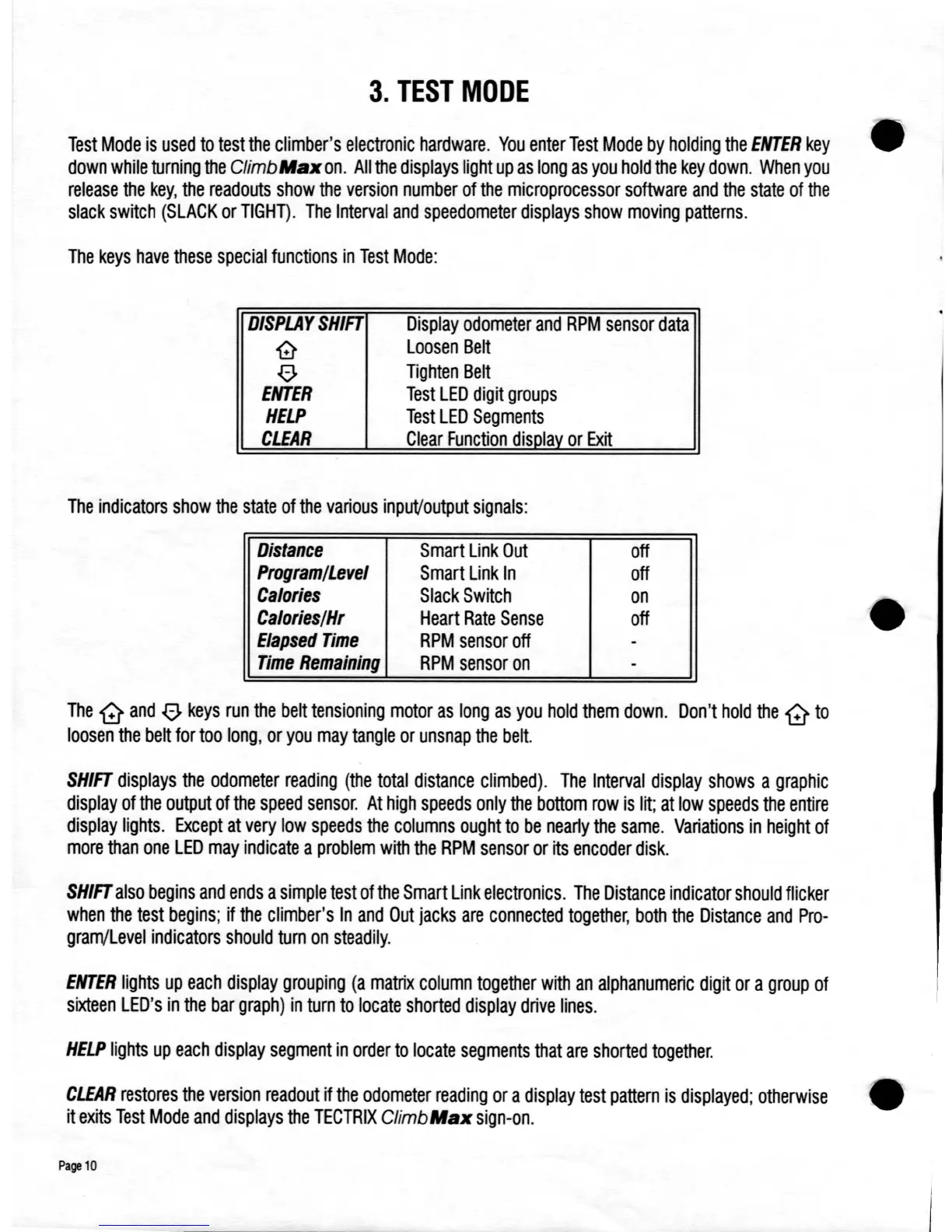
The
keys
have
these
special
functions
in
Test
Mode:
DISPLAY
SHIFT
'0
00
ENTER
HELP
CLEAR
Display
odometer
and
RPM
sensor
data
Loosen
Belt
Tighten
Belt
Test
LED
digit
groups
Test
LED
Segments
Clear
Function
disolav
or
Exit
The
indicators
show
the
state
of
the
various
inpuVoutput
signals:
Distance
Smart
Link
Out
off
Program/Level
Smart
Link
In
off
Calories
Slack
Switch
on
Calories/Hr
Heart
Rate
Sense
off
Elapsed
Time
RPM
sensor
off
-
Time
Remaining
RPM
sensor
on
-
The
G
and
00
keys
run
the
belt
tensioning
motor
as
long
as
you
hold
them
down.
Don't
hold
the
G
to
loosen
the
belt
for
too
long,
or
you
may
tangle
or
unsnap
the
belt.
SHIFT
displays
the
odometer
reading
(the
total
distance
climbed).
The
Interval
display
shows
a
graphic
display
of
the
output
of
the
speed
sensor.
At
high
speeds
only
the
bottom
row
is
lit;
at
low
speeds
the
entire
display
lights.
Except
at
very
low
speeds
the
columns
ought
to
be
nearly
the
same.
Variations
in
height
of
more
than
one
LED
may
indicate
a
problem
with
the
RPM
sensor
or
its
encoder
disk.
SHIFT
also
begins
and
ends
a
simple
test
of
the
Smart
Link
electronics.
The
Distance
indicator
should
flicker
when
the
test
begins;
if
the
climber's
In
and
Out
jacks
are
connected
together,
both
the
Distance
and
Pro-
gram/Level
indicators
should
turn
on
steadily.
ENTER
lights
up
each
display
grouping
(a
matrix
column
together
with
an
alphanumeric
digit
or
a
group
of
sixteen
LED's
in
the
bar
graph)
in
turn
to
locate
shorted
display
drive
lines.
HELP
lights
up
each
display
segment
in
order
to
locate
segments
that
are
shorted
together.
CLEAR
restores
the
version
readout
if
the
odometer
reading
or
a
display
test
pattern
is
displayed;
otherwise
it
exits
Test
Mode
and
displays
the
TECTRIX
ClimbMaJl
sign-on.
Page
10

Table of Contents