EasyManua.ls Logo

Tectrix Climbmax 150 - Setup Mode; Programmable Options and Settings

Tectrix Climbmax 150
60 pages
Print Icon
To Next Page IconTo Next Page
To Previous Page IconTo Previous Page
Loading...
2.
SETUP
MODE
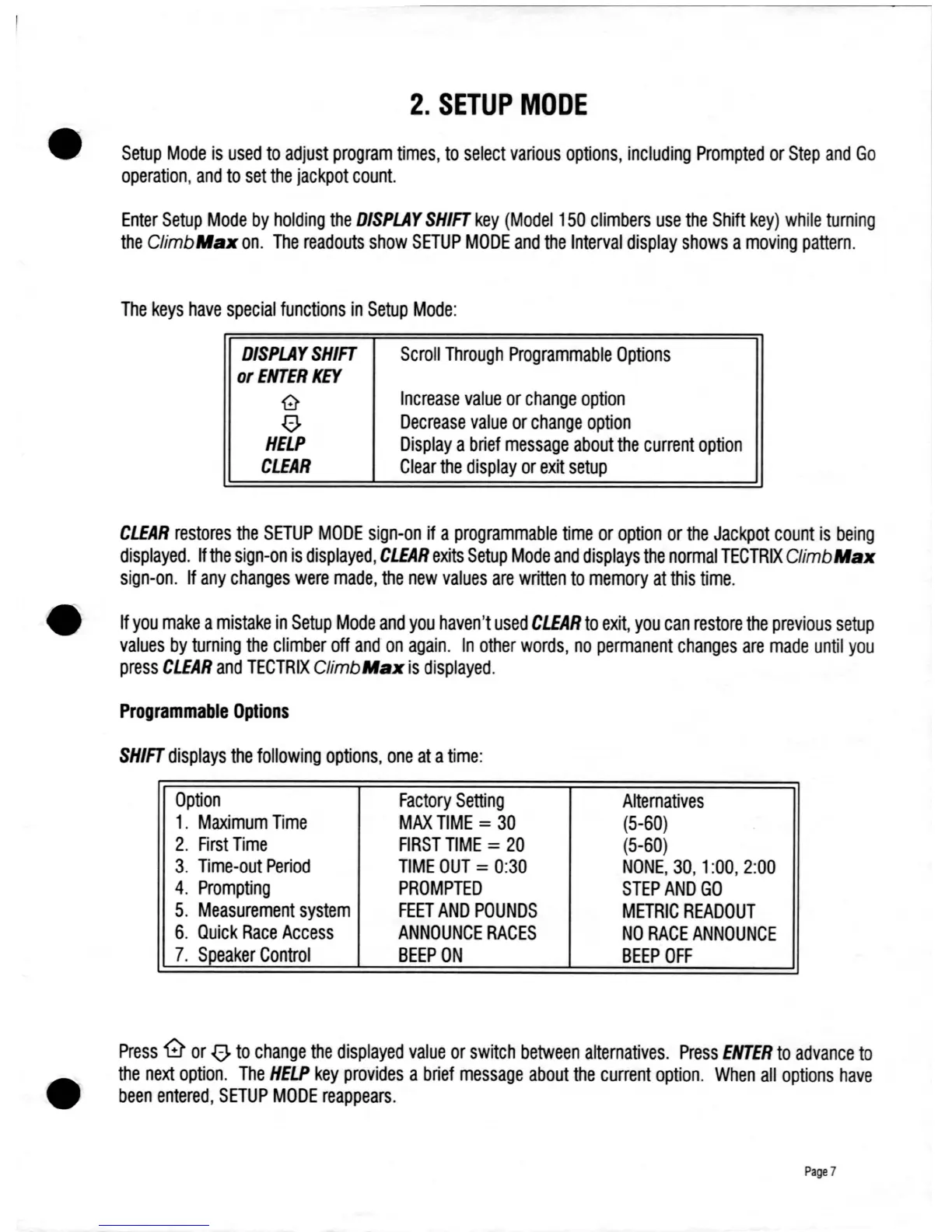
Setup
Mode
is
used
to
adjust
program
times,
to
select
various
options,
including
Prompted
or
Step
and
Go
operation,
and
to set
the
jackpot
count.
Enter
Setup
Mode
by
holding
the
DISPLAY
SHIFT
key
(Model
150
climbers
use
the
Shift
key)
while
turning
the
ClimbMaJC
on.
The
readouts
show
SETUP
MODE
and
the
Interval
display
shows
a
moving
pattern.
The
keys
have
special
functions
in
Setup
Mode:
DISPLAY
SHIFT
or
ENTER
KEY
G
o
HELP
CLEAR
Scroll
Through
Programmable
Options
Increase
value
or
change
option
Decrease
value
or
change
option
Display
a
brief
message
about
the
current
option
Clear
the
display
or
exit
setup
CLEAR
restores
the
SETUP
MODE
sign-on
if
a
programmable
time
or
option
or
the
Jackpot
count
is
being
displayed.
If
the
sign-on
is
displayed,
CLEAR
exits
Setup
Mode
and
displays
the
normal
TECTRIX
ClimbMaJC
sign-on.
If
any
changes
were
made,
the
new
values
are
written
to
memory
at
this
time.
If
you
make
a
mistake
in
Setup
Mode
and
you
haven't
used
CLEAR
to
exit,
you
can
restore
the
previous
setup
values
by
turning
the
climber
off
and
on
again.
In
other
words,
no
permanent
changes
are
made
until
you
press
CLEAR
and
TECTRIX
ClimbMaJC
is
displayed.
Programmable
Options
SHIFT
displays
the
following
options,
one
at
a
time:
Option
Factory
Setting
Alternatives
1.
Maximum
Time
MAX
TIME
=
30
(5-60)
2.
First
Time
FIRST
TIME
=
20
(5-60)
3.
Time-out
Period
TIME
OUT
=
0:30
NONE,
30,
1
:00,
2:00
4.
Prompting
PROMPTED
STEP
AND
GO
5.
Measurement
system
FEET
AND
POUNDS
METRIC
READOUT
6.
Quick
Race
Access
ANNOUNCE
RACES
NO
RACE
ANNOUNCE
7.
Speaker
Control
BEEP
ON
BEEP
OFF
Press
'0
or
0.
to
change
the
displayed
value
or
switch
between
alternatives.
Press
ENTER
to
advance
to
the
next
option.
The
HELP
key
provides
a
brief
message
about
the
current
option.
When
all
options
have
been
entered,
SETUP
MODE
reappears.
Page
7

Table of Contents