EasyManua.ls Logo

Tectrix Climbmax 150 - Installation Steps and Features

Tectrix Climbmax 150
60 pages
Print Icon
To Next Page IconTo Next Page
To Previous Page IconTo Previous Page
Loading...
Connecting
The
Display
Cable
B
Fig. 3
<
~LPower
In
c
A
r--
/
/
/
/
Fig.
4
11
B
Power_lJ
Out
A
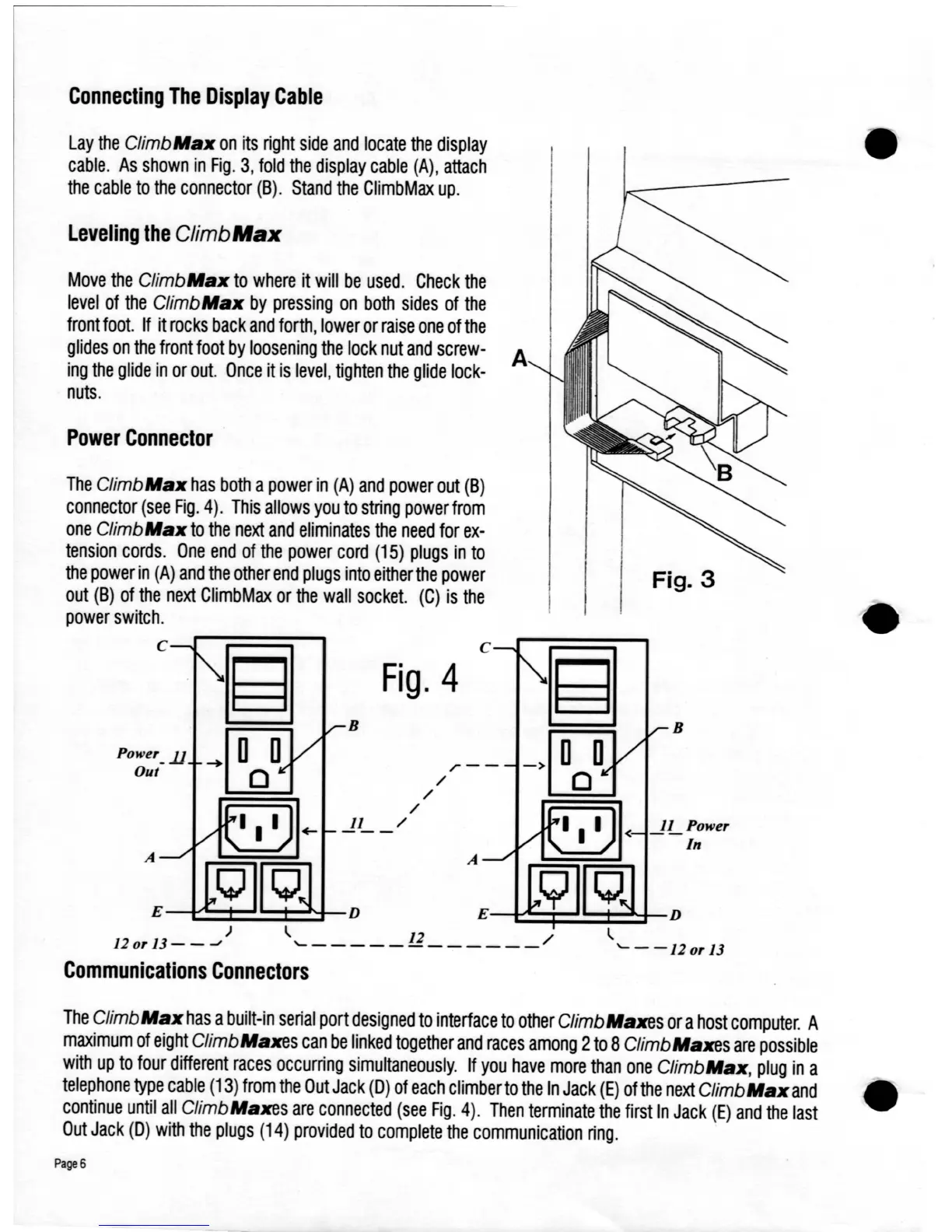
The
Climb
Max
has
both
a
power
in
(A)
and
power
out
(B)
connector
(see
Fig.
4).
This
allows
you
to
string
power
from
one
Climb
Max
to
the
next
and
eliminates
the
need
for
ex-
tension
cords.
One
end
of
the
power
cord
(15)
plugs
in
to
the
power
in
(A)
and
the
other
end
plugs
into
either
the
power
out
(B)
of
the
next
ClimbMax
or
the
wall
socket.
(C)
is
the
power
switch.
c
Move
the
ClimbMax
to
where
it
will
be
used.
Check
the
level
of
the
Climb
Max
by
pressing
on
both
sides
of
the
front
foot.
If
it
rocks
back
and
forth,
lower
or
raise
one
of
the
glides
on
the
front
foot
by
loosening
the
lock
nut
and
screw-
A
ing
the
glide
in
or
out.
Once
it
is
level,
tighten
the
glide
lock-
nuts.
Power
Connector
Leveling
the
ClimbMaJC
Lay
the
Climb
Max
on
its
right
side
and
locate
the
display
cable.
As
shown
in
Fig.
3,
fold
the
display
cable
(A),
attach
the
cable
to
the
connector
(B).
Stand
the
ClimbMax
up.
)
120r
13-
_-oJ
E
---1~:::t:::~:::t:::~-D
E---1~=i=~:±::t--D
~
12
/
~
'-------------
'---120r13
Communications
Connectors
The
Climb
Max
has
a
built-in
serial
port
designed
to
interface
to
other
ClimbMaxes
or
a
host
computer.
A
maximum
of
eight
ClimbMaxes
can
be
linked
together
and
races
among
2
to
8ClimbMaxes
are
possible
with
up
to
four
different
races
occurring
simultaneously.
If
you
have
more
than
one
ClimbMax,
plug
in
a
telephone
type
cable
(13)
from
the
Out
Jack
(D)
of
each
climber
to
the
In
Jack
(E)
of
the
next
Climb
Max
and
continue
until
all
ClimbMaxes
are
connected
(see
Fig.
4).
Then
terminate
the
first
In
Jack
(E)
and
the
last
Out
Jack
(D)
with
the
plugs
(14)
provided
to
complete
the
communication
ring.
Page
6

Table of Contents