EasyManua.ls Logo

Tectrix Climbmax 150 - Page 5

Tectrix Climbmax 150
60 pages
Print Icon
To Next Page IconTo Next Page
To Previous Page IconTo Previous Page
Loading...
Attaching
The
Hand
Rail
Upright
2
/
11
~
Attaching
the
Hand
Rails
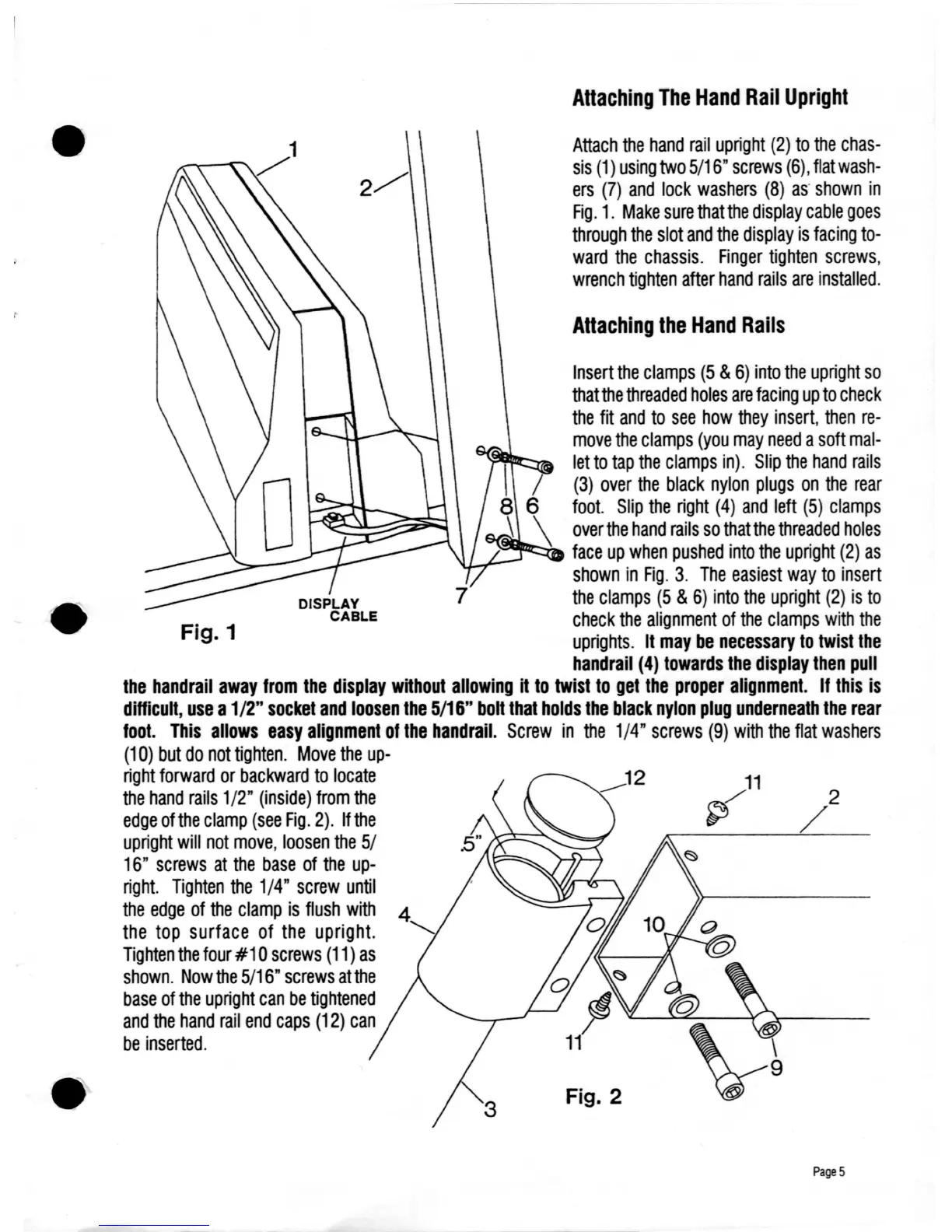
Attach
the
hand
rail
upright
(2)
to
the
chas-
sis
(1)
using
two
5/16"
screws
(6),
flat
wash-
ers
(7)
and
lock
washers
(8)
as'
shown
in
Fig.
1.
Make
sure
that
the
display
cable
goes
through
the
slot
and
the
display
is
facing
to-
ward
the
chassis.
Finger
tighten
screws,
wrench
tighten
after
hand
rails
are
installed.
Fig. 2
Fig. 1
Insert
the
clamps
(5
&
6)
into
the
upright
so
that
the
threaded
holes
are
facing
up
to
check
the
fit
and
to
see
how
they
insert,
then
re-
move
the
clamps
(you
may
need
a
soft
mal-
let
to
tap
the
clamps
in).
Slip
the
hand
rails
(3)
over
the
black
nylon
plugs
on
the
rear
foot.
Slip
the
right
(4)
and
left
(5)
clamps
over
the
hand
rails
so
that
the
threaded
holes
-~~~
face
up
when
pushed
into
the
upright
(2)
as
..
~-
shown
in
Fig.
3.
The
easiest
way
to
insert
the
clamps
(5
&
6)
into
the
upright
(2)
is
to
check
the
alignment
of
the
clamps
with
the
uprights.
It
may
be
necessary
to
twist
the
handrail
(4)
towards
the
display
then
pull
the
handrail
away
from
the
display
without
allowing
it
to
twist
to
get
the
proper
alignment.
If
this
is
difficult,
use
a1/2"
socket
and
loosen
the
5/16"
boh
that
holds
the
black
nylon
plug
underneath
the
rear
foot.
This
allows
easy
alignment
of
the
handrail.
Screw
in
the
1/4"
screws
(9)
with
the
flat
washers
(10)
but
do
not
tighten.
Move
the
up-
right
forward
or
backward
to
locate
the
hand
rails
1/2"
(inside)
from
the
edge
ofthe
clamp
(see
Fig.
2).
If
the
upright
will
not
move,
loosen
the
5/
16"
screws
at
the
base
of
the
up-
right.
Tighten
the
1/4"
screw
until
the
edge
of
the
clamp
is
flush
with
the
top
surface
of
the
upright.
Tighten
the
four
#1
0
screws
(11)
as
shown.
Now
the
5/16"
screws
atthe
base
of
the
upright
can
be
tightened
and
the
hand
rail
end
caps
(12)
can
be
inserted.
Page
5

Table of Contents