Important Deployment Warnings
Never go past the maximum line payout.
Line is taped on the spool. Never get in to the bottom RED layer or you will lose a probe.
If the winch cannot pull the line in or the brake is not working, STOP the vessel immediately.
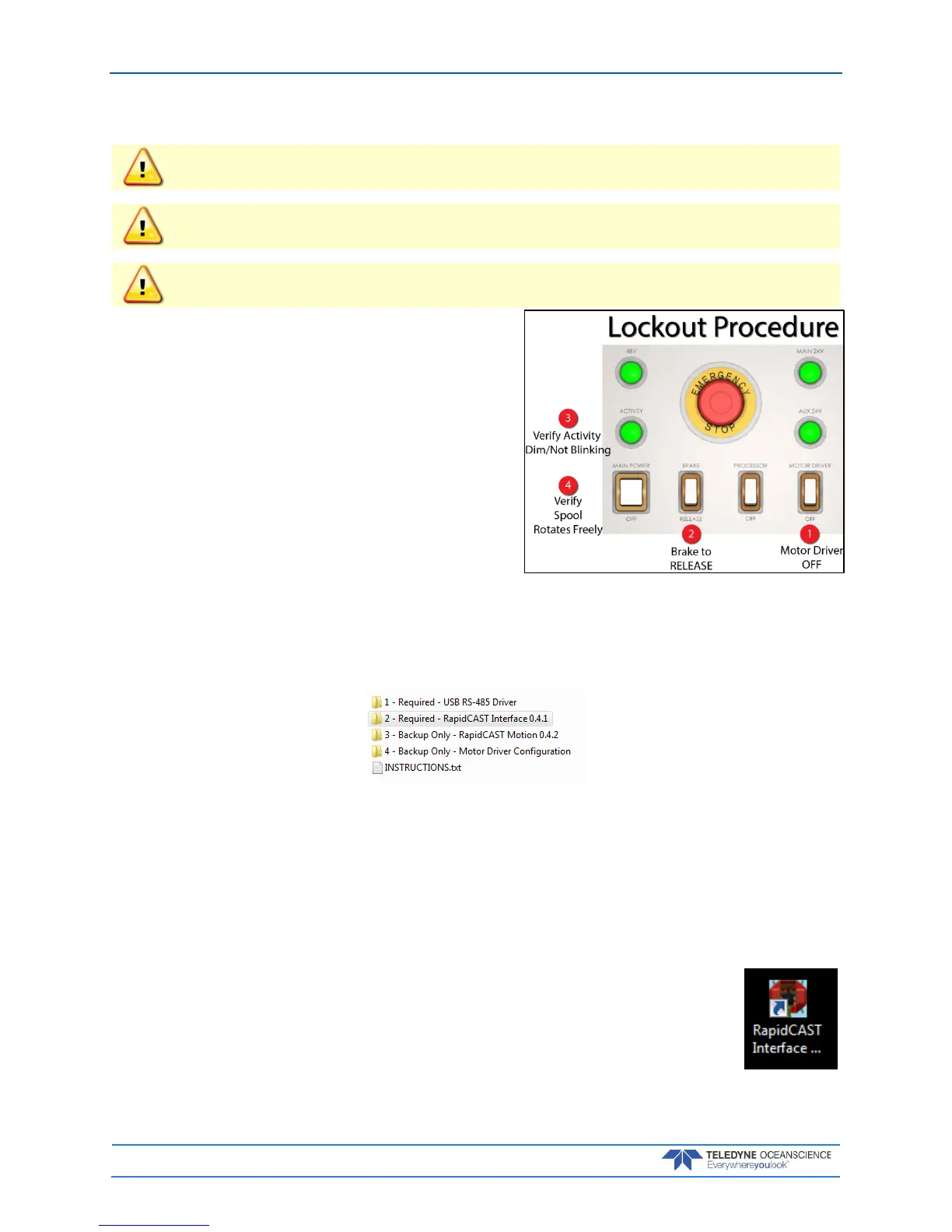
Lockout Procedure
To lock out the system:
1. Switch Motor Driver OFF.
2. Switch Brake to RELEASE.
3. Check to ensure Activity Light is Dim/Not blink-
ing.
4. Check to see if the spool rotates freely.
The system is now SAFE.
Installing the rapidCAST Interface Software
The rapidCAST Control Software is located on the documentation CD.
To install the drivers and software:
1. Connect the system and apply power. Connect the PC to the Control USB port of RapidCAST In-
terface Module, which should automatically install two USB Serial Port devices on the PC.
Make note of the serial port numbers because they will be used for:
Lower Comm port for Telemetry
Higher Comm port for Control
2. Install the USB RS-485 Driver located in the 1 – Required – USB RS-485 Driver folder of the doc-
umentation CD, specifically the RS-422/485 USB Adapter.
3. Install the RapidCAST Interface software by double-clicking on the RapidCAST
Interface X.xx.exe file (where X.xx is the version number) located in the 2 – Re-
quired – RapidCAST Interface X.xx folder. Administrator access is required to
properly install the software. A desktop icon is added: Double-click to run the
software.



 To Next Page