Echotrac E20 Operator's Manual8
Uncontrolled Technology Subject to Restrictions Contained on the Cover Page.
5.2.1 Mobilize Modes
These modes are used for setup and testing of the E20.
5.2.1.1 Setup
This mode allows configuration and selection of different transducers on channels A and/or B. See
section 4.4 Configuration in SBES UI.
5.2.1.2 On Deck
This is a testing mode, where all controls can be changed and adjusted without transmitting power to
the transducer.
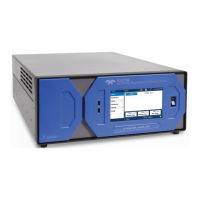
5.2.1.3 Bar Check
This mode is implemented for operators wishing to perform a bar check.
Figure 9: Bar check mode
o The E20 runs with a fixed range of transmission parameters.
o The operator can only change the pulse length and pulse type (Chirp or CW).
o For more reliable detections on the bar in the water column, the operator can choose to
enable gates by double-clicking the echogram at the chosen depth. The gate width is set
automatically based on depth; the gates are shown in red.
The gates are only visible and interactive when the depth line for the given channel is on.
The gates option is NOT available in any of the survey modes (see section 5.2.2 below).







 To Next Page