Echotrac E20 Operator's Manual8
Uncontrolled Technology Subject to Restrictions Contained on the Cover Page.
5.4 SBES UI BITE
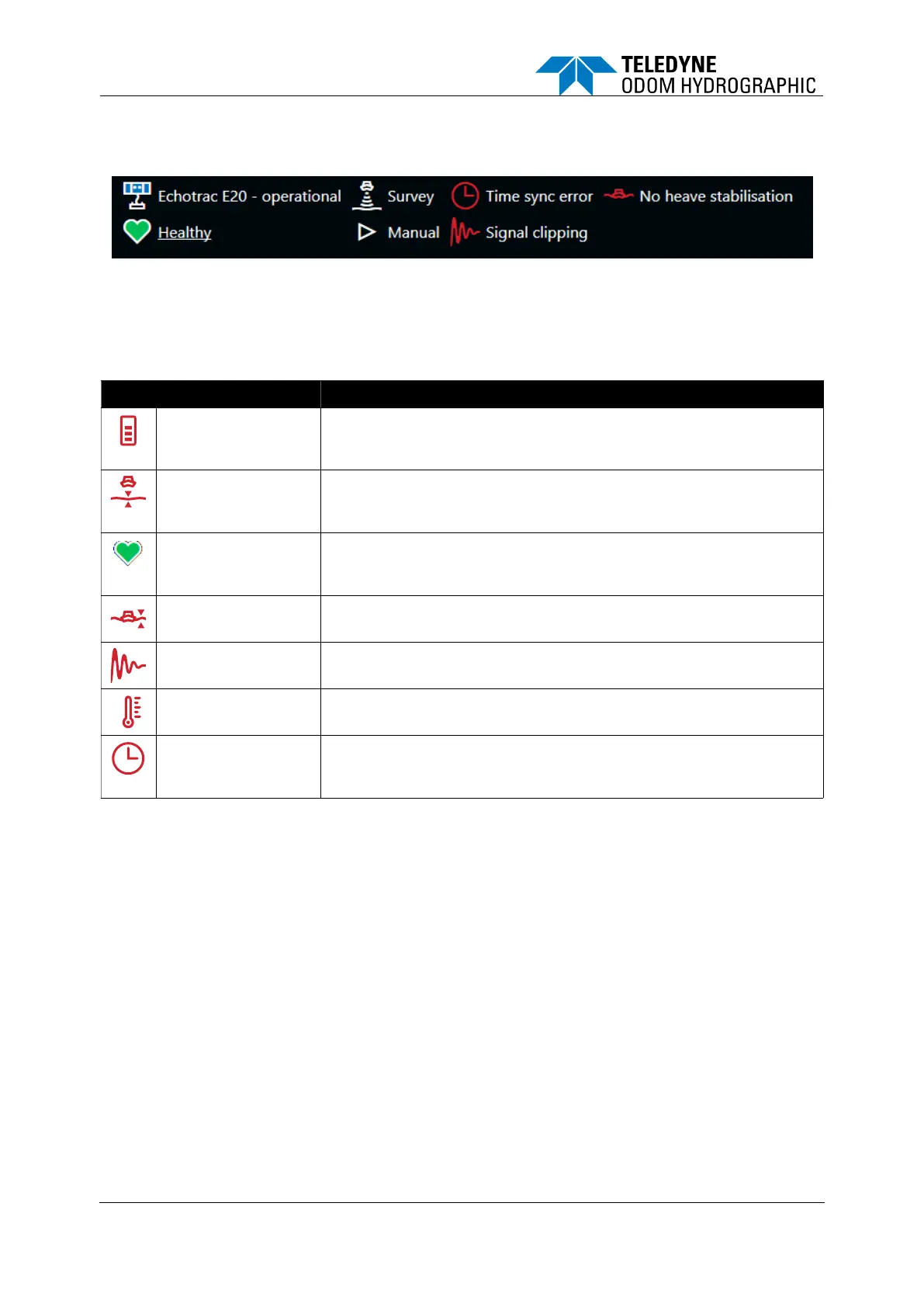
The top left of the screen provides feedback from the E20 to the operator about its current state.
Figure 10: SBES UI BITE
There are a number of built-in alarms/icons to assist the operator troubleshoot the most common
problems during operation.
Table 7: BITE icons
A drop in the power supply has been detected by the E20, which is an
indicator that the external battery supply may need to be
replaced/recharged.
This alarm shows that the bottom detection is lost. Some settings may
have to be adjusted to regain bottom detection.
Consider whether the range is too short.
The Heart indicates the general health of the E20 unit. The icon is
interactive. Click it to generate a more detailed BITE summary file,
which can be shared with support when troubleshooting.
This icon shows that a source is active on the Sensors tab, but no
data is received.
Clipping has occurred in one or more samples of the water column.
Reduce power and/or gain, if in manual mode.
Environment is too hot. Increase ventilation or reduce the demand on
the E20, such as limiting ping rate or reducing source level.
A time source is active, but no data is received, or the data contains a
large time jump. If you are confident there is no error, the time sync
can be restarted by toggling the source in the UI.







 To Next Page