User Manual
6
2 Hardware Installation
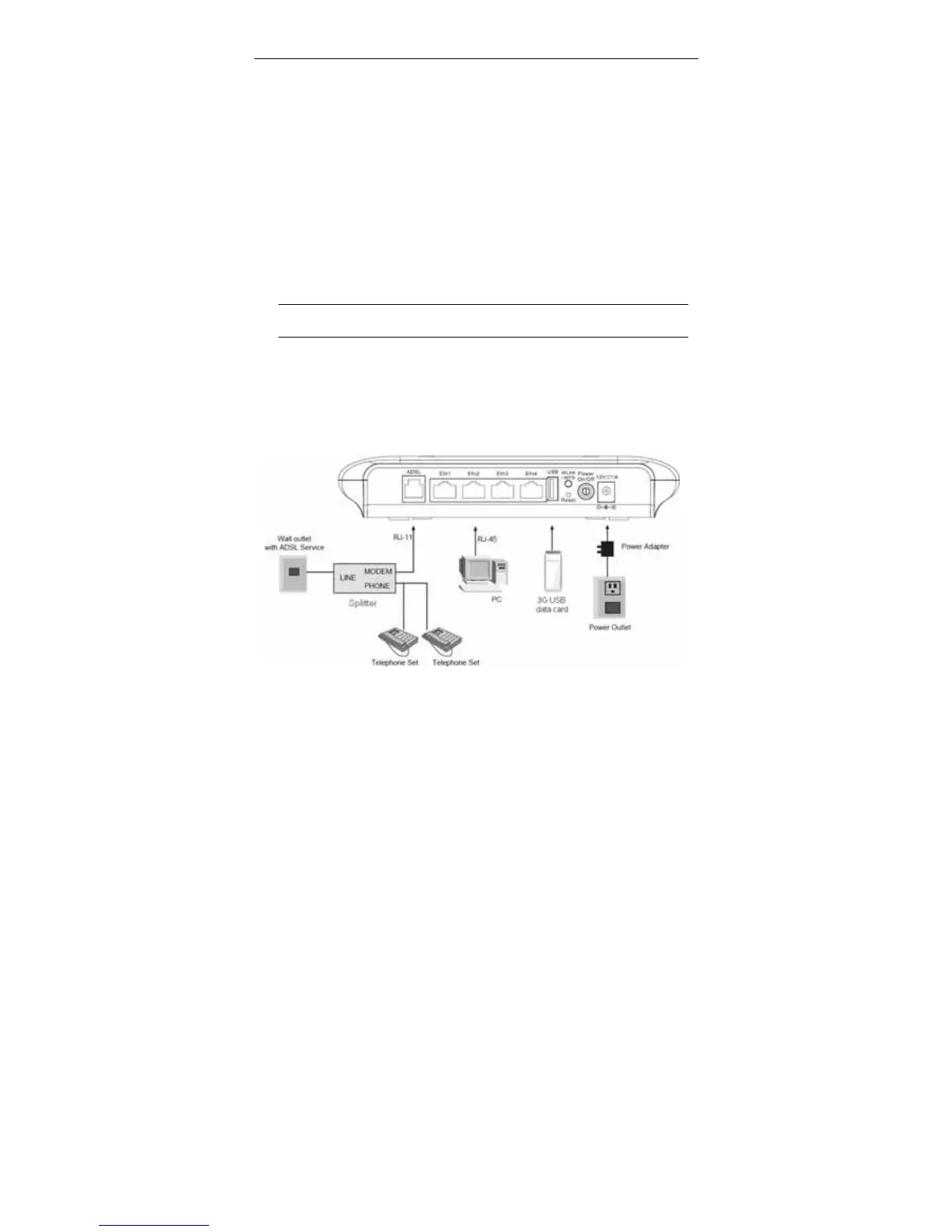
Step 1 Connect the ADSL port of the device and the Modem port of the
splitter with a telephone cable. Connect the phone to the Phone port of
the splitter through a telephone cable. Connect the incoming line to the
Line port of the splitter.
The splitter has three ports:
Line: Connect to a wall phone port (RJ-11 jack).
Modem: Connect to the DSL port of the device.
Phone: Connect to a telephone set.
Step 2 Connect an Eth port of the device to the network card of the PC
through an Ethernet cable (MDI/MDIX).
Note:
Use twisted-pair cables to connect the device to a Hub or switch.
Step 3 Plug one end of the power adapter to the wall outlet and the other end
to the Power port of the device.
Connection 1: Figure 3 displays the application diagram for the connection of
the device, PC, splitter and telephone sets, when no telephone set is placed
before the splitter.
Figure 3 Connection diagram (without telephone sets before the splitter)



 To Next Page