Installation and User Manual
Televic Conference Systems
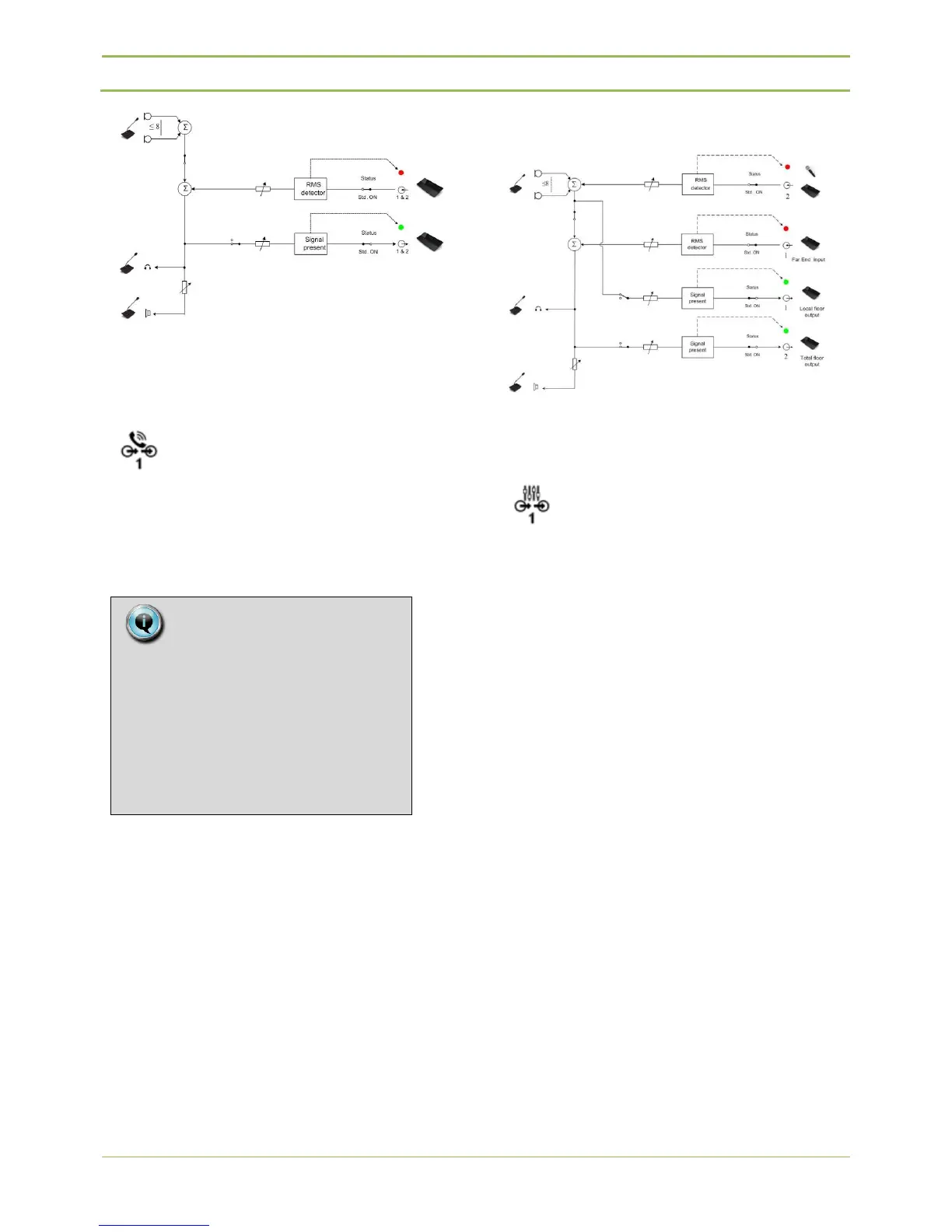
Figure 12.1 : Normal audio path
12.10.2. Remote Conferencing
Remote conferencing option gives the possibility to
connect a central unit to e.g. a video conferencing
system or telephone coupler. To prevent echoing,
the remote conferencing option needs to be set.
Audio path for N_1
Figure 12.2 : Remote conferencing audio path
12.10.3. External Equalizer
To avoid feedback or to equalize audio signals it is
possible to connect external equipment to the
central unit. When this setting is chosen, the floor
signal (mics + Aux IN2) will be routed to both AUX
OUT. The signal present at AUX IN1 will be used as
the new floor channel and audible on the units
loudspeakers. This way it is possible to use external
audio equipment like equalizers, feedback destroyers
or mixers. The schematic below summarizes this
feature.
The signal at both AUX OUT will be the sum of the
microphones and the AUX IN2.
Note:
When selecting “Remote
conferencing, Aux volume settings
are set to default values!
So Aux input – output levels have to
be set to desired values AFTER
selecting “Remote conferencing”



 To Next Page