Installation and User Manual
Televic Conference Systems
16. Camera protocol
First set the correct destination IP address and port.
The port number has to be higher than 3000. For
example 9050 is a valid port.
The content is sent using the UDP packet protocol
and it is given in the following format (the * are
substitute for the real values, see further examples):
{“serial”: “********”,“status”: *,“totalMicOn”:
*,“totalMicReq”,*}
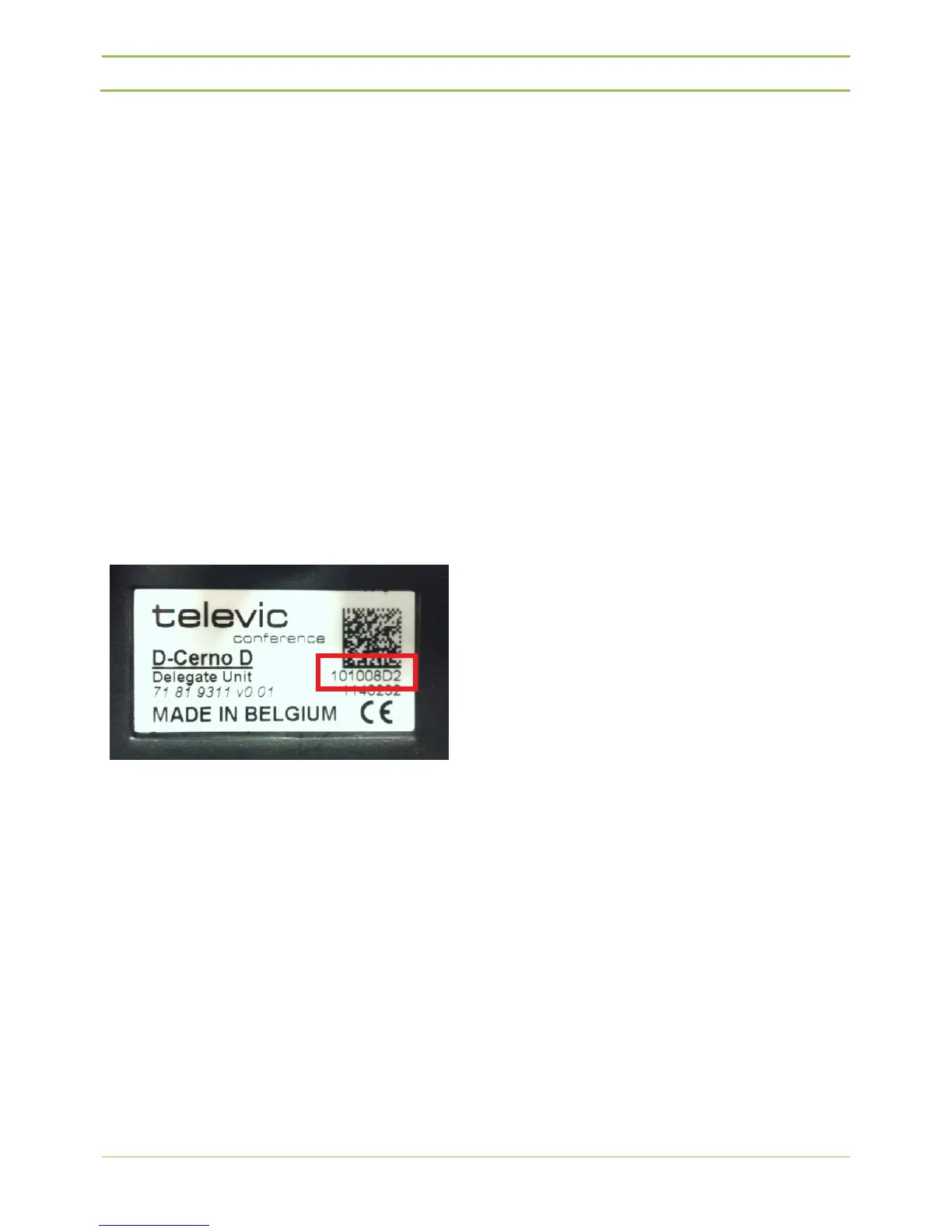
“serial” contains the serial code of the delegate unit.
This code is shown at the back of each delegate unit,
as the 8-digit number just under the barcode.
The “serial” data of a D-Cerno D delegate unit starts
with “10……”
The “serial” data of a D-Cerno C chairman unit starts
with “11……”
“status” has several options:
0 = off
1 = on
2 = request
4 = next in line
8 = prior
“totalMicOn” = total number of active microphones.
“totalMicReq” = total number of microphones in
request.
So for example if the microphone with serial
“101008D2” goes into request mode the following
command is send:
{“serial”: “101008D2”,“status”: 2,“totalMicOn”:
1,“totalMicReq”,0}
After a microphone conference mode change the
following string is sent:
{“serial”: “00000000”,“status”: 0,“totalMicOn”:
0,“totalMicReq”,0}



 To Next Page