Installation and User Manual
Televic Conference Systems
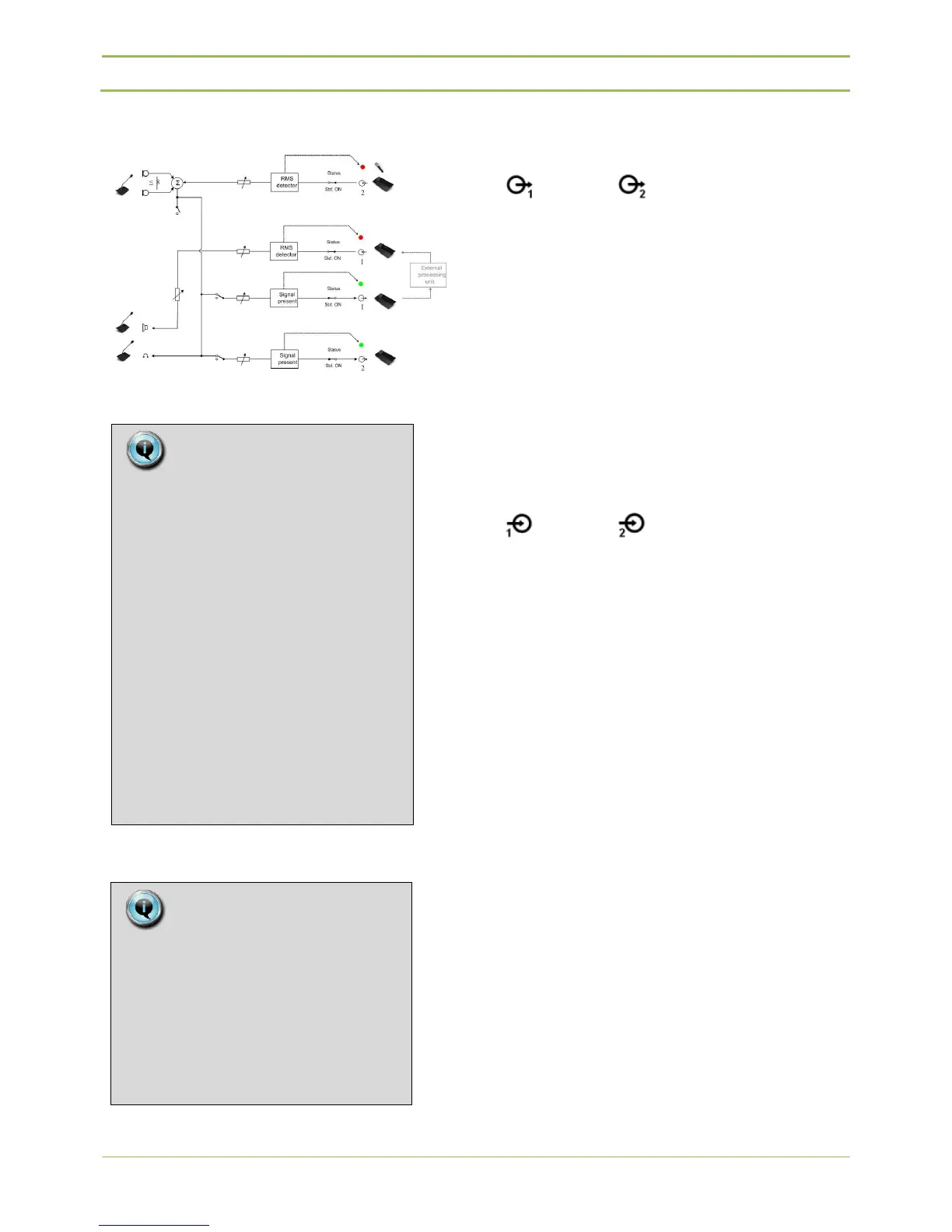
Audio path for external equalizer Mode
Figure 12.3 : External equalizer audio path
12.11. Audio out
The D-Cerno CU has 2 auxiliary output RCA
connectors.
On each output there is also an activity indication.
(Led is on when level > -40dBV)
The output gain is adjustable between +24dB and -
51dB + “OFF”
Default gain value = 0dB
10dBV (=0dBFS)
12.12. Audio In
Two auxiliary line inputs are available on the central
unit.
Aux IN1: RCA connector
Aux IN2: XLR connector
On each input there is also an overload led
indication. (Led is on when input level > 9dBV)
The input gain is adjustable between +24dB and -
51dB + “OFF”
Default gain value = 0dB
10dBV (=0dBFS)
12.13. Master-slave
configuration
Whenever an installation requires more than 50
units the system can be extended using 1 or 2 extra
central units in a master/slave configuration.
The system can be extended to a maximum of 150
units. One D-Cerno central unit acts like a master
whereas the other central units are configured as
slave units.
Note:
“Remote conferencing” and
“External Equalizer” audio paths
apply only to Aux In 1 and Aux Out 1.
In “remote conferencing” setup
mode, Aux Out 1 is considered as
“local floor” out and Aux Out 2 is
considered as “total floor” out.
Aux Input 1 is used as “Far End
input”, so this signal will not be part
of the Aux Out 1 signal.
Aux Input 2 (XLR) can also be used to
add a signal (e.g. from external
microphones) to the local floor.
Note:
When selecting “External equalizer”,
Aux volume settings are set to
default values!
So Aux input – output levels have to
be set to desired values AFTER
selecting “External Equalizer”



 To Next Page