INSTALL NAMEPLATE IN PLIXUS
NETWORK
The Plixus Nameplate requires a network speed of 100Mbit. This means that when you want to use the
nameplate in your Plixus network, you can only combine it with units that require the same speed (in that
branch). For a detailed list of all Plixus compatible units and their network speed see the Plixus Installation
Guide. You could, for example, combine the nameplate with a Confidea T or F unit in the same branch, but
not with an uniCOS unit.
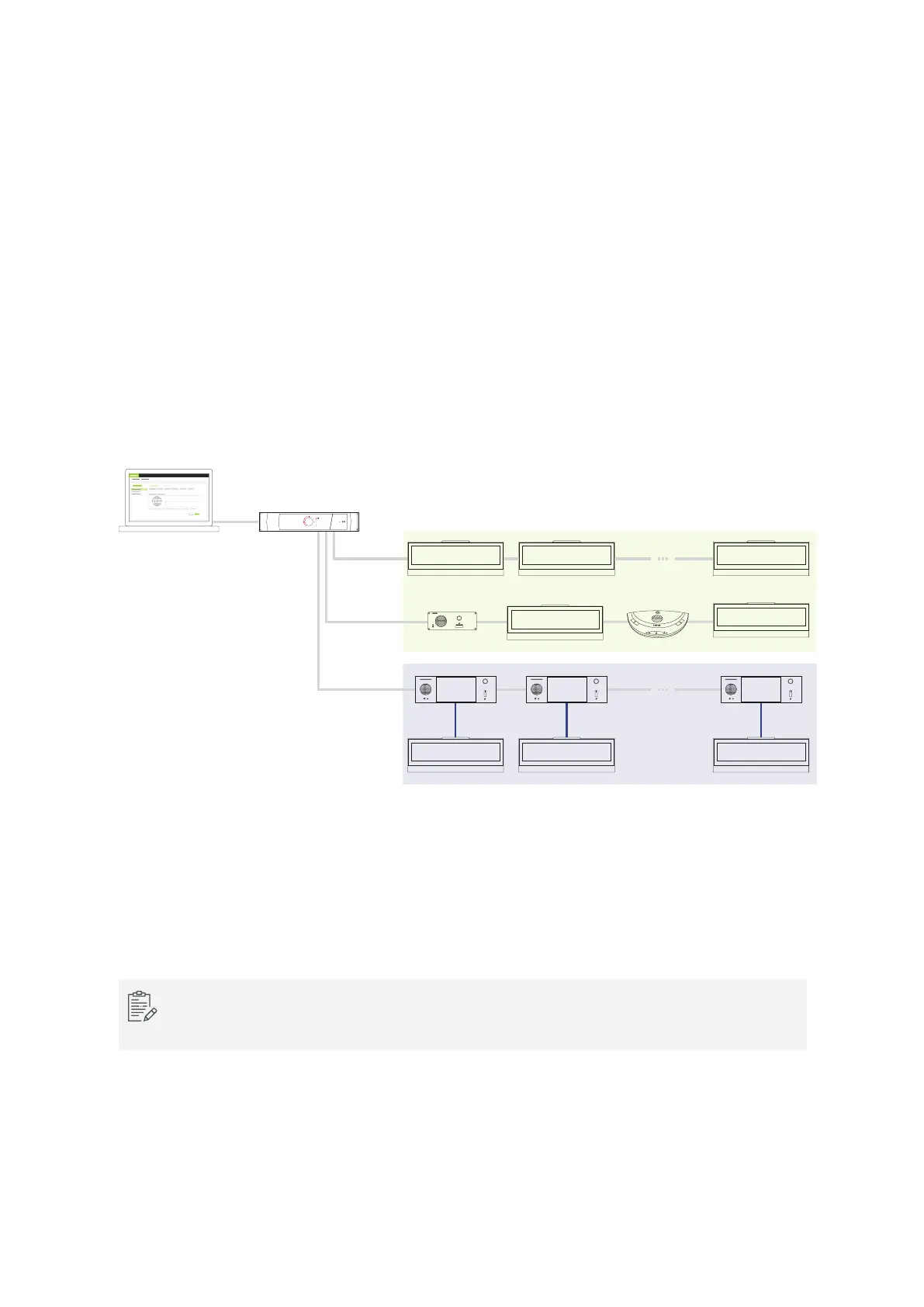
However, there is a possibility to combine the nameplate with multimedia units, such as the uniCOS units,
on the same branch. To connect the units, you can use the USB connection available on both units.
televic televic
televic
televic
televic
televic
televic televic
televic
First - Last name
Title
Nameplate
Application
Engine
USB
CAT 5e
Figure 1-32 How to integrate the nameplate in the Plixus network
There are two different ways of using the nameplate. First, it is possible to associate the nameplate with a
delegate unit on the same seat. However, you can also use the nameplate in standalone mode. In this
case the nameplate works independently of the delegate unit.
When the nameplate is connected via USB as well as the Plixus conference ports, then the
nameplate will always use the USB connection.
INSTAL L NAMEPL ATE IN PLIX US NETWO RK 65



 To Next Page