calibrating sensorschapter 5 PB5-10
Note: At any time during calibration verication, you can press the stop key (in the upper-right
corner of the monitor’s front panel) to halt the calibration verication process. You can then
resume calibration verication by pressing the √ (OK) key. If you run out of time and you need to
abort the calibration verication, press the stop key. You can then press the cancel (X) key to exit
and return to Standby.
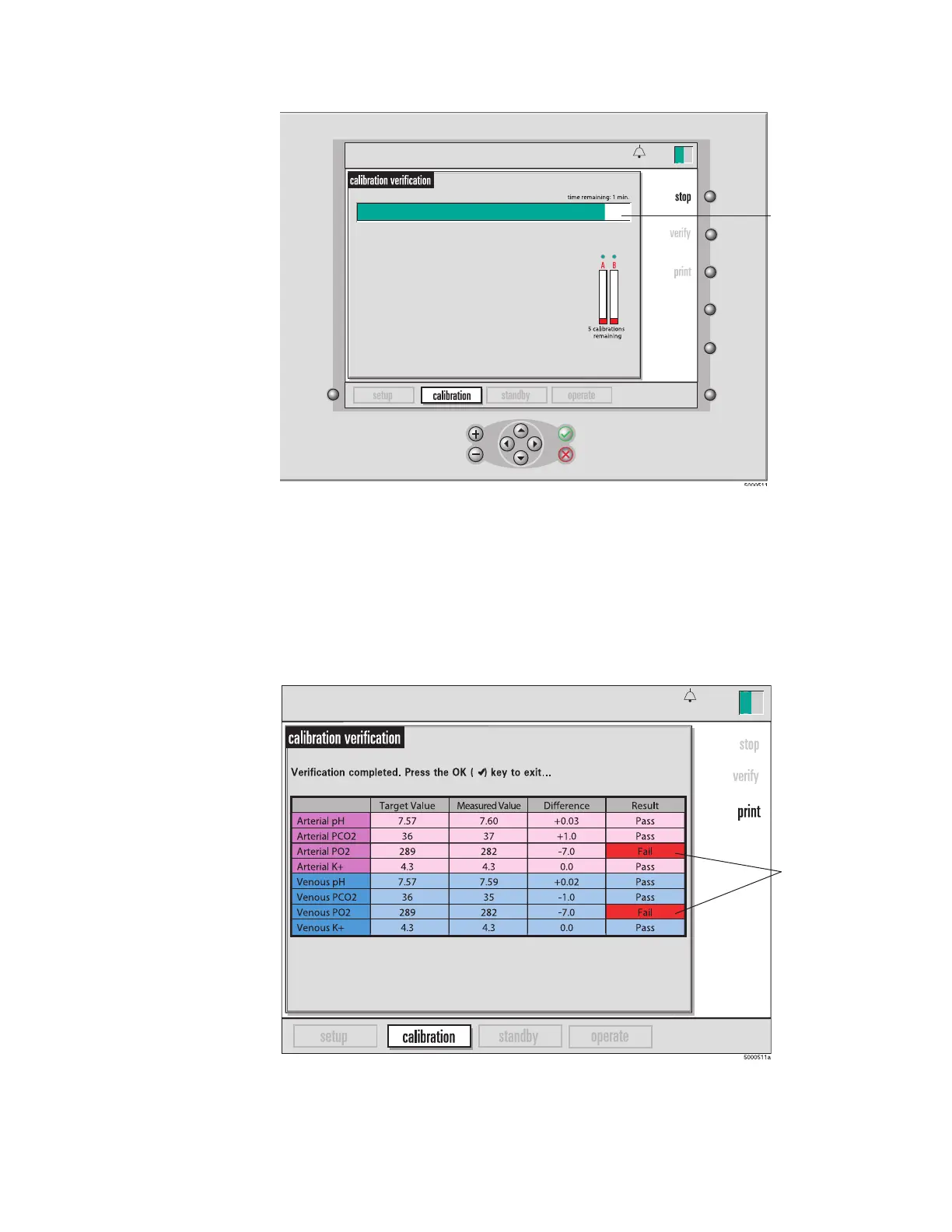
When the calibration verication is nished, the results are reported:
4 Press the “print” key to print the results table.
Note: If there are any failures, set aside the failed sensor and calibrate another sensor.
Note: Print soft key will be gray if the printer is disabled.
5 Press the √ (OK) key to exit verification. The monitor will go immediately to Standby.
13:26
9-25-18
This shows how
much time is left
in the verification
process.
13:26
9-25-18
These values
fall outside the
acceptable
ranges for
these
parameters.








 To Next Page