concluding a casechapter 8 8-1
This chapter explains the procedures to be followed at the conclusion of a patient
case.
Printing or sending a report
Immediately after an extracorporeal case, the user can print a case summary that con-
tains the data recorded during the case. The user can also send the case summary data
to a computer via the serial port. The post-case report will include data at the time interval
specied in the “Case Summary” option in the setup mode. Special events, which include
“store,” “recalibration” and “mark” functions are part of the summary.
Caution
• The case data is lost if the user returns to the “operate” mode after the next
power up. Be sure to print the case report before that point.
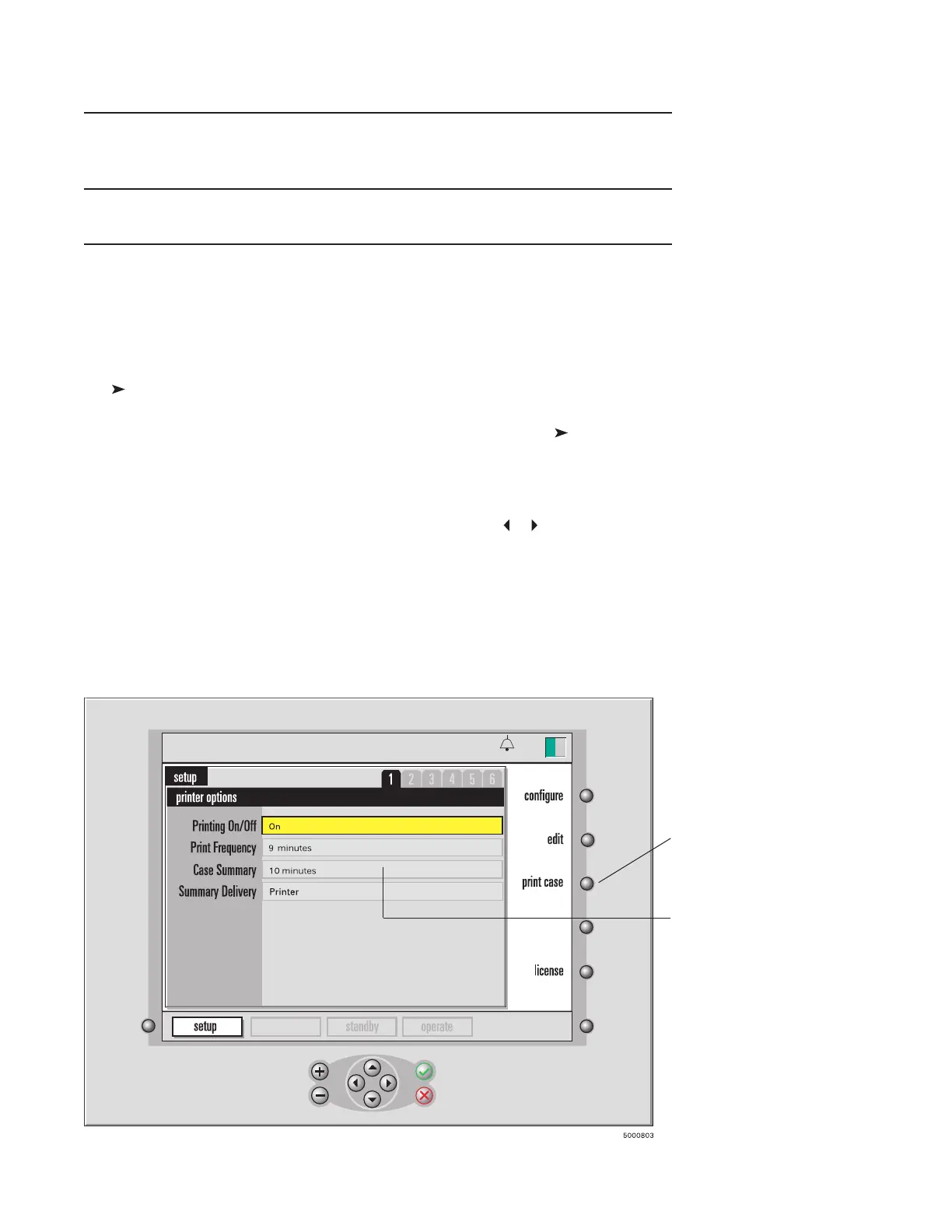
To print or send a case report:
1 Go to the setup mode.
To do this, press the system mode select key, press the or key until “setup” mode
label highlights, then press √.
2 Make sure the “Printing On/Off” selection is set to “On”.
3 Choose the desired “Summary Delivery” option: “Printer,” “Serial Port,” or
“Printer and Serial Port.”
4 Make sure the “Case Summary” data interval is set as previously determined.
5 Press the “print case” key.
calibration
13:26
9-25-18
Press the “print case”
key to print the case
report for the current
case.
This setting
determines the time
interval for the inclu-
sion of data in the
case report.




 To Next Page