choosing system settingschapter 44-10
Default
Calibration
Use the + and − or and keys to choose either the “factory default val-
ues” or “last calibration values.”
Note: This section determines what calibration values are used as a de-
fault if a two-point tonometered gas calibration is not done. “Last calibration
values” are simply the values obtained from your last gas calibration. “Fac-
tory default values” are average calibration values determined from factory
experience. An in vivo recalibration from the operate mode should be done
to improve the applicability of these default values.
Warning
• Measured values prior to in vivo calibration may not be
accurate. Do not use values prior to initial in vivo calibration
for patient management. Failure to perform a proper set-up,
full two-point tonometered gas calibration, and initial in vivo
calibration may result in compromised system performance
that does not meet the system accuracy limits found in
Appendix B.
Note: Once changed, the default calibration status will not take effect until
the monitor is turned off and on again.
Verify
Calibration
Use the + and − or
and keys to choose either “Enabled” or “Disabled.”
If you choose Enabled, a verify key will appear on the screen after each
calibration procedure. You can press it immediately to verify that the system
is calibrated properly. The verify function will remain available to check the
gas calibration values until the monitor is turned off.
When you’ve made all your selections and conrmed them, press the key to move
on to the next screen.
Specifying values used in calculations
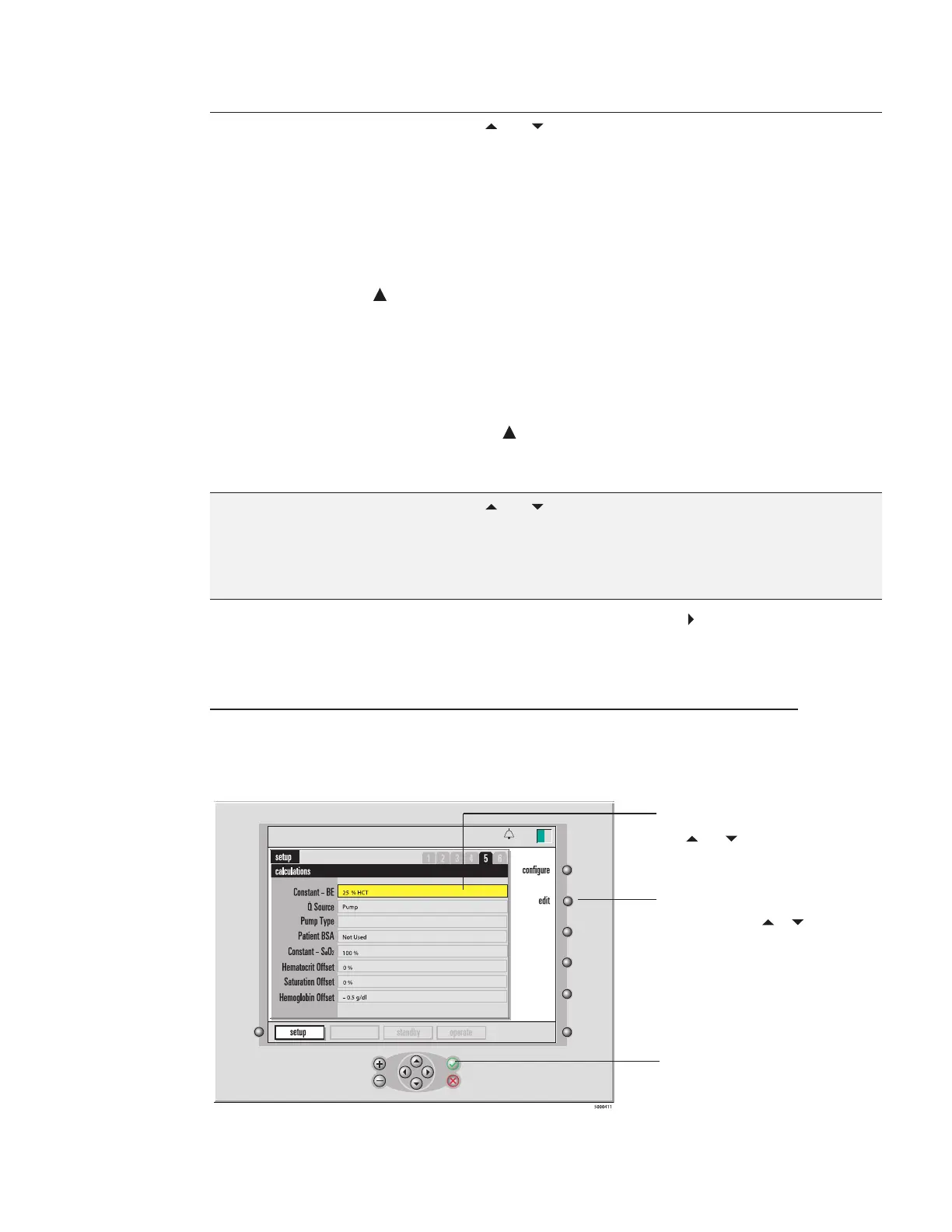
On the fth screen in setup mode — the calculations screen — you can specify
certain values to be used in system calculations (as shown in the next gure.)
calibration
13:26
D02 Display
Enabled
9-25-18
Terumo® System 1/CDI
TM
Module
defaults
To move the highlight up and
down through the options, use
the and keys.
To set the selected (highlighted)
option, first press the edit key,
then press +, –,
or keys to
change the value.
Press √ to confirm your
choice for the selected
option.




 To Next Page